Where does Data come from, what does it look like
“Difficulties strengthen the mind, as labor does the body.”
— Seneca
1
This tutorial uses web-r to create Code Playgrounds. That allows you to run all code within your browser, on all devices. Most code chunks herein are formatted in a tabbed structure ( like in an old-fashioned library) with duplicated code. The tabs in front have regular R code that will work when copy-pasted in your RStudio session. The tab “behind” has the web-R code that can work directly in your browser, and can be modified as well. The R code is also there to make sure you have original code to go back to, when you have made several modifications to the code on the web-r tabs and need to compare your code with the original!
Keyboard Shortcuts
- Run selected code using either:
- macOS: ⌘ + ↩︎/Return
- Windows/Linux: Ctrl + ↩︎/Enter
- Run the entire code by clicking the “Run code” button or pressing Shift+↩︎.
All embedded figures are displayed full-screen when clicked.
2 First, Some Data Games
Let us start with a couple of small rumpus/games.[^1]
2.1 Game-1: Making Sushi
I will call out a few random characteristics, such as “People who wake up before 0800 hours in the morning”, or “People who love Sushi”. We will see how our classgroup spontaneously reorganises itself based on these characteristics.
Questions to Ponder:
- Did you stay in the one group you chose?
- If you moved, why did you move?
- How did you know “where to stand”? (like Archimedes seems to have known)
- Did you feel some groups to be “cooler” than say the groups you were in?
- If you were to look down at our classroom arrangement from the ceiling, how would you know which group was which?
2.2 Game-2: Thinking like Kandinsky
Look around the room, at the people, furniture, walls, fittings…. and write down as many abstract nouns that pertain to concrete things as you can.
A concrete noun is a noun that can be identified through one of the five senses (taste, touch, sight, hearing, or smell).
An abstract noun names a quality or an idea that cannot be physically quantified with the senses. Instead, it symbolises an abstract concept, such as a feeling, a quality, or an idea. In other words, abstract nouns are intangible concepts.
Questions to Ponder:
- Did any of the Abstract Nouns “show up” in the way you formed Sushi groups?
- Which abstract nouns mattered to you?
- How are these abstract nouns different from the characteristics in Game #1?
- Are any of these abstract nouns measurable? What does that mean?
3 Where does Data come from?
We will need to form a basic understanding of basic scientific enterprise. Let us look at the slides. (Also embedded below!)
4
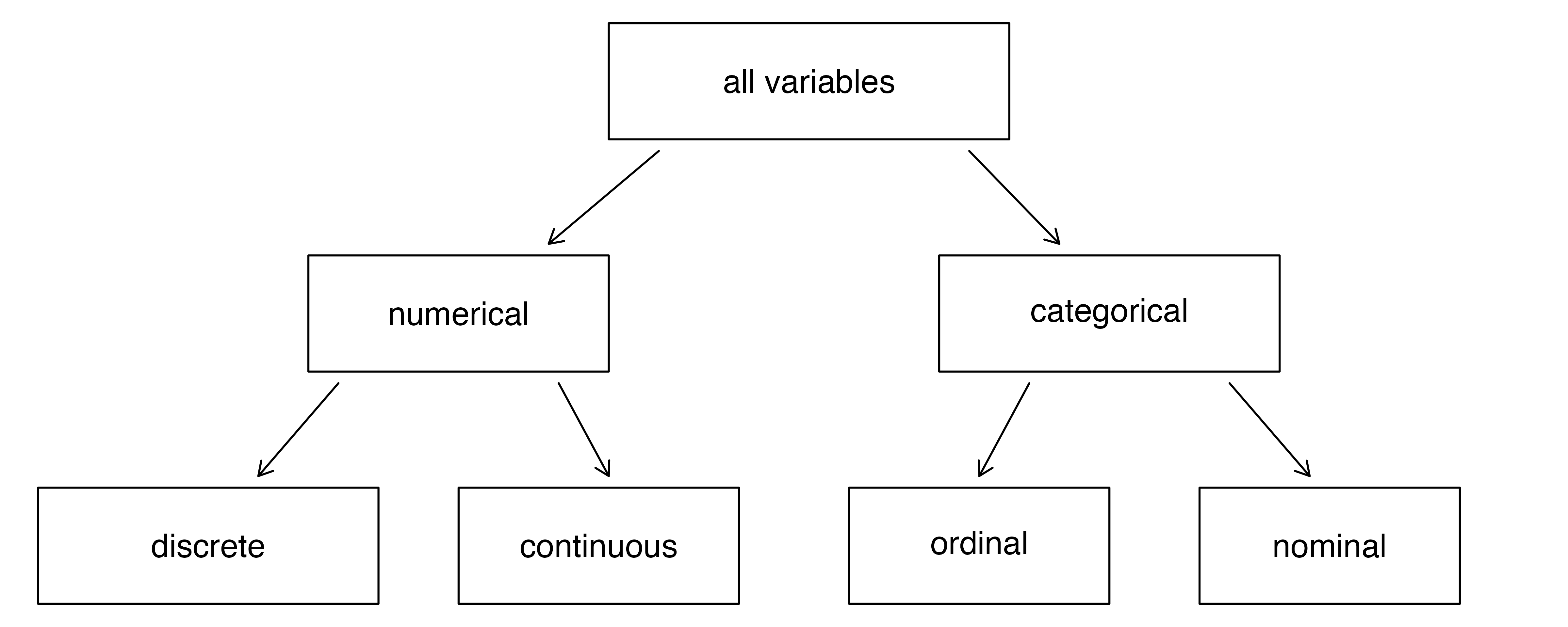
5 How do we Spot Data Variable Types?
By asking questions! Shown below is a table of different kinds of questions you could use to query a dataset. The variable or variables that “answer” the question would be in the category indicated by the question.
5.1 Variables and Operations
| No | Pronoun | Answer | Variable/Scale | Example | What Operations? |
|---|---|---|---|---|---|
| 1 | How Many / Much / Heavy? Few? Seldom? Often? When? | Quantities, with Scale and a Zero Value.Differences and Ratios /Products are meaningful. | Quantitative/Ratio | Length,Height,Temperature in Kelvin,Activity,Dose Amount,Reaction Rate,Flow Rate,Concentration,Pulse,Survival Rate | Correlation |
| 2 | How Many / Much / Heavy? Few? Seldom? Often? When? | Quantities with Scale. Differences are meaningful, but not products or ratios | Quantitative/Interval | pH,SAT score(200-800),Credit score(300-850),SAT score(200-800),Year of Starting College | Mean,Standard Deviation |
| 3 | How, What Kind, What Sort | A Manner / Method, Type or Attribute from a list, with list items in some " order" ( e.g. good, better, improved, best..) | Qualitative/Ordinal | Socioeconomic status (Low income, Middle income, High income),Education level (HighSchool, BS, MS, PhD),Satisfaction rating(Very much Dislike, Dislike, Neutral, Like, Very Much Like) | Median,Percentile |
| 4 | What, Who, Where, Whom, Which | Name, Place, Animal, Thing | Qualitative/Nominal | Name | Count no. of cases,Mode |
5.2 What is Tidy Data?
In our work, we will often use the idea of tidy data; we will often spend time to tidy-up our data before we analyze it, or make charts and inferences.
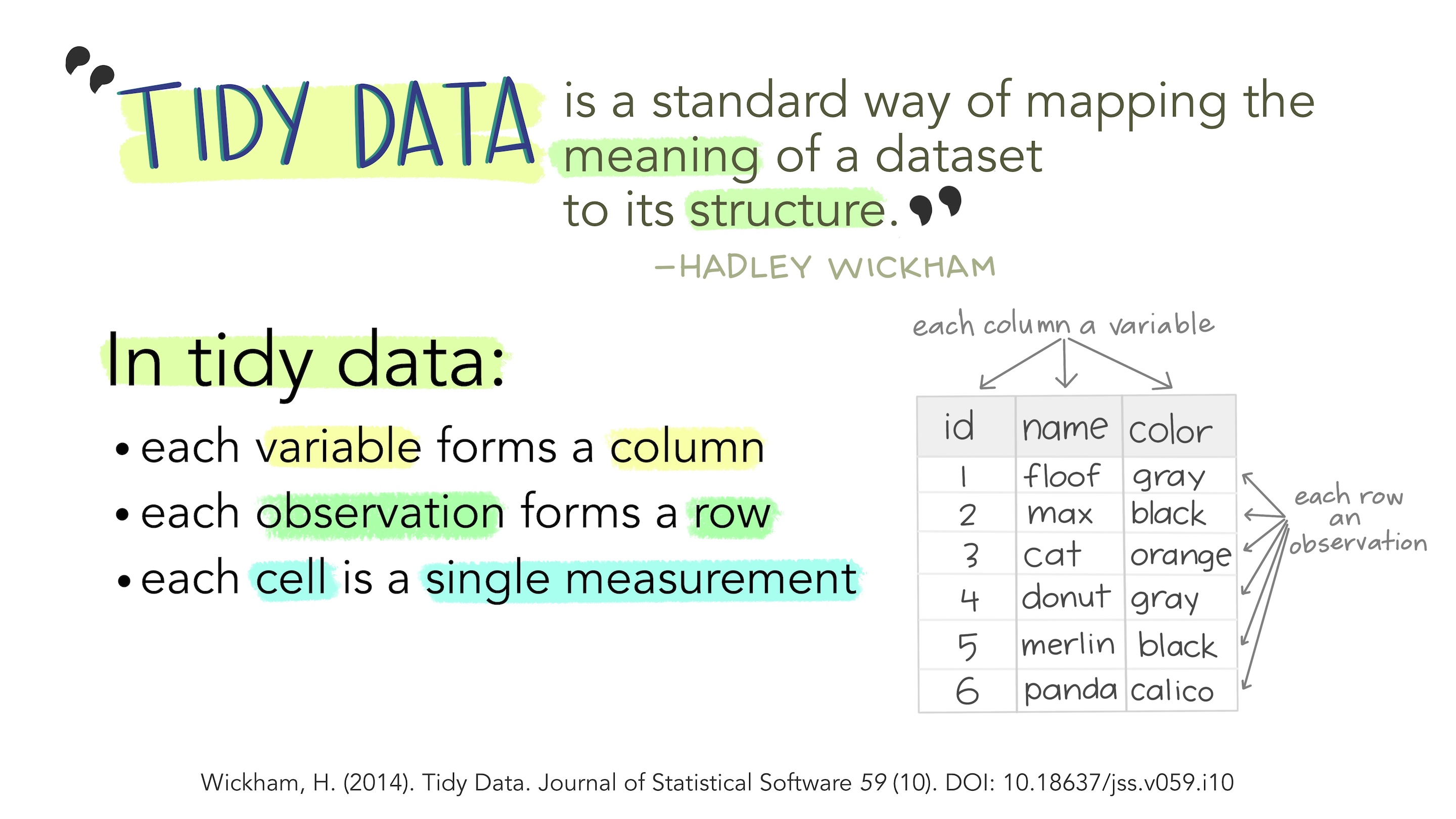
- Each variable is a column;
- Each column contains one kind of data.
- Each observation or case is a row.
- Each observations contains one value for each variable.
6 Some Examples of Data Variables
6.1 Example 1: AllCountries
Q1. How many people in Andorra have internet access?
A1. This leads to the Internet variable, which is a Quantitative variable, a proportion.1 The answer is 70.5\%.
Is this data in tidy format? Yes; each variable/column holds unique information and is of a unique type too.
6.2 Example 2:StudentSurveys
Q.1. What kind of students are these?
A.1. The variables Gender, and Year both answer to this Question. And they are both Qualitative/Categorical variables, of course.
Q.2. What is their status in their respective families?
A.2. Hmm…they are either first-born, or second-born, or third…etc. While this is recorded as a number, it is still a Qualitative variable2! Think! Can you do math operations with BirthOrder? Like mean or median?
Q.3.How big are the families?
A.3. Clearly, the variable that answers is Siblings and since the question is synonymous with “how many”, this is a Quantitative variable.
Again, this data is also in tidy format.
7
Let us take a look at Wickham and Grolemund’s Data Science workflow picture:

So there we have it:
- Data: We generate data by experiment, or obtain readily available data. We import and clean the data
- Variables: Questions lead us to identify Types of Variables (Quant and Qual)
- Transform: Sometimes we may need to transform the data (long to wide, summarize, create new variables…)
- Explore: Further Questions lead us to infer relationships between variables, the relative size of things, which we describe using Data Visualizations
- Report: This may be of interest, or best of all, outright surprising! Which is finally Communicated with charts and descriptions in a research report.
You might think of all these Questions, Answers, Mapping as being equivalent to a grammar, as a language in itself. And indeed, in R we use a philosophy called the Grammar of Graphics! We will use this grammar in the R graphics packages that we will encounter when we make Graphs next. Other parts of the Workflow (Transformation, Analysis and Modelling) are also following similar grammars, as we shall see.
7.1 Randomized Trials
These are the gold standard for experimental data. They involve randomly assigning subjects to treatment and control groups (e.g vaccine and no vaccine) to measure the effect of a treatment or intervention. This method helps eliminate bias and confounding variables, providing robust evidence for causal relationships.
Randomized Controlled Trials
8
- Martyn Shuttleworth, Lyndsay T Wilson (Jun 26, 2009). What is the Scientific Method? Retrieved Mar 12, 2024 from Explorable.com: https://explorable.com/what-is-the-scientific-method
- Adam E.M. Eltorai, Jeffrey A. Bakal, Paige C. Newell, Adena J. Osband (editors). (March 22, 2023) Translational Surgery: Handbook for Designing and Conducting Clinical and Translational Research. A very lucid and easily explained set of chapters. ( I have a copy. Yes.)
- Part III. Clinical: fundamentals
- Part IV: Statistical principles
- https://safetyculture.com/topics/design-of-experiments/
- Emi Tanaka. https://emitanaka.org/teaching/monash-wcd/2020/week09-DoE.html
- Open Intro Stats: Types of Variables
- Lock, Lock, Lock, Lock, and Lock. Statistics: Unlocking the Power of Data, Third Edition, Wiley, 2021. https://www.wiley.com/en-br/Statistics:+Unlocking+the+Power+of+Data,+3rd+Edition-p-9781119674160)
- Claus Wilke. Fundamentals of Data Visualization. https://clauswilke.com/dataviz/
- Tim C. Hesterberg (2015). What Teachers Should Know About the Bootstrap: Resampling in the Undergraduate Statistics Curriculum, The American Statistician, 69:4, 371-386, DOI:10.1080/00031305.2015.1089789. PDF here