1 Setting up R Packages
Plot Fonts and Theme
Show the Code
library(systemfonts)
library(showtext)
## Clean the slate
systemfonts::clear_local_fonts()
systemfonts::clear_registry()
##
showtext_opts(dpi = 96) # set DPI for showtext
sysfonts::font_add(
  family = "Alegreya",
  regular = "../../../../../../fonts/Alegreya-Regular.ttf",
  bold = "../../../../../../fonts/Alegreya-Bold.ttf",
  italic = "../../../../../../fonts/Alegreya-Italic.ttf",
  bolditalic = "../../../../../../fonts/Alegreya-BoldItalic.ttf"
)

sysfonts::font_add(
  family = "Roboto Condensed",
  regular = "../../../../../../fonts/RobotoCondensed-Regular.ttf",
  bold = "../../../../../../fonts/RobotoCondensed-Bold.ttf",
  italic = "../../../../../../fonts/RobotoCondensed-Italic.ttf",
  bolditalic = "../../../../../../fonts/RobotoCondensed-BoldItalic.ttf"
)
showtext_auto(enable = TRUE) # enable showtext
##
theme_custom <- function() {
  font <- "Alegreya" # assign font family up front
  "%+replace%" <- ggplot2::"%+replace%" # nolint

  theme_classic(base_size = 14, base_family = font) %+replace% # replace elements we want to change

    theme(
      text = element_text(family = font), # set base font family

      # text elements
      plot.title = element_text( # title
        family = font, # set font family
        size = 24, # set font size
        face = "bold", # bold typeface
        hjust = 0, # left align
        margin = margin(t = 5, r = 0, b = 5, l = 0)
      ), # margin
      plot.title.position = "plot",
      plot.subtitle = element_text( # subtitle
        family = font, # font family
        size = 14, # font size
        hjust = 0, # left align
        margin = margin(t = 5, r = 0, b = 10, l = 0)
      ), # margin

      plot.caption = element_text( # caption
        family = font, # font family
        size = 9, # font size
        hjust = 1
      ), # right align

      plot.caption.position = "plot", # right align

      axis.title = element_text( # axis titles
        family = "Roboto Condensed", # font family
        size = 12
      ), # font size

      axis.text = element_text( # axis text
        family = "Roboto Condensed", # font family
        size = 9
      ), # font size

      axis.text.x = element_text( # margin for axis text
        margin = margin(5, b = 10)
      )

      # since the legend often requires manual tweaking
      # based on plot content, don't define it here
    )
}

## Use available fonts in ggplot text geoms too!
ggplot2::update_geom_defaults(geom = "text", new = list(
  family = "Roboto Condensed",
  face = "plain",
  size = 3.5,
  color = "#2b2b2b"
))
ggplot2::update_geom_defaults(geom = "label", new = list(
  family = "Roboto Condensed",
  face = "plain",
  size = 3.5,
  color = "#2b2b2b"
))

## Set the theme
ggplot2::theme_set(new = theme_custom())
2 Introduction
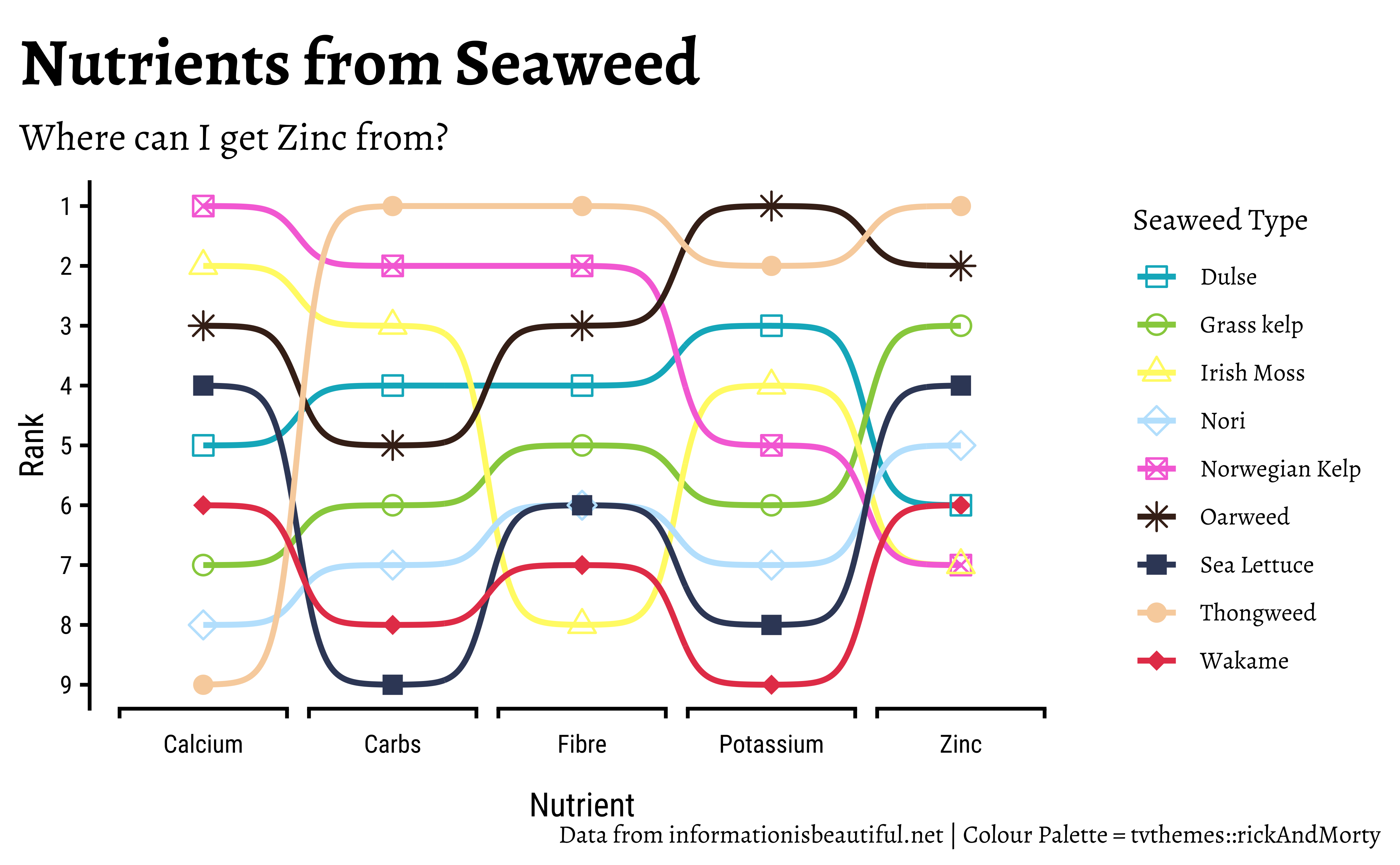
Nine types of Seaweed were rated on different parameters and charted as shown below.
3 Read the Data
NoteExcel Data
The data is an excel sheet. Inspect it first in Excel and decide which sheet you need, and which part of the data you need. There are multiple sheets! Then use readxl::read_xlsx(..) to read it into R. NOTE: The sheet that contains our data of interest is titled “seaweed nutrition”, range = “A3:R13”.
4 Inspect the Data
Rows: 10
Columns: 18
$ `common name`     <chr> "RDA", "Norwegian Kelp", "Oarweed", "Thongweed", "Wa…
$ `sci-name`        <chr> NA, "-Ascophyllum nodosum", "-Laminaria digitata", "…
$ `total fats`      <chr> NA, "0.6", "-", "-", "0.6", "0.3", "-", "0.2", "-", …
$ `saturated fat`   <chr> NA, "0.2", "-", "-", "0.1", "0.1", "-", "0", "-", "-"
$ cholesterol       <chr> NA, "0", "0", "0", "0", "0", "0", "0", "0", "-"
$ protein           <chr> NA, "1.7", "-", "-", "3", "5.8", "-", "1.5", "-", "-"
$ `Total fiber`     <dbl> NA, 8.8, 6.2, 9.8, 3.4, 3.8, 5.4, 1.3, 3.8, 4.9
$ `Soluble fiber`   <chr> NA, "7.5", "5.4", "7.7", "2.9", "3", "3", "-", "2.1"…
$ `Insoluble fiber` <chr> NA, "1.3", "0.8", "2.1", "0.5", "1", "2.3", "-", "1.…
$ Carbohydrates     <dbl> NA, 13.1, 9.9, 15.0, 4.6, 5.4, 10.6, 12.0, 4.1, 7.8
$ Calcium           <dbl> NA, 575.0, 364.7, 30.0, 112.3, 34.2, 148.8, 373.8, 3…
$ Potassium         <dbl> NA, 765.0, 2013.2, 1351.4, 62.4, 302.2, 1169.6, 827.…
$ Magnesium         <dbl> NA, 225.0, 403.5, 90.1, 78.7, 108.3, 97.6, 573.8, 46…
$ Sodium            <dbl> NA, 1173.8, 624.6, 600.6, 448.7, 119.7, 255.2, 1572.…
$ Copper            <dbl> NA, 0.8, 0.3, 0.1, 0.2, 0.1, 0.4, 0.1, 0.3, 0.1
$ Iron              <dbl> NA, 14.9, 45.6, 5.0, 3.9, 5.2, 12.8, 6.6, 15.3, 22.2
$ Iodine            <dbl> NA, 18.2, 70.0, 10.7, 3.9, 1.3, 10.2, 6.1, 1.6, 97.9
$ Zinc              <chr> NA, "-", "1.6", "1.7", "0.3", "0.7", "0.3", "-", "0.…
5 Data Dictionary
NoteQuantitative Variables
Write in.
NoteQualitative Variables
Write in.
NoteObservations
Write in.
6 Research Question
Note
Write in! First look at the chart below!
7 Analyse/Transform the Data
```{r}
#| label: data-preprocessing
#
# Write in your code here
# to prepare this data as shown below
# to generate the plot that follows
```
8 Plot the Data
9 Tasks and Discussion
- Complete the Data Dictionary.
- Select and Transform the variables as shown.
- Create the graphs shown and discuss the following questions:
- Identify the type of charts
- Identify the variables used for various geometrical aspects (x, y, fill…). Name the variables appropriately.
- What research activity might have been carried out to obtain the data graphed here? Provide some details.
- What might have been the Hypothesis/Research Question to which the response was Chart?
- Write a 2-line story based on the chart, describing your inference/surprise.
- Based on the diagram, discuss which one an elderly person might try if they are deficient in calcium. If you were trying to avoid carbs, which seaweed sushi would you try?
10 References
Over 2500 colour palettes are available in the paletteer package. Can you find tayloRswift? wesanderson? harrypotter? timburton?
Here are the Qualitative Palettes:
And the Quantitative/Continuous palettes:
Use the commands:
## For Qual variable-> colour/fill:
scale_colour_paletteer_d(
  name = "Legend Name",
  palette = "package::palette",
  dynamic = TRUE / FALSE
)

## For Quant variable-> colour/fill:
scale_colour_paletteer_c(
  name = "Legend Name",
  palette = "package::palette",
  dynamic = TRUE / FALSE
)