library(tidyverse)
library(mosaic) # Our trusted friend
library(skimr)
# options(rgl.useNULL = TRUE) # reset graphics device for vcdExtra
# rgl::rgl.useNULL()
##
library(janitor) # Data Cleaning and Tidying
library(visdat) # Visualize whole dataframes for missing data
library(naniar) # Clean missing data
library(DT) # Interactive Tables for our data
library(tinytable) # Elegant Tables for our data
###
library(vcd) # Michael Friendly's package, Visualizing Categorical
library(vcdExtra) # Categorical Data Sets
library(resampledata) # More datasets
library(visStatistics) # Comprehensive all-in-one stats viz/test package
# library(pak)
# pak::pak("haleyjeppson/ggmosaic") # removed from CRAN
library(ggmosaic) # Tidy Mosaic Plots
library(ggpubr) # Colours, Themes and new geometries in ggplot
Proportions
Frequency Tables
Contingency Tables
Margins
Bar Plots
Mosaic Plots
Balloon Plots
Pie Charts
Abstract
Types, Categories, Counts, and Associations
…“Thinking is difficult, that’s why most people judge.”
— C.G. Jung
1
2
| Variable #1 | Variable #2 | Chart Names | Chart Shape |
|---|---|---|---|
| Qual | Qual | Pies, and Mosaic Charts |
|
3
| No | Pronoun | Answer | Variable/Scale | Example | What Operations? |
|---|---|---|---|---|---|
| 3 | How, What Kind, What Sort | A Manner / Method, Type or Attribute from a list, with list items in some " order" ( e.g. good, better, improved, best..) | Qualitative/Ordinal | Socioeconomic status (Low income, Middle income, High income),Education level (HighSchool, BS, MS, PhD),Satisfaction rating(Very much Dislike, Dislike, Neutral, Like, Very Much Like) | Median,Percentile |
4
To recall, a categorical variable is one for which the possible measured or assigned values consist of a discrete set of categories, which may be ordered or unordered. Some typical examples are:
- Gender, with categories “Male,” “Female.”
- Marital status, with categories “Never married,” “Married,” “Separated,” “Divorced,” “Widowed.”
- Fielding position (in
baseballcricket), with categories “Slips,”Cover “,”Mid-off “Deep Fine Leg”, “Close-in”, “Deep”… - Side effects (in a pharmacological study), with categories “None,” “Skin rash,” “Sleep disorder,” “Anxiety,” . . ..
- Political attitude, with categories “Left,” “Center,” “Right.”
- Party preference (in India), with categories “BJP” “Congress,” “AAP,” “TMC”…
- Treatment outcome, with categories “no improvement,” “some improvement,” or “marked improvement.”
- Age, with categories “0–9,” “10–19,” “20–29,” “30–39,” . . . .
- Number of children, with categories 0, 1, 2, . . . .
As these examples suggest, categorical variables differ in the number of categories: we often distinguish binary variables (or dichotomous variables) such as Gender from those with more than two categories (called polytomous variables).
5
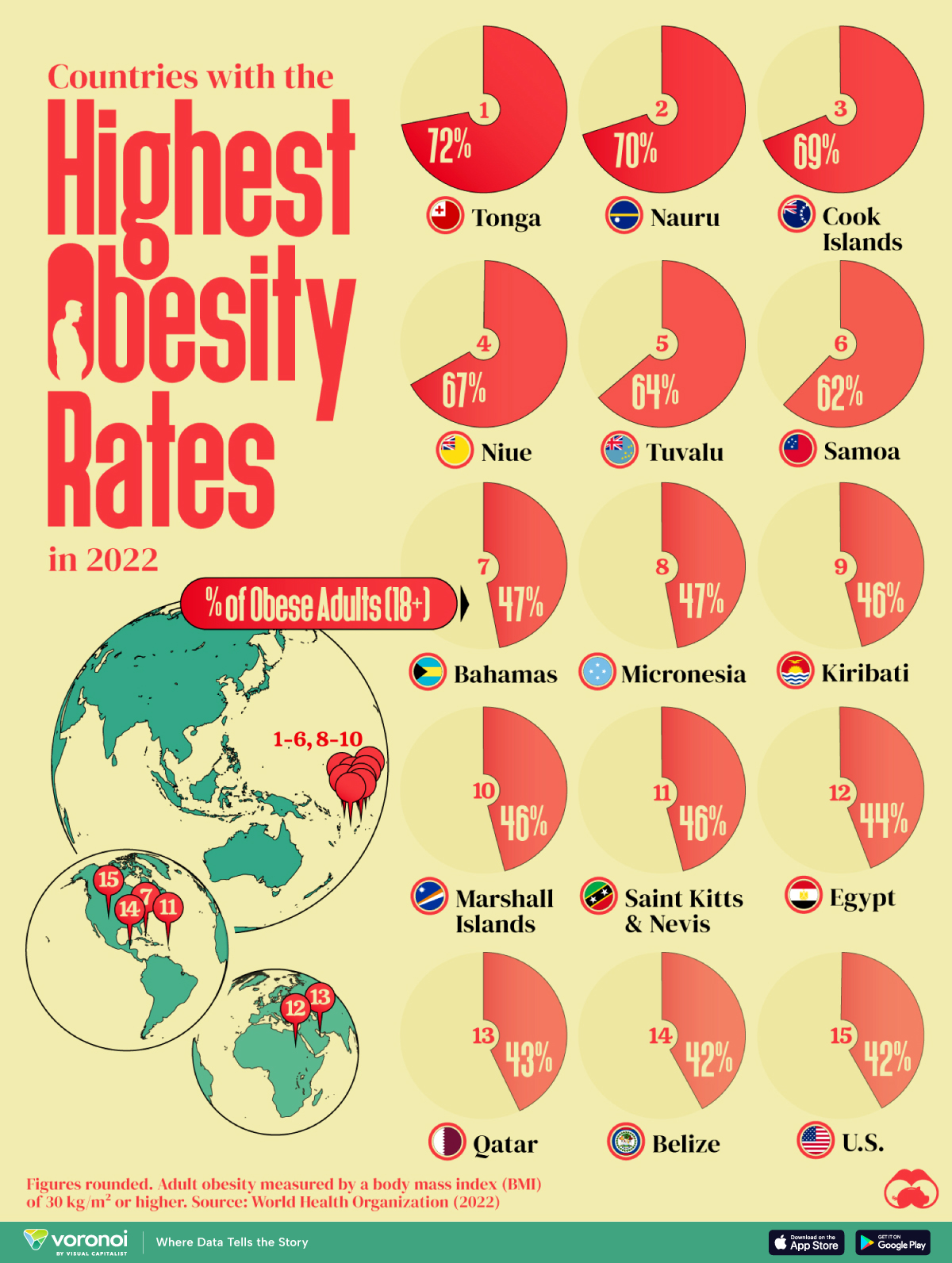
From Figure 1 (a), it is seen that Egypt, Qatar, and the United States are the only countries with a population greater than 1 million on this list. Poor food habits are once again a factor, with some cultural differences. In Egypt, high food inflation has pushed residents to low-cost high-calorie meals. To combat food insecurity, the government subsidizes bread, wheat flour, sugar and cooking oil, many of which are the ingredients linked to weight gain. In Qatar, a country with one of the highest per capita GDPs in the world, a genetic predisposition towards obesity and sedentary lifestyles worsen the impact of rich diets. And in the U.S., bigger portions are one of the many reasons cited for rampant adult and child obesity. For example, Americans ate 20% more calories in the year 2000 than they did in 1983. They consume 195 lbs of meat annually compared to 138 lbs in 1953. And their grain intake has increased 45% since 1970.
It’s worth noting however that this dataset is based on BMI values, which do not fully account for body types with larger bone and muscle mass.
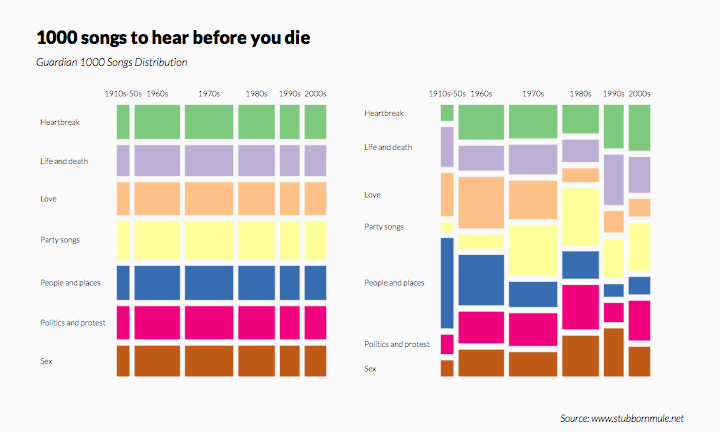
From Figure 1 (b), we see that the 1000 Songs you must hear before you die are shown in a plot of song topic vs song-year, and that the important songs vary in topic over the years.
What does the plot on the left tell you? Huh?
6
We saw with Bar Charts that when we deal with single Qual variables, we perform counts for each level of the variable. For a single Qual variable, even with multiple levels ( e.g. Education Status: High school, College, Post-Graduate, PhD), we can count the observations as with Bar Charts and plot Pies.
We can also plot Pie Charts when the number of levels in a single Qual variable are not too many. Almost always, a Bar chart is preferred. The problem is that humans are pretty bad at reading angles. This ubiquitous chart is much vilified in the industry and bar charts that we have seen earlier, are viewed as better options. On the other hand, pie charts are ubiquitous in design and business circles, and are very much accepted! Do also read this spirited defense of pie charts here. https://speakingppt.com/why-tufte-is-flat-out-wrong-about-pie-charts/
What if there are two Quals? Or even more? The answer is to take them pair-wise, make all combinations of levels for both and calculate counts for these. This is called a Contingency Table. Then we plot that table. We’ll see.
7
From the {vcd} vignette:
The first thing you need to know is that categorical data can be represented in three different forms in R, and it is sometimes necessary to convert from one form to another, for carrying out statistical tests, fitting models or visualizing the results.
- Case Data
- Frequency Data
- Cross-Tabular Count Data
Let us first see examples of each.
From Michael Friendly Discrete Data Analysis and Visualization :
In many circumstances, data is recorded on each individual or experimental unit. Data in this form is called case data, or data in case form. Containing individual observations with one or more categorical factors, used as classifying variables. The total number of observations is
nrow(X), and the number of variables isncol(X).
class(Arthritis)[1] "data.frame"| ID | Treatment | Sex | Age | Improved |
|---|---|---|---|---|
| 57 | Treated | Male | 27 | Some |
| 46 | Treated | Male | 29 | None |
| 77 | Treated | Male | 30 | None |
| 17 | Treated | Male | 32 | Marked |
| 36 | Treated | Male | 46 | Marked |
| 23 | Treated | Male | 58 | Marked |
| 75 | Treated | Male | 59 | None |
| 39 | Treated | Male | 59 | Marked |
| 33 | Treated | Male | 63 | None |
| 55 | Treated | Male | 63 | None |
The Arthritis data set has three factors and two integer variables. One of the three factors Improved is an ordered factor.
-
ID:` integer; a unique identifier for each case -
Treatment: a factor; Placebo or Treated -
Sex: a factor, M / F -
Age: integer; age of the patient -
Improved: Ordinal factor; None < Some < Marked
Each row in the Arthritis dataset is a separate case or observation.
Data in frequency form has already been tabulated and aggregated by counting over the (combinations of) categories of the table variables. When the data are in case form, we can always trace any observation back to its individual identifier or data record, since each row is a unique observation or case; the reverse, with the Frequency Form is rarely possible.
Frequency Data is usually a data frame, with columns of categorical variables and at least one column containing frequency or count information.
'data.frame':   6 obs. of  3 variables:
 $ sex  : Factor w/ 2 levels "female","male": 1 2 1 2 1 2
 $ party: Factor w/ 3 levels "dem","indep",..: 1 1 2 2 3 3
$ count: num 279 165 73 47 225 191| sex | party | count |
|---|---|---|
| female | dem | 279 |
| male | dem | 165 |
| female | indep | 73 |
| male | indep | 47 |
| female | rep | 225 |
| male | rep | 191 |
Respondents in the GSS survey were classified by sex and party identification. As can be seen, there is a count for every combination of the two categorical variables, sex and party. This is still a data.frame.
Table Form Data can be a matrix, array or table object, whose elements are the frequencies in an n-way table. The variable names (factors) and their levels are given by dimnames(X).
HairEyeColor
class(HairEyeColor)
, , Sex = Male
Eye
Hair Brown Blue Hazel Green
Black 32 11 10 3
Brown 53 50 25 15
Red 10 10 7 7
Blond 3 30 5 8
, , Sex = Female
Eye
Hair Brown Blue Hazel Green
Black 36 9 5 2
Brown 66 34 29 14
Red 16 7 7 7
Blond 4 64 5 8[1] "table"HairEyeColor is a “two-way” table, consisting of two tables, one for Sex = Female and the other for Sex = Male. The total number of observations is sum(X). The number of dimensions of the table is length(dimnames(X)), and the table sizes are given by sapply(dimnames(X), length). The data looks like a n-dimensional cube and needs n-way tables to represent.
sum(HairEyeColor)[1] 592dimnames(HairEyeColor)$Hair
[1] "Black" "Brown" "Red" "Blond"
$Eye
[1] "Brown" "Blue" "Hazel" "Green"
$Sex
[1] "Male" "Female"Hair Eye Sex
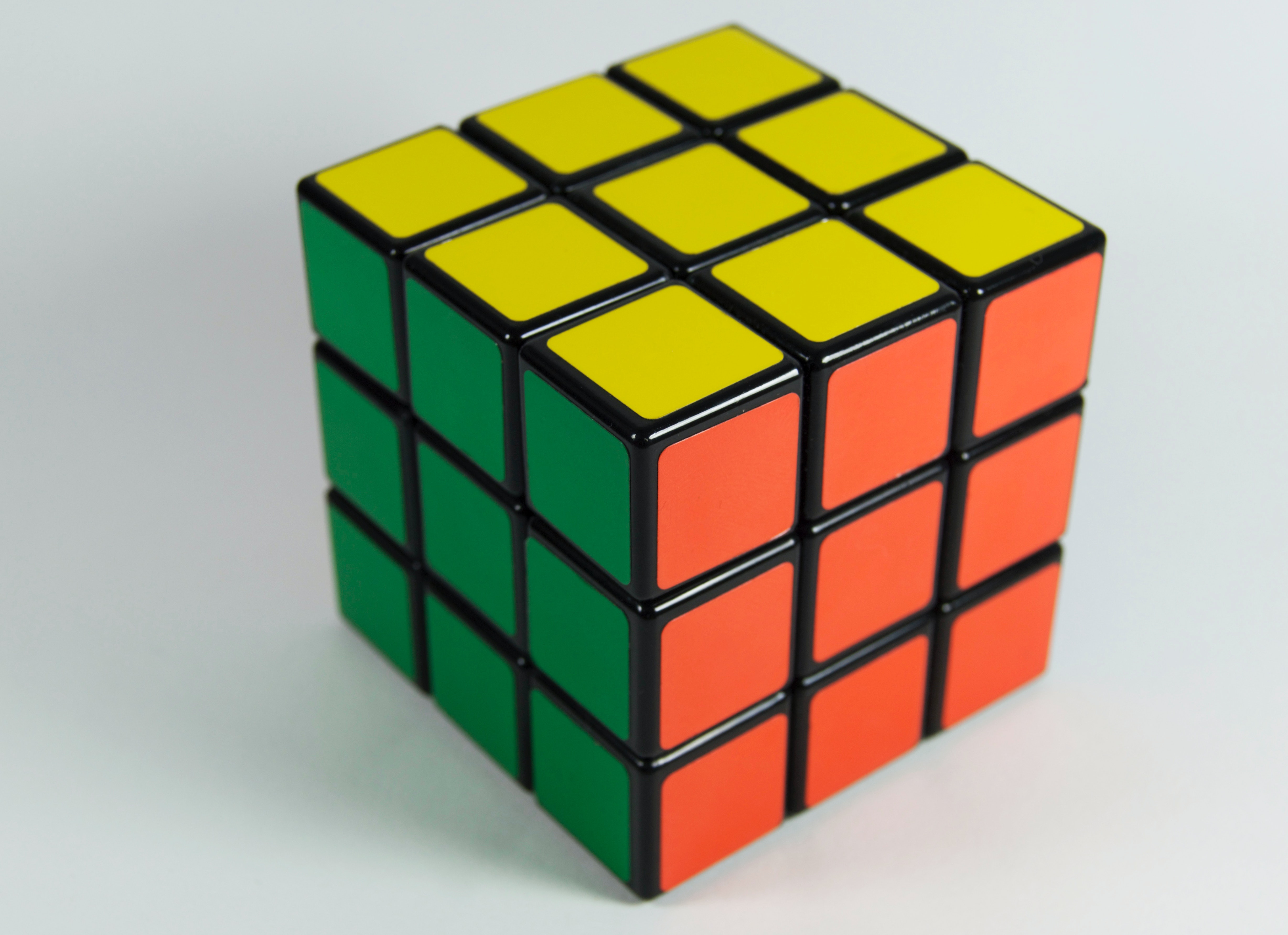
4 4 2 A good way to think of tabular data is to think of a Rubik’s Cube.
TipRubik’s Cube and Categorical Data Tables
Each of the edges is an Ordinal Variable, each segment represents a level in the variable. So each face of the Cube represents two ordinal variables. Any segment is at the intersection of two (independent) levels of two variables, and the colour may be visualized as a count. This array of counts on a face is a 2D or 2-Way Table.
Since we can only print 2D tables, we hold one face in front and the image we see is a 2-Way Table. Turning the Cube by 90 degrees gives us another face with 2 variables, with one variable in common with the previous face. If we consider two faces together, we get two 2-way tables, effectively allowing us to contemplate 3 categorical variables.
Multiple 2-Way tables ( such as HairEyeColor) can be flattened into a single long table that contains all counts for all combinations of categorical variables. This can be visualized as “opening up” and laying flat the Rubik’s cube, as with a cardboard model of it.
ftable(HairEyeColor) Sex Male Female
Hair Eye
Black Brown 32 36
Blue 11 9
Hazel 10 5
Green 3 2
Brown Brown 53 66
Blue 50 34
Hazel 25 29
Green 15 14
Red Brown 10 16
Blue 10 7
Hazel 7 7
Green 7 7
Blond Brown 3 4
Blue 30 64
Hazel 5 5
Green 8 8Converting these (multiple) tables into a data frame or tibble:
| Hair | Eye | Sex | n |
|---|---|---|---|
| Black | Brown | Male | 32 |
| Brown | Brown | Male | 53 |
| Red | Brown | Male | 10 |
| Blond | Brown | Male | 3 |
| Black | Blue | Male | 11 |
| Brown | Blue | Male | 50 |
| Red | Blue | Male | 10 |
| Blond | Blue | Male | 30 |
| Black | Hazel | Male | 10 |
| Brown | Hazel | Male | 25 |
| Red | Hazel | Male | 7 |
| Blond | Hazel | Male | 5 |
| Black | Green | Male | 3 |
| Brown | Green | Male | 15 |
| Red | Green | Male | 7 |
| Blond | Green | Male | 8 |
| Black | Brown | Female | 36 |
| Brown | Brown | Female | 66 |
| Red | Brown | Female | 16 |
| Blond | Brown | Female | 4 |
| Black | Blue | Female | 9 |
| Brown | Blue | Female | 34 |
| Red | Blue | Female | 7 |
| Blond | Blue | Female | 64 |
| Black | Hazel | Female | 5 |
| Brown | Hazel | Female | 29 |
| Red | Hazel | Female | 7 |
| Blond | Hazel | Female | 5 |
| Black | Green | Female | 2 |
| Brown | Green | Female | 14 |
| Red | Green | Female | 7 |
| Blond | Green | Female | 8 |
8
We have already examined Bar Charts. Pie Charts are discussed here.. These are both good for single Qual variables. Bars are more suited when there are many levels and/or when there is more than one Qual variable, as discussed earlier.
How do we deal with multiple Qual variables?
9
When we want to visualize proportions based on Multiple Qual variables, we are looking at what Claus Wilke calls nested proportions: groups within groups. Making counts with combinations of levels for two Qual variables gives us a data structure called a Contingency Table , which we will use to build our plot for nested proportions. The Statistical tests for Proportions ( the \chi^2 test ) also needs Contingency Tables. The Frequency Table we encountered earlier is very close to being a full-fledged Contingency Table; one only needs to add the margin counts! So what is a Contingency Table?
We can think of it as an a new intermediate tabular structure that will help us create a new kind of chart for our Qual data.
From Wolfram Alpha:
A contingency table, sometimes called a two-way frequency table, is a tabular mechanism with at least two rows and two columns used in statistics to present categorical data in terms of frequency counts. More precisely, an r \times c contingency table shows the observed frequency of two variables the observed frequencies of which are arranged into r rows and c columns. The intersection of a row and a column of a contingency table is called a cell.
9.1
In this section we understand how to make Contingency Tables(CT) from each of the three forms. We will use base-R and the {vcd} package for our purposes. Then we will see how they can be visualized. In most cases, we will also see how we can create the Contingency Table as a tibbleor data frame for further analysis.
-
vcd: For Case Form data,
vcd::structable()is a good option, as it can also add margins to the table. The Table can also be converted to a tibble, preserving the rownames.
Show the Code
Arthritis %>% class()
vcd::structable(data = Arthritis, Improved ~ Treatment)
vcd::structable(data = Arthritis, Improved ~ Treatment) %>%
as.matrix() %>% # Convert to matrix;
addmargins() %>% # Add margins to the table; matrix output
class()
vcd::structable(data = Arthritis, Improved ~ Treatment) %>%
as.matrix() %>% # Convert to matrix;
addmargins() %>% # Add margins to the table; matrix output
as_tibble(rownames = "Treatment") # Convert to tibble; ensure row names![1] "data.frame" Improved None Some Marked
Treatment
Placebo 29 7 7
Treated 13 7 21[1] "matrix" "array" vcd
- Base R: Base R also provides very compact formula-based smethods for Case Form Data:
Show the Code
Arthritis %>% class()
ftable(data = Arthritis,
Improved ~ Treatment) %>% # Two-way table
as.matrix() %>% # ftable to matrix;
# Keeps the names when margins are added
addmargins() # Add margins to the table
ftable(data = Arthritis,
Improved ~ Treatment) %>% # Two-way table
as.matrix() %>% # ftable to matrix;
# Keeps the names when margins are added
addmargins() %>% # Add margins to the table
class()
ftable(data = Arthritis,
Improved ~ Treatment) %>% # Two-way table)
as.matrix() %>% # ftable to matrix;
# Keeps the names when margins are added
addmargins() %>% # Add margins to the table
as_tibble(rownames = "Treatment") # Convert to tibble; ensure row names![1] "data.frame" Improved
Treatment None Some Marked Sum
Placebo 29 7 7 43
Treated 13 7 21 41
Sum 42 14 28 84[1] "matrix" "array" base::ftable()
UCBAdmissions is already in Frequency Form i.e. a Contingency Table. But it is a set of (two-way) Contingency Tables. So let us try!
-
vcd: For Frequency Form data,
vcd::structable()can again work nicely for us:
Show the Code
UCBAdmissions %>% class()
vcd::structable(UCBAdmissions) %>% class()
## Add margin sums
## Must flatten to matrix first since it is 3-WAY
structable(UCBAdmissions, Admit + Dept ~ Gender) %>%
as.matrix() %>%
addmargins()
structable(UCBAdmissions, Admit + Dept ~ Gender) %>%
as.matrix() %>%
addmargins() %>% # Is this step not counterintuitive for Freq data?
as_tibble(rownames = "Admit-Dept") # Convert to tibble; ensure row names![1] "table"[1] "structable" "ftable" Gender
Admit_Dept Male Female Sum
Admitted_A 512 89 601
Admitted_B 353 17 370
Admitted_C 120 202 322
Admitted_D 138 131 269
Admitted_E 53 94 147
Admitted_F 22 24 46
Rejected_A 313 19 332
Rejected_B 207 8 215
Rejected_C 205 391 596
Rejected_D 279 244 523
Rejected_E 138 299 437
Rejected_F 351 317 668
Sum 2691 1835 4526vcd
- Base R: Base R also provides a very compact method for Frequency Form Data:
Show the Code
UCBAdmissions %>% class()
ftable(data = UCBAdmissions, Gender ~ Admit + Dept)
ftable(data = UCBAdmissions, Gender ~ Admit + Dept) %>% class()
ftable(data = UCBAdmissions, Gender ~ Admit + Dept) %>%
as.matrix() %>% # Keeps the names when margins are added
addmargins() %>% # Add margins to the table
as_tibble(rownames = "Admit-Dept")[1] "table" Gender Male Female
Admit Dept
Admitted A 512 89
B 353 17
C 120 202
D 138 131
E 53 94
F 22 24
Rejected A 313 19
B 207 8
C 205 391
D 279 244
E 138 299
F 351 317[1] "ftable"base::ftable()
How about a multi-table dataset, like HairEyeColor?
-
vcd: For Table Form data,
vcd::structable()can readily be used:
Show the Code
# HairEyeColor is in multiple table form data
HairEyeColor
HairEyeColor %>% class()
## Option#1 vcd:structable()
vcd::structable(HairEyeColor) %>%
as.matrix() %>% # Flatten
addmargins() # Add margins to the table
vcd::structable(data = HairEyeColor, Sex ~ Hair + Eye) %>%
as.matrix() %>%
addmargins() %>% # Add margins to the table
as_tibble(rownames = "Hair-Eye") # Convert to tibble; ensure row names!, , Sex = Male
Eye
Hair Brown Blue Hazel Green
Black 32 11 10 3
Brown 53 50 25 15
Red 10 10 7 7
Blond 3 30 5 8
, , Sex = Female
Eye
Hair Brown Blue Hazel Green
Black 36 9 5 2
Brown 66 34 29 14
Red 16 7 7 7
Blond 4 64 5 8[1] "table" Eye
Hair_Sex Brown Blue Hazel Green Sum
Black_Male 32 11 10 3 56
Black_Female 36 9 5 2 52
Brown_Male 53 50 25 15 143
Brown_Female 66 34 29 14 143
Red_Male 10 10 7 7 34
Red_Female 16 7 7 7 37
Blond_Male 3 30 5 8 46
Blond_Female 4 64 5 8 81
Sum 220 215 93 64 592vcd
-
Base R also offers the
ftable()option again:
Show the Code
            Sex Male Female
Hair  Eye
Black Brown       32     36
      Blue        11      9
      Hazel       10      5
      Green        3      2
Brown Brown       53     66
      Blue        50     34
      Hazel       25     29
      Green       15     14
Red   Brown       10     16
      Blue        10      7
      Hazel        7      7
      Green        7      7
Blond Brown        3      4
      Blue        30     64
      Hazel        5      5
Green 8 8 Sex
Hair_Eye Male Female Sum
Black_Brown 32 36 68
Black_Blue 11 9 20
Black_Hazel 10 5 15
Black_Green 3 2 5
Brown_Brown 53 66 119
Brown_Blue 50 34 84
Brown_Hazel 25 29 54
Brown_Green 15 14 29
Red_Brown 10 16 26
Red_Blue 10 7 17
Red_Hazel 7 7 14
Red_Green 7 7 14
Blond_Brown 3 4 7
Blond_Blue 30 64 94
Blond_Hazel 5 5 10
Blond_Green 8 8 16
Sum 279 313 592base::ftable()
ImportantWorkflow
So, it does seem that we could use mostly vcd::structable() or ftable() to create Contingency Tables, and then convert them to tibble form if needed. The usage is identical!
9.2
All right then, how does one plot a set of data that looks like this, a matrix? No column is a single variable, nor is each row a single observation, which is what we understand with the idea of tidy data.
Let us take the GSS2002 dataset, and create a Contingency Table out of it. We will use the Education and DeathPenalty variables, which are both Qualitative. The GSS2002 dataset is a part of the resampledata package, and contains data from the General Social Survey (GSS) for the year 2002.
Show the Code
gss_table <- vcd::structable(Education ~ DeathPenalty, data = GSS2002)
gss_table %>%
    addmargins() %>%
as_tibble(rownames = "Education")The answer is provided in the very shape of the CT: we plot this as a set of tiles, where \pmb{area~of~tile \sim count} We recursively partition off a (usually) square area into vertical and horizontal pieces whose area is proportional to the count at a specific combination of levels of the two Qual variables. So we might follow the process as shown below:
- Take the bottom row of the CT (i.e.per-column totals) and create vertical rectangles with these widths
- Take the individual counts in the rows and partition each rectangle based in the counts in these rows.
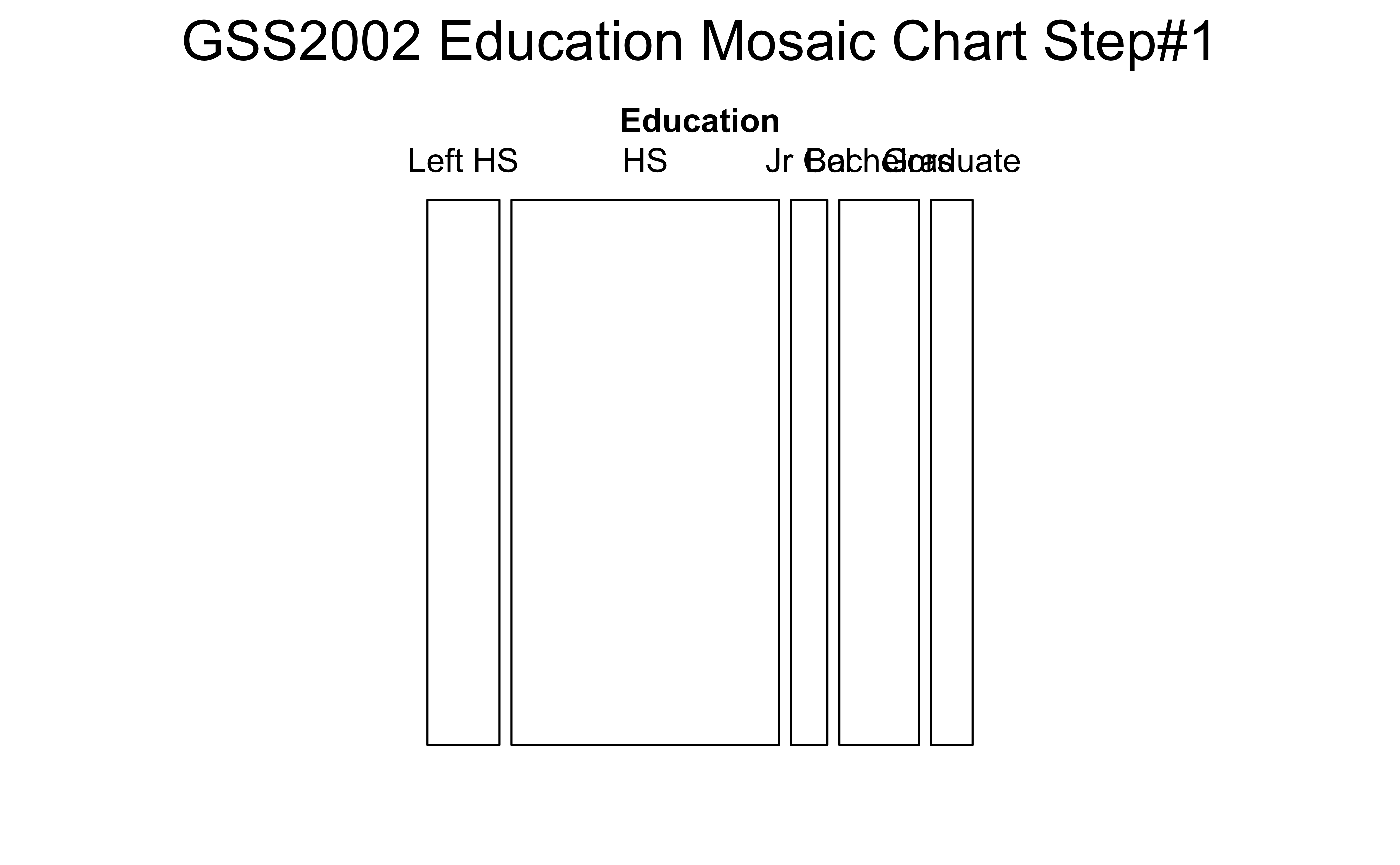
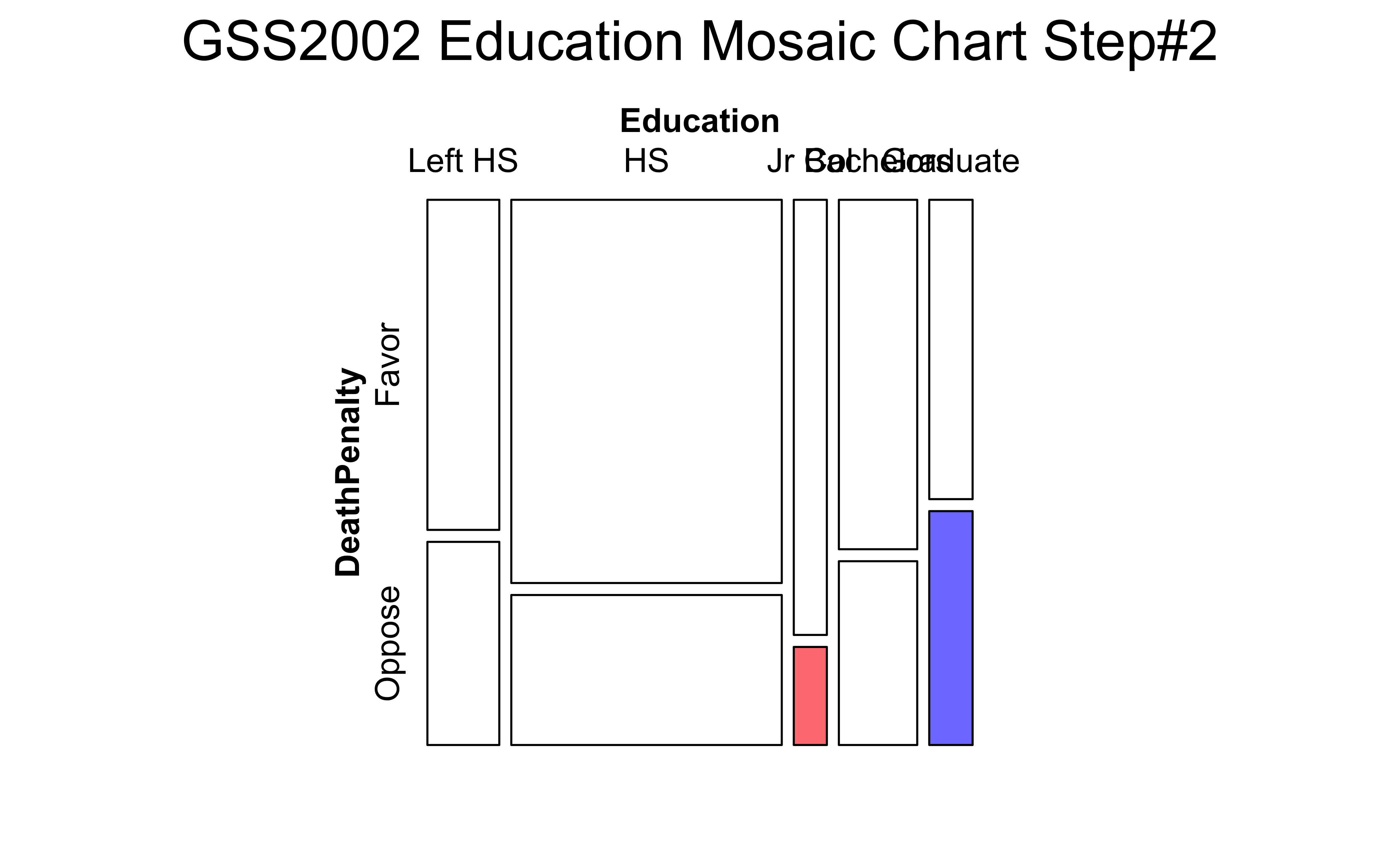
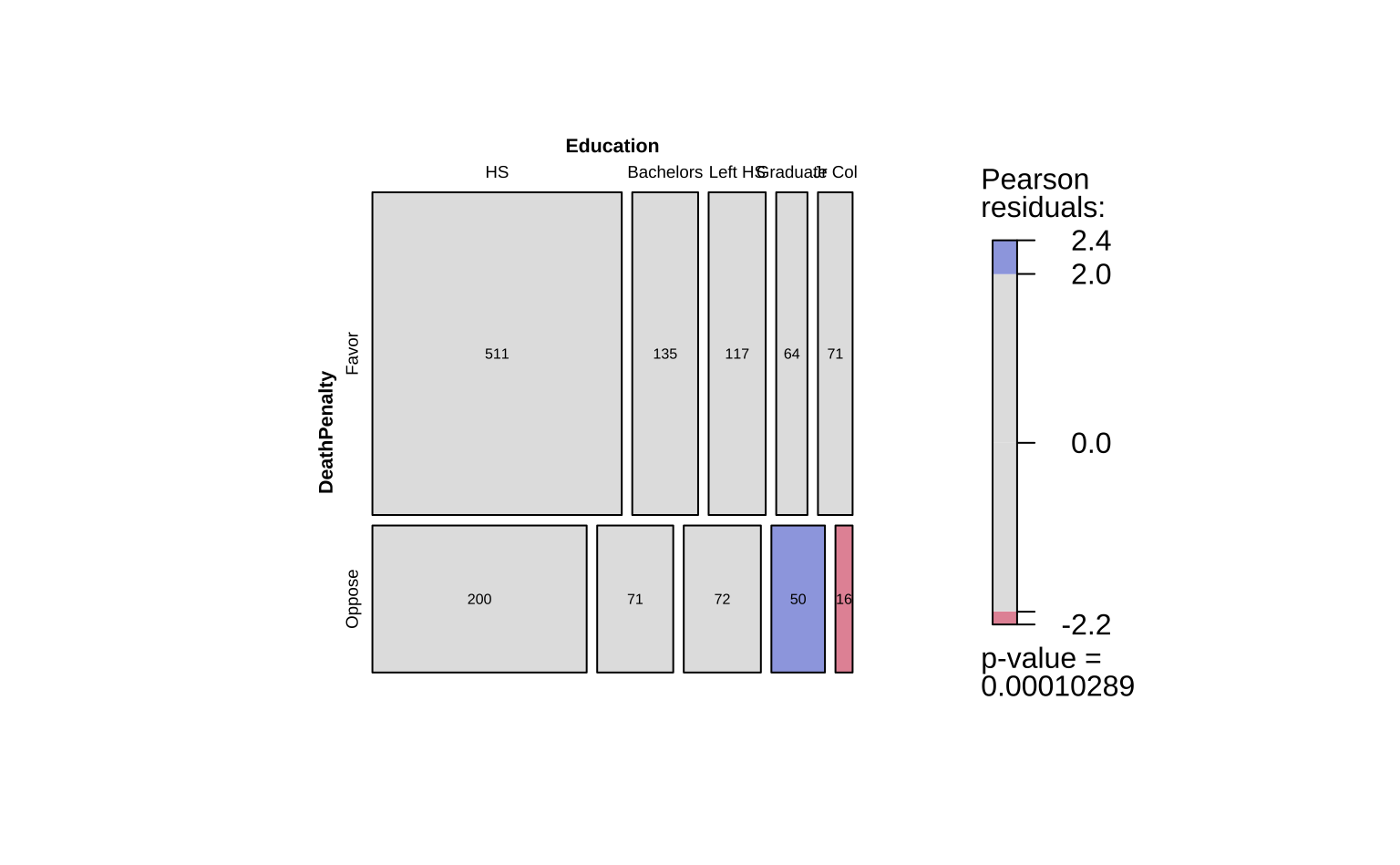
The first split shows the various levels of Education and their counts as widths. Order is alphabetical! This splitting corresponds to the bottom ROW of the Table 7. HS is clearly the largest subgroup in Education.
In the second step, the columns from Figure 3 (a) are sliced horizontally into tiles, in proportion to the number of people in each Education category/level who support/do not support DeathPenalty. This is done in proportion to all the entries in each COLUMN, giving us Figure 3 (b).
Let us now make this plot with {vcd}, and with a new package called visStatistics, which allows us to create a wide variety of statistical charts, including Mosaic Charts, with very little code.
The vcd::mosaic() function needs the data in contingency table form. Of course, vcd::structable() gives us one!
Show the Code
arthritis_table <- vcd::structable(Improved ~ Treatment,
                                   data = Arthritis)
arthritis_table
vcd::mosaic(arthritis_table,
            gp = shading_max, direction = "v",
            main = "Arthritis Treatment Dataset",
labeling = labeling_border(
                varnames = c("F", "F"), # Remove variable name labels
                rot_labels = c(90,0,0,0), #t,r,b,l
                just_labels = c("left",
                                "left",
                                "left",
                                "right"))) # How?
Improved None Some Marked
Treatment
Placebo 29 7 7
Treated 13 7 21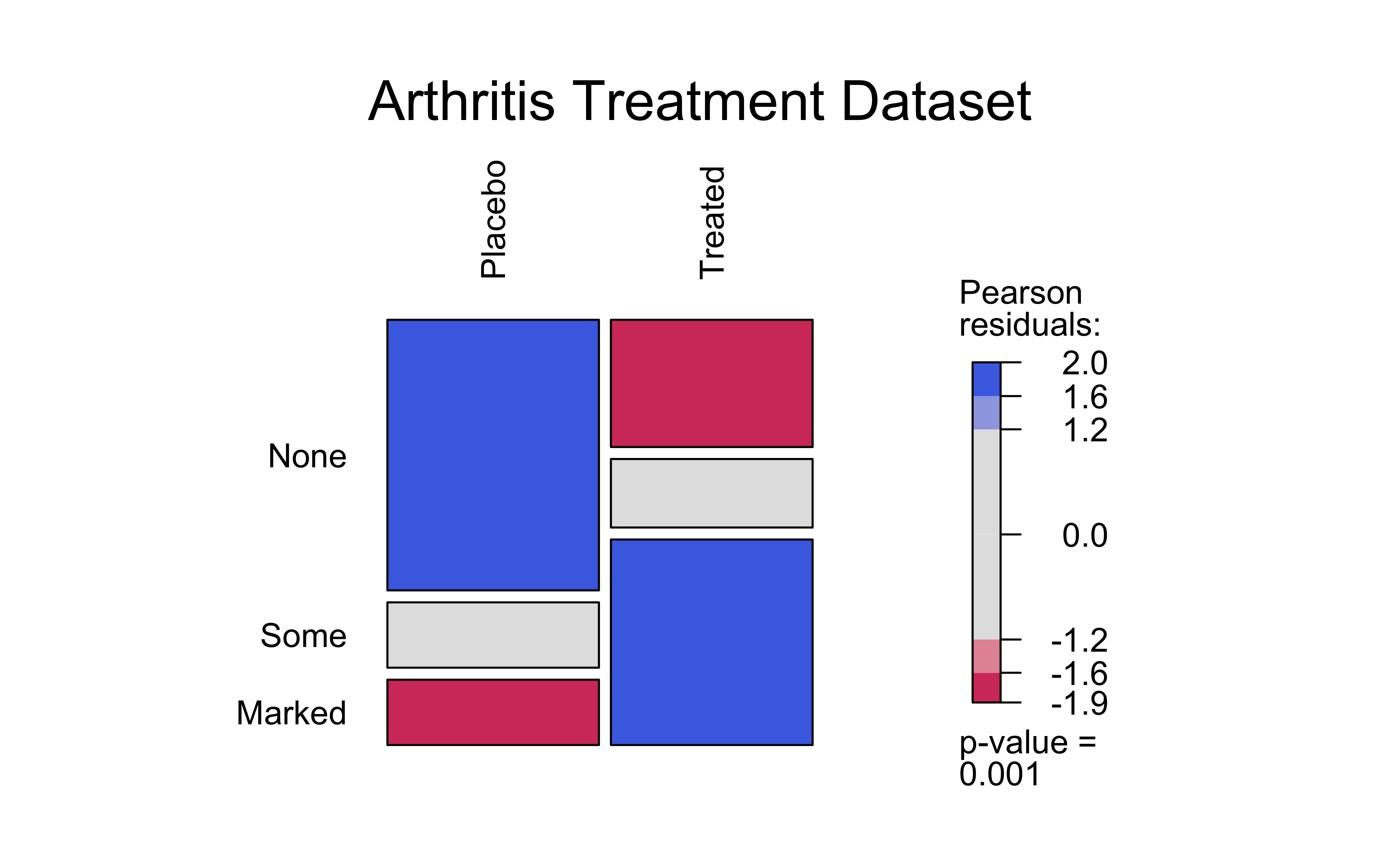
There are visible differences in the counts for the Improved variable, based on the Treatment variable. The Placebo treatment has a much lower count for Marked improvement, and a higher count for None improvement. The Treated group has a higher count for Marked improvement, and a lower count for None improvement. We can make a hypothesis that the Treatment variable is related to the Improved variable, and that the Treated group has a higher chance of improvement than the Placebo group.
Show the Code
library(NHANES)

nhanes_ct <- vcd::structable(data = NHANES, Race1 ~ Education)
nhanes_ct
vcd::mosaic(nhanes_ct,
            gp = shading_max, direction = "v",
            main = "",
labeling = labeling_border(
                varnames = c("F", "F"),
                rot_labels = c(90,0,0,0), # Rotation, t,r,b,l
                just_labels = c("left", # How?
                                "center", # Don't Care
                                "center", # Don't Care
                                "right"))) # How?
Race1 Black Hispanic Mexican White Other
Education
8th Grade 22 72 177 133 47
9 - 11th Grade 156 67 138 489 38
High School 219 86 122 1033 57
Some College 292 112 114 1575 174
College Grad 130 76 50 1613 229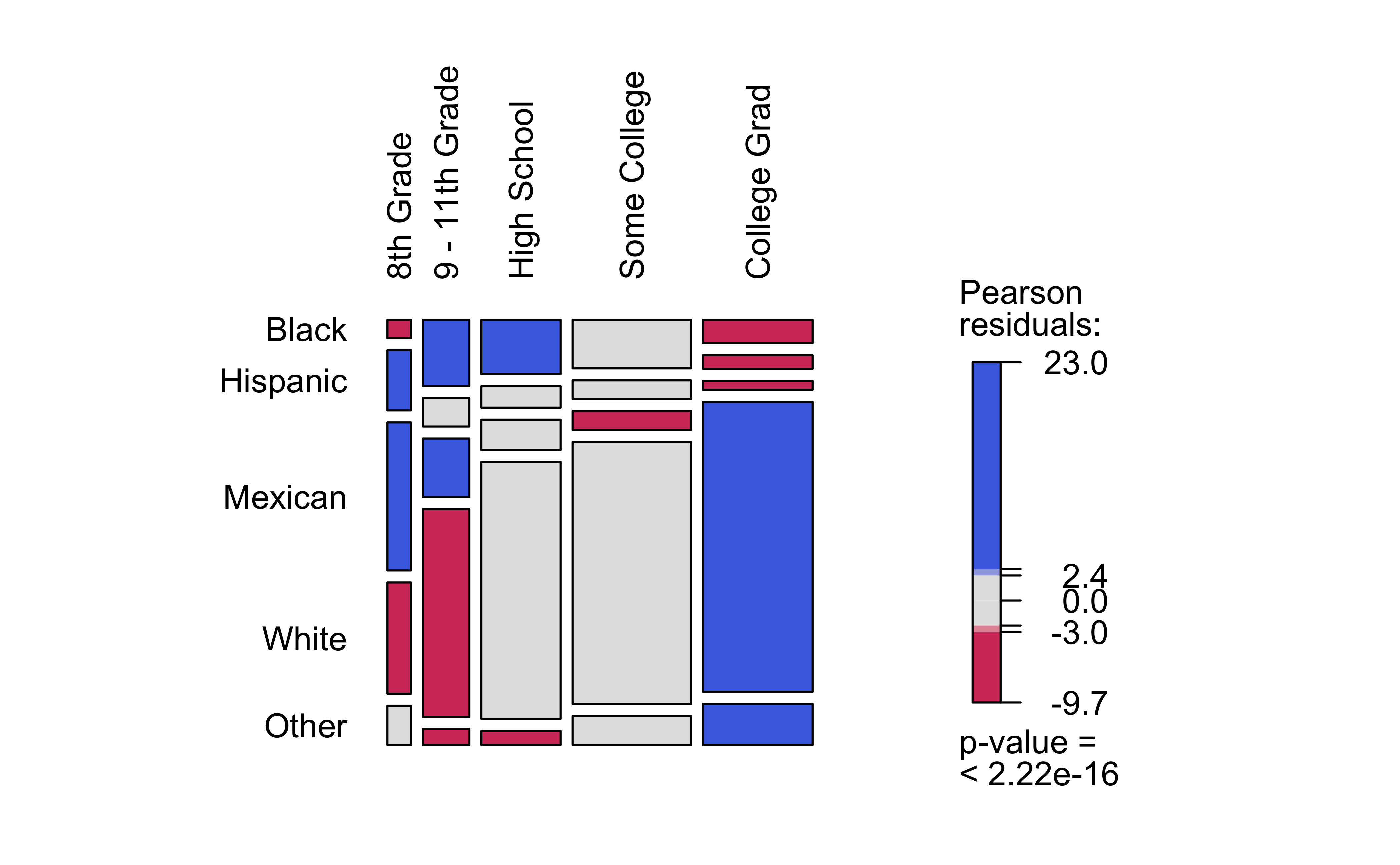
Based on this mosaic chart, we can say that White people have had more College education than Black or Hispanic people, and that Black people have had more High School education than Hispanic people. The Hispanic group has the lowest count for College education. So we can hypothesize that the Qual variables Race1 and Education are related.
visStatistics is a recent package that allows a very wide variety of statistical charts to be created automagically based on the variables chosen. Let us plot a mosaic chart directly with this package:
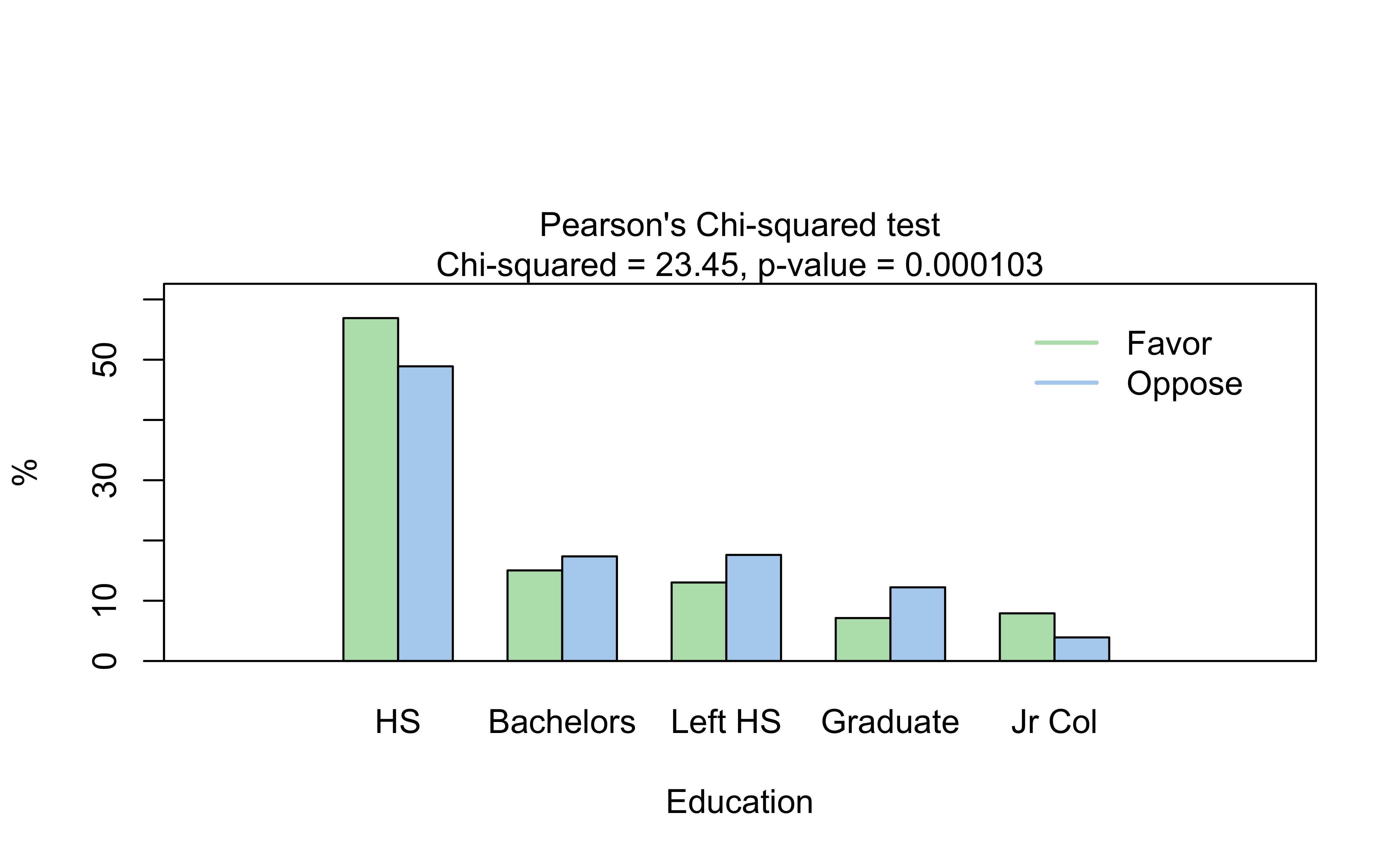
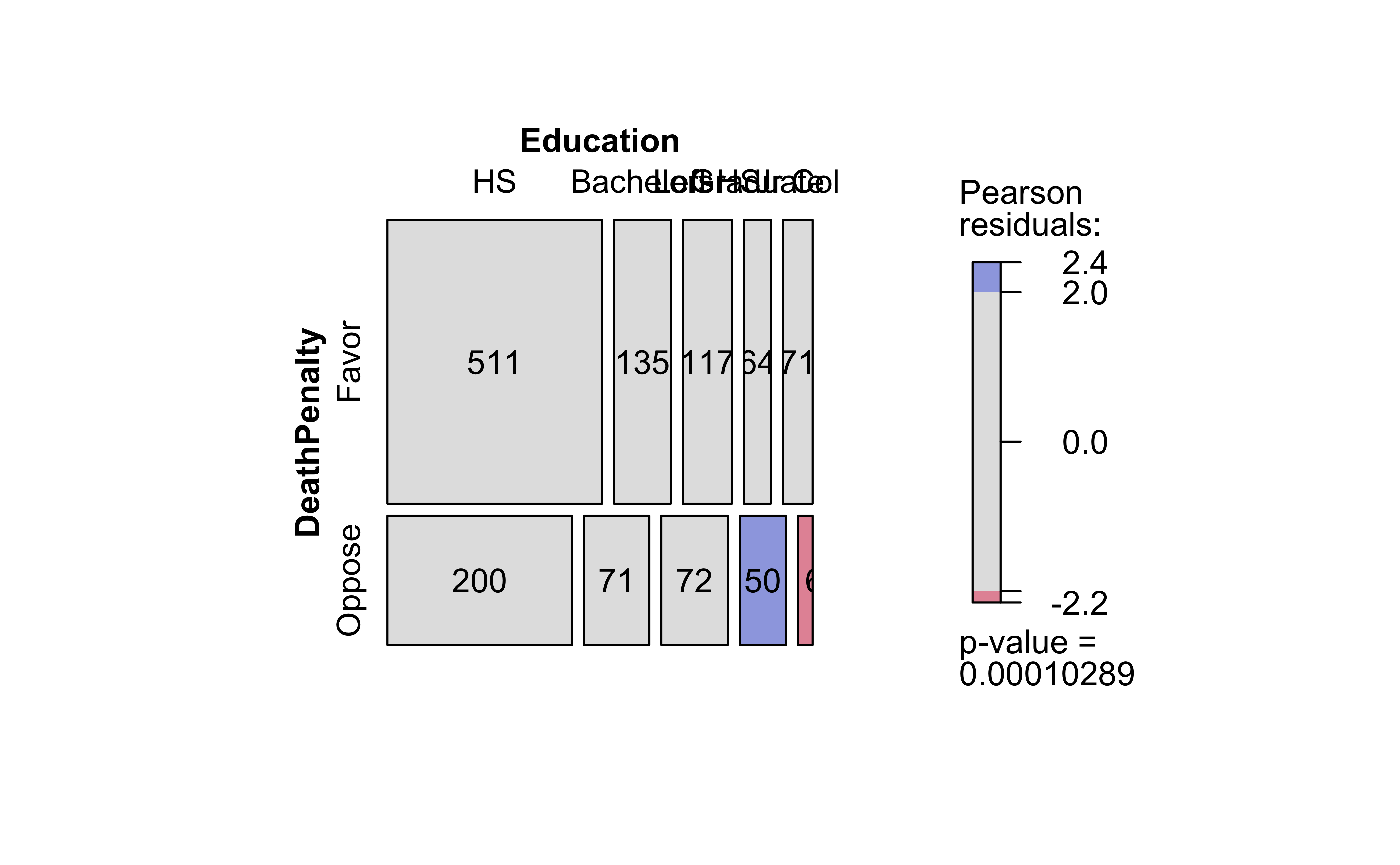
# Plots the Bar Chart and Mosaic Chart
visstat(GSS2002$DeathPenalty, GSS2002$Education)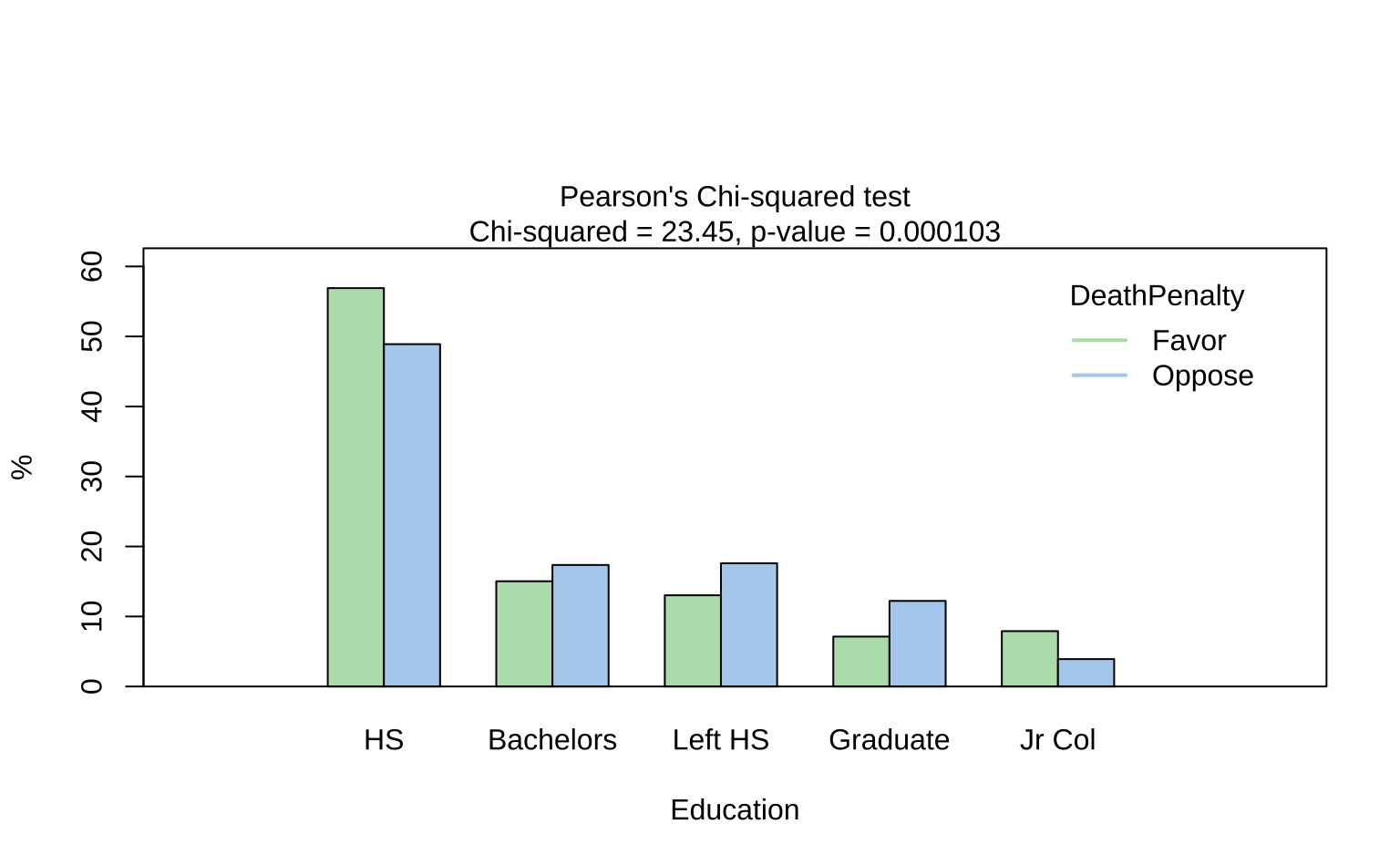
# Plots the Bar Chart and Mosaic Chart
visstat(NHANES$Race1, NHANES$Education)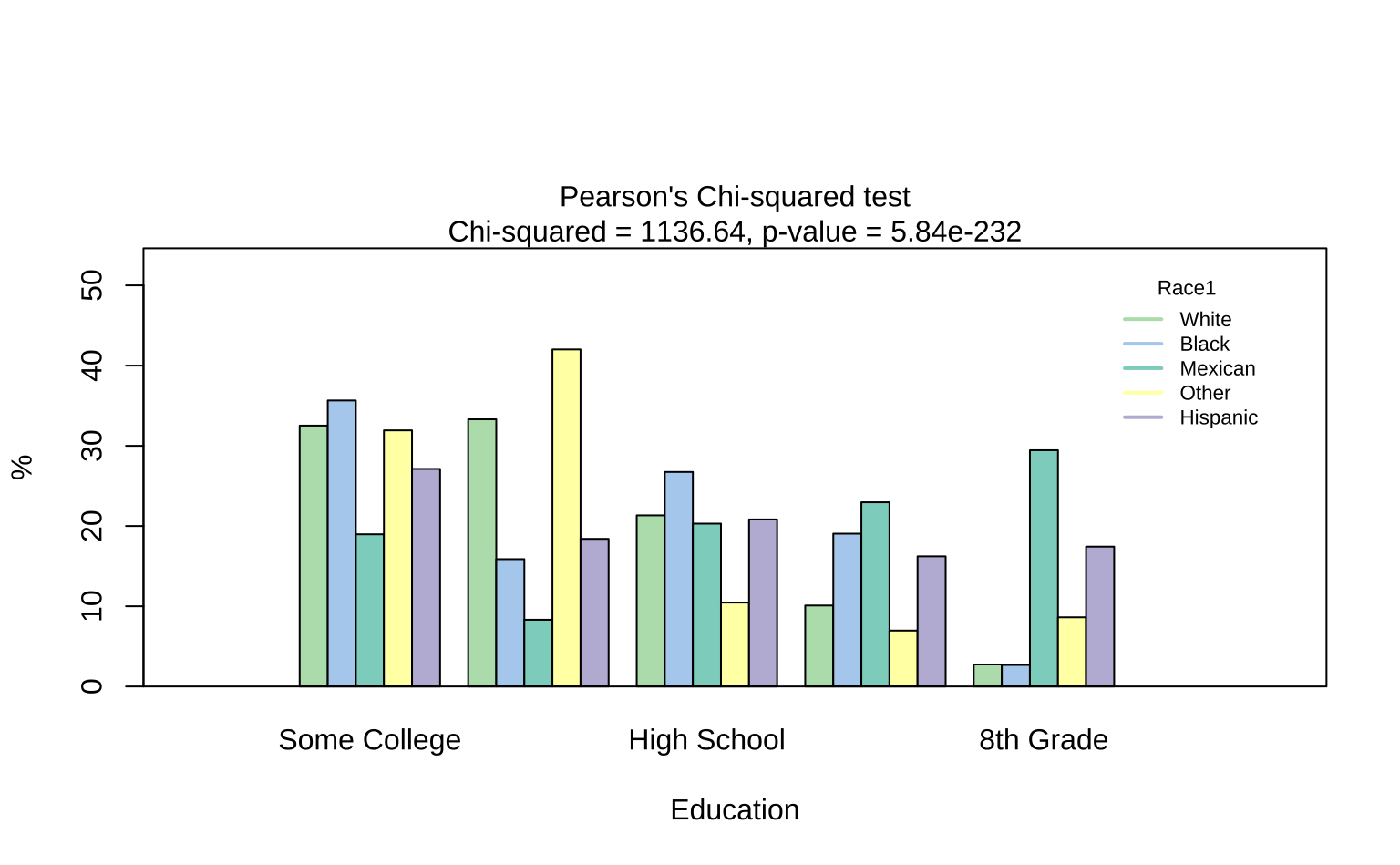
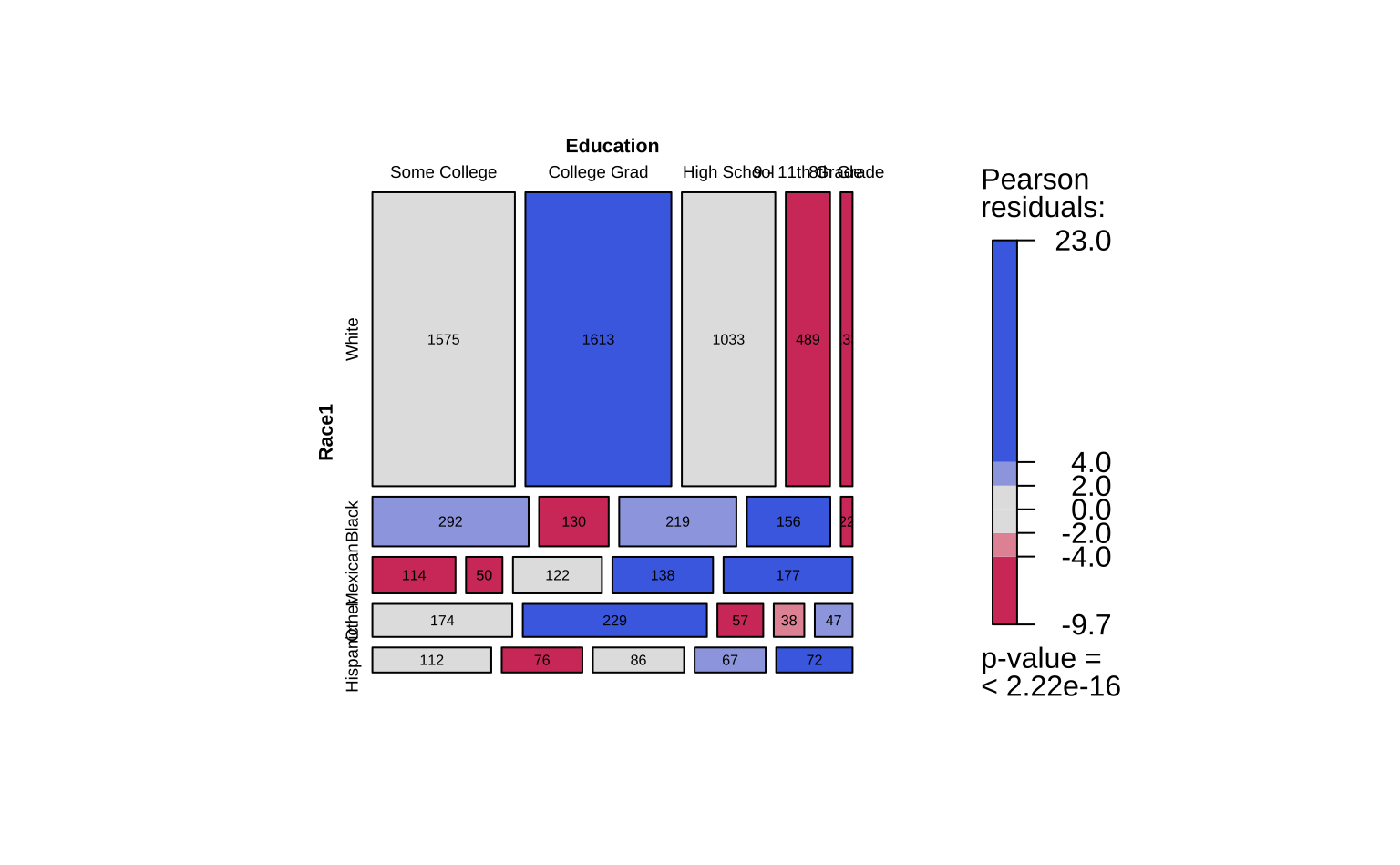
The visStatistics package is a very powerful package that can be used to create a wide variety of statistical charts, including Mosaic Charts, with very little code. This “universal” command visstat() computes a good many statistics and plots, all in one. NOTE: visstat() does need both its variables to be integers/numbers/factors: cannot handle ordinal (factor) variables.
Important
Note how one visstat() command gave us TWO plots! The output of visstat() is very interesting! So, for the fearless: Try doing an str() after this command to see what (else) it has computed. There is a wealth of information in the output object, including the Contingency Table, the Chi-Squared test results, and more. Type visstat(GSS2002$DeathPenalty, GSS2002$Education) %>% str() in the Console or your Quarto chunk to see this.
9.3 Coloured Tiles: Actual and Expected Contingency Tables
We notice that the mosaic plots have coloured some tiles blue and some red. Why was this done? Consider the set of mosaic plots below:
vcd::mosaic(Improved ~ Treatment, data = Arthritis,
            direction = "v", gp = shading_max, legend = FALSE)
vcd::mosaic(Improved ~ Treatment, data = Arthritis,
            type = "expected", direction = "v", gp = shading_max,
            legend = FALSE)
vcd::assoc(Treatment ~ Improved, # Note formula direction!
           data = Arthritis,
           gp = shading_max,
legend = FALSE) 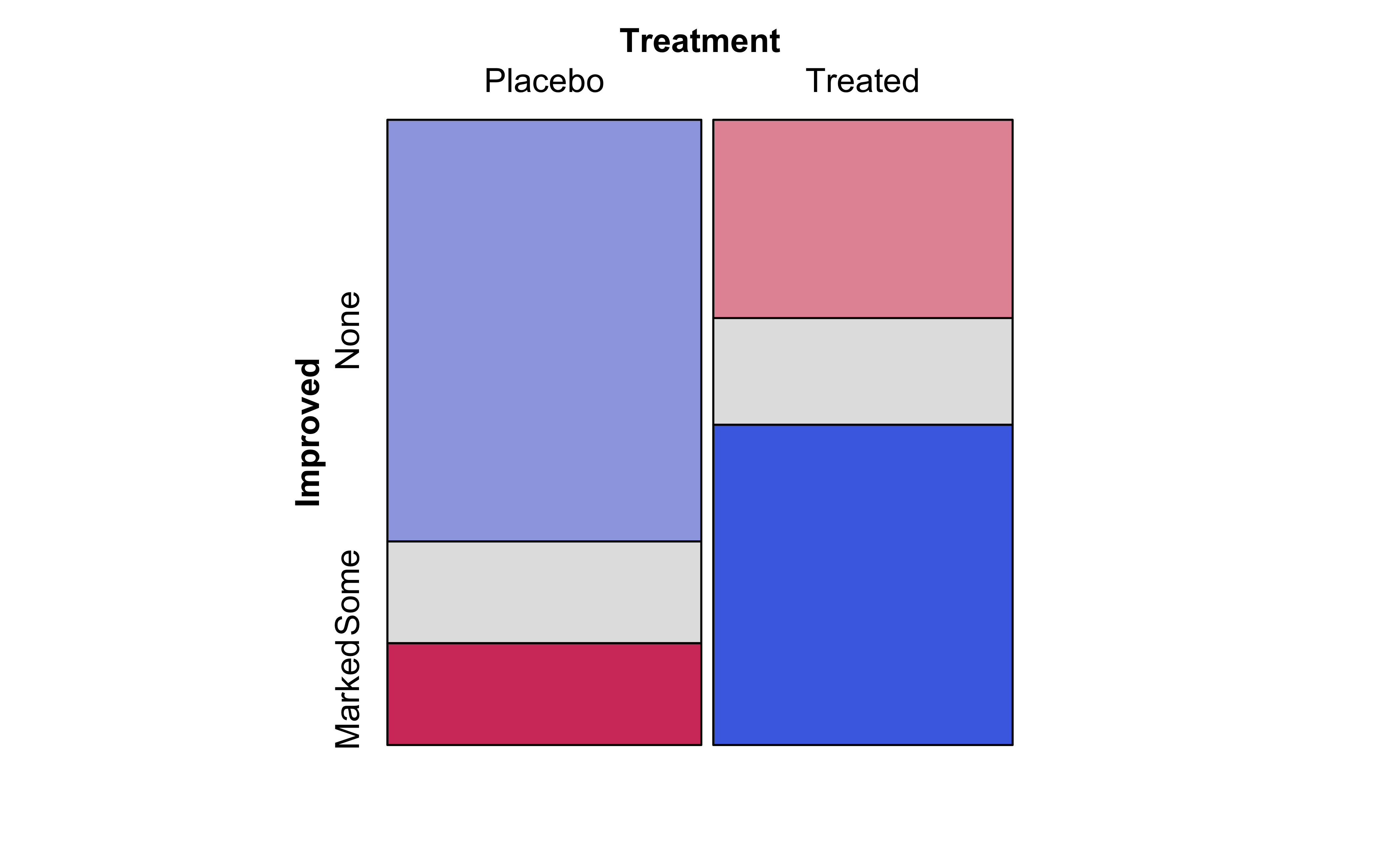
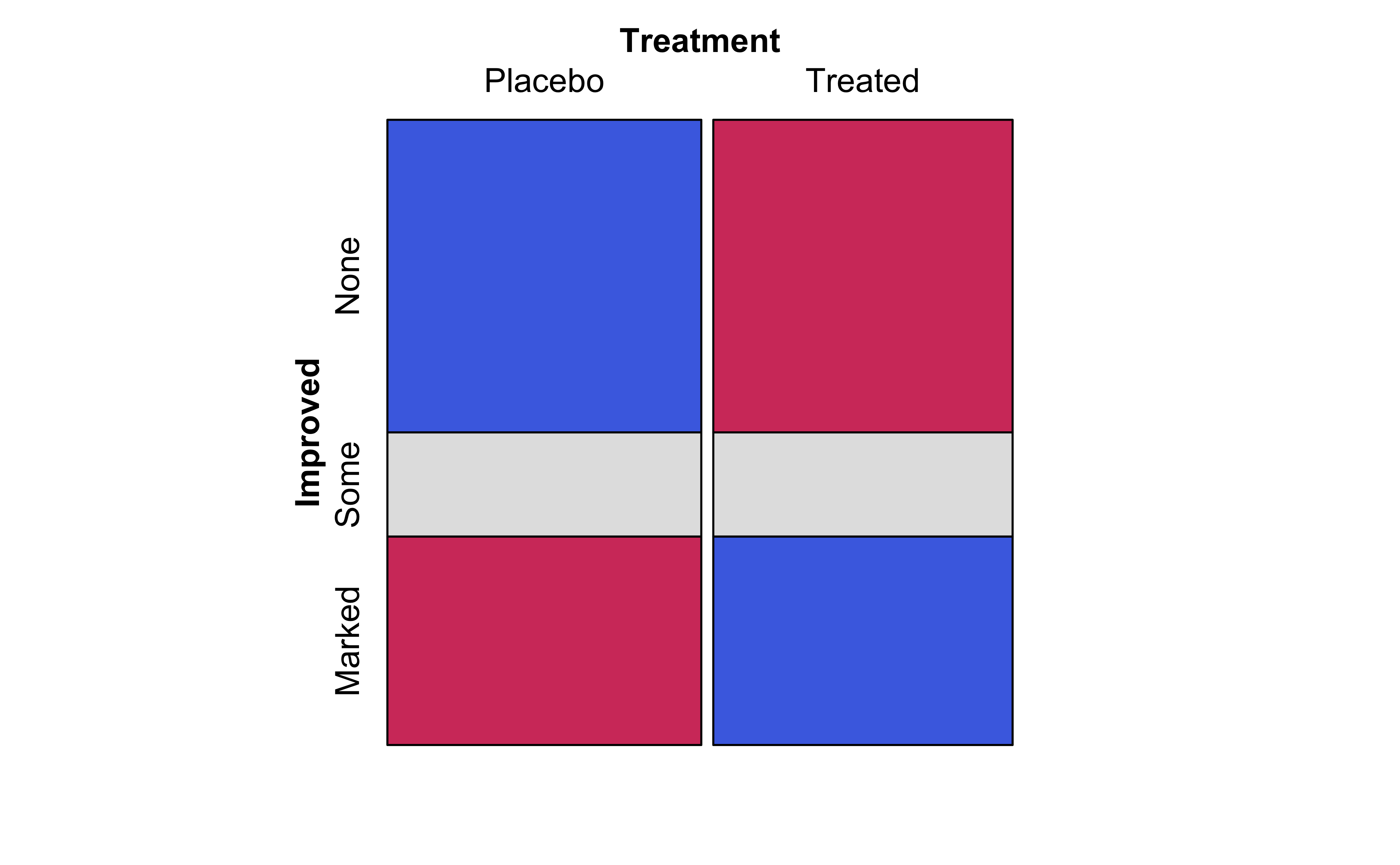
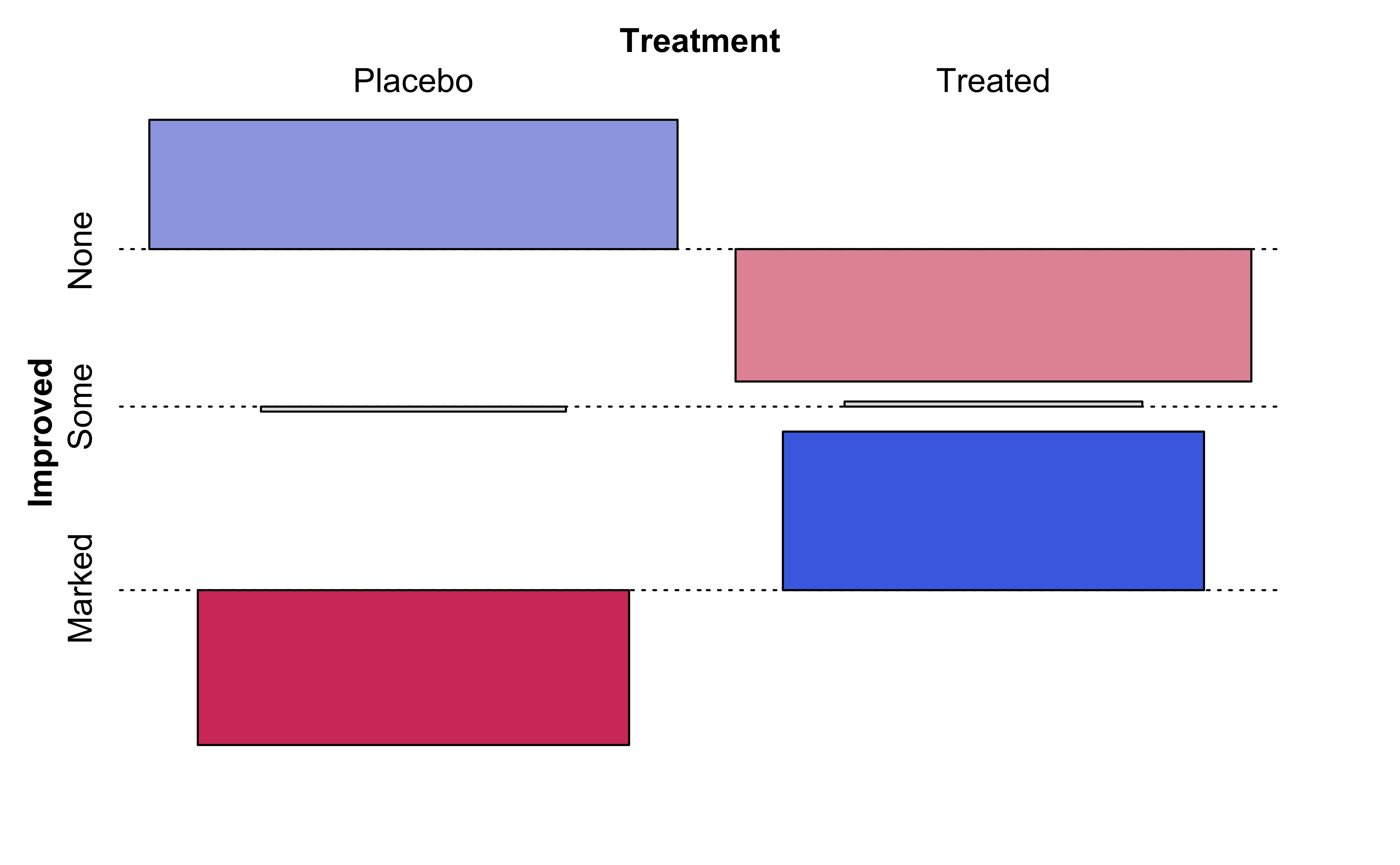
From an inspection of these plots, we see the (tile-wise) difference between situations when Qualitative variables are related to that when they not related.
The graph on the left Figure 9 (a) shows the mosaic plot of the actual Contingency Table.
The graph in the middle Figure 9 (b) shows a similar but fictitious plot but with the cuts neatly horizontal or vertical. This mosaic is what we would expect, if Education and the opinion on Death Penalty were independent!!
The graph on the right Figure 9 (c) shows the differences between the two plots, tile by tile.
Clearly, there are differences in area of the corresponding tiles in the two mosaics, actual and expected, as shown in the graph on the right. Some differences are positive, and some negative. In the actual mosaic, Figure 9 (a), tiles with large positive differences are coloured blue, and those with large negative differences are coloured red. These are called the Pearson Residuals, and they indicate the extent to which the actual counts differ from the expected counts, if the two Qual variables were independent. The higher the absolute values of these differences, the greater the effect of one Qual on the other.
We will explore these ideas (what does “expected” mean here?) when we get into Inference for Two Proportions.
10
Banzai!!! That was quite some journey! Let us wrap it up by quickly looking at a sadly famous dataset:
# library(ggmosaic)
data("titanic", package = "ggmosaic")
titanic
There were 2201 passengers, as per this dataset.
10.1
NoteQuantitative Data
None.
NoteQualitative Data
-
Survived: (chr) yes or no -
Class: (chr) Class of Travel, else “crew” -
Age: (chr) Adult, Child -
Sex: (chr) Male / Female.
10.2
NoteQ.1. What is the dependence of
survived upon sex?
vcd::structable(Survived ~ Sex, data = titanic) %>%
    vcd::mosaic(gp = shading_max)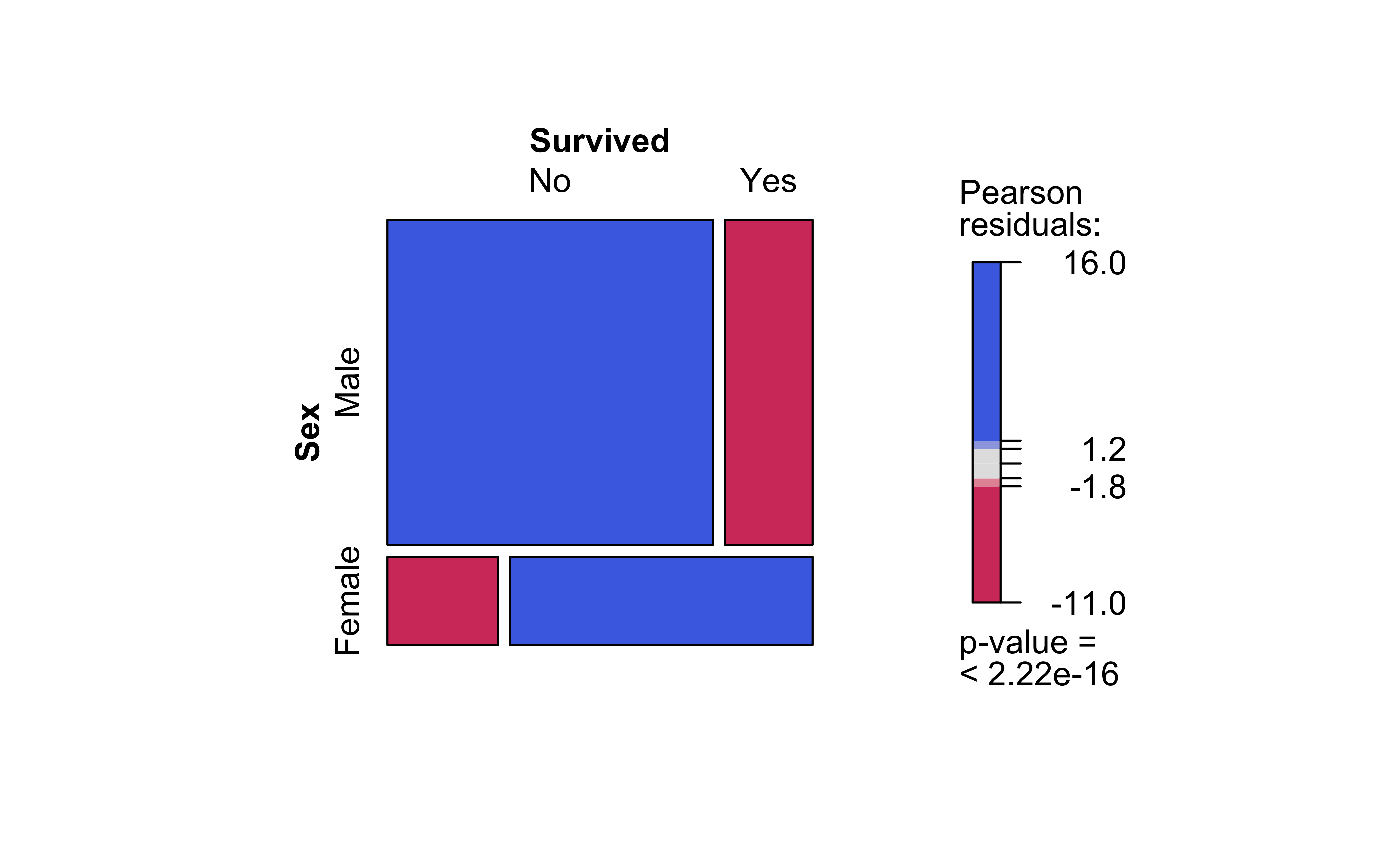
Note the huge imbalance in survived with sex: men have clearly perished in larger numbers than women. Which is why the colouring by the Pearson Residuals show large positive residuals for men who died, and large negative residuals for women who died.
So sadly Jack is far more likely to have died than Rose.
NoteQ.2. How does
Survived depend upon Class?
vcd::structable(Survived ~ Class, data = titanic) %>%
    vcd::mosaic(gp = shading_max)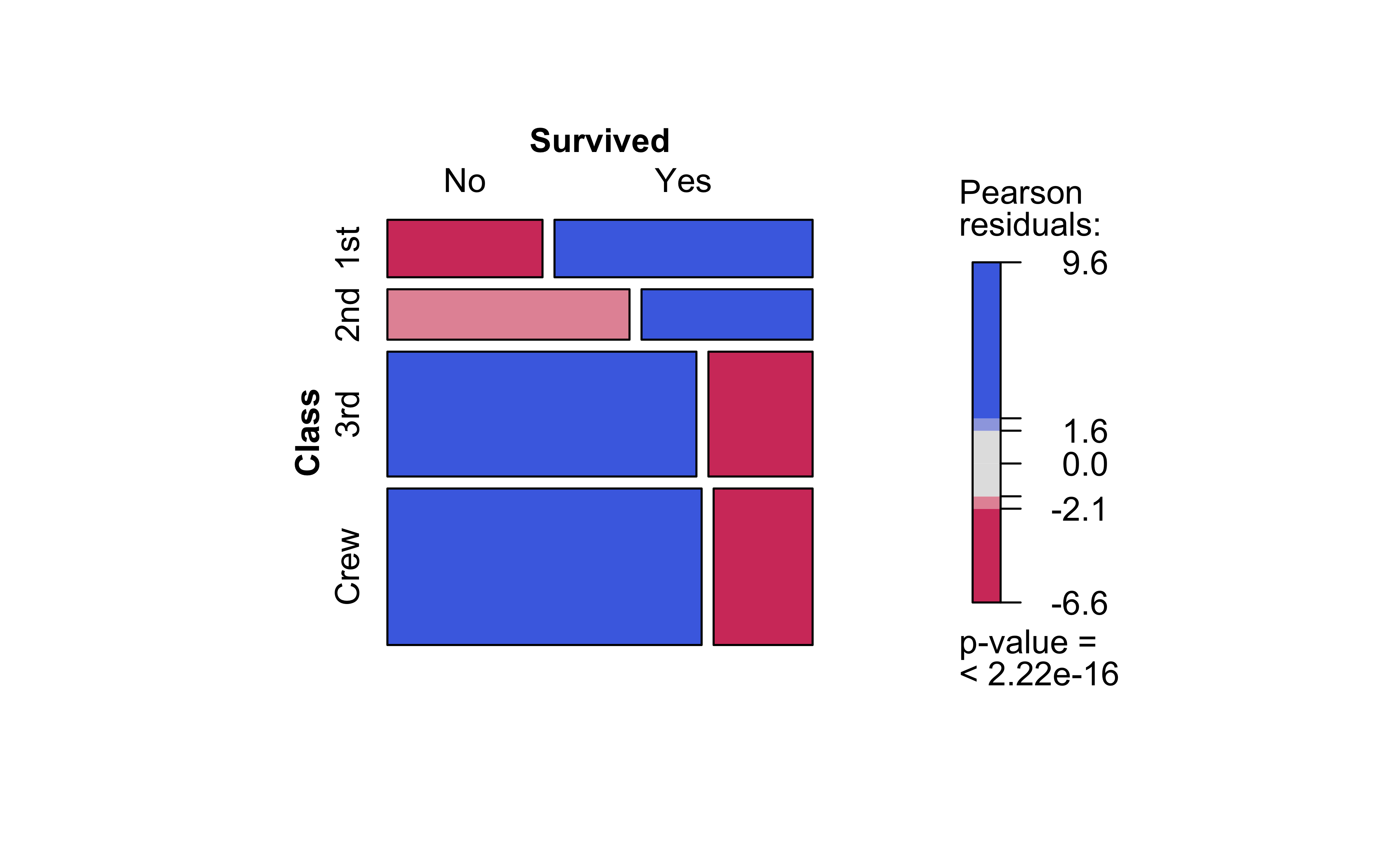
Crew has seen deaths in large numbers, as seen by the large negative residual for crew-survivals. First Class passengers have had speedy access to the boats and have survived in larger proportions than say second or third class. There is a large positive residual for first-class survivals.
Rose travelled first class and Jack was third class. So again the odds are stacked against him.
11
There is another visualization of Categorical Data, called a Balloon Plot. We will use the housetasks dataset from the package ggpubr.
11.1
housetasks <- read.delim(system.file("demo-data/housetasks.txt", package = "ggpubr"),
    row.names = 1)
housetasksinspect(housetasks)
quantitative variables:
         name   class min Q1 median Q3 max     mean       sd  n missing
1        Wife integer   0 10     32 77 156 46.15385 50.05971 13       0
2 Alternating integer   1 11     14 24  51 19.53846 16.26149 13       0
3     Husband integer   1  5      9 23 160 29.30769 44.97663 13       0
4     Jointly integer   2  4     15 57 153 39.15385 44.09808 13       0
We see that we have 13 observations.
Important
This data is already in Contingency Table form (without the margin totals)!
11.2
NoteQuantitative Data
-
Freq: (int) No of times a task was carried out by specific people
NoteQualitative Data
-
Who: (chr) Who carried out the task? -
Task: (chr) Task? Which task? Can’t you see I’m tired?
ggpubr::ggballoonplot(housetasks, fill = "value", ggtheme = theme_pubr(base_family = "Alegreya",
    base_size = 14)) + scale_fill_viridis_c(option = "C") + labs(title = "A Balloon Plot for Categorical Data")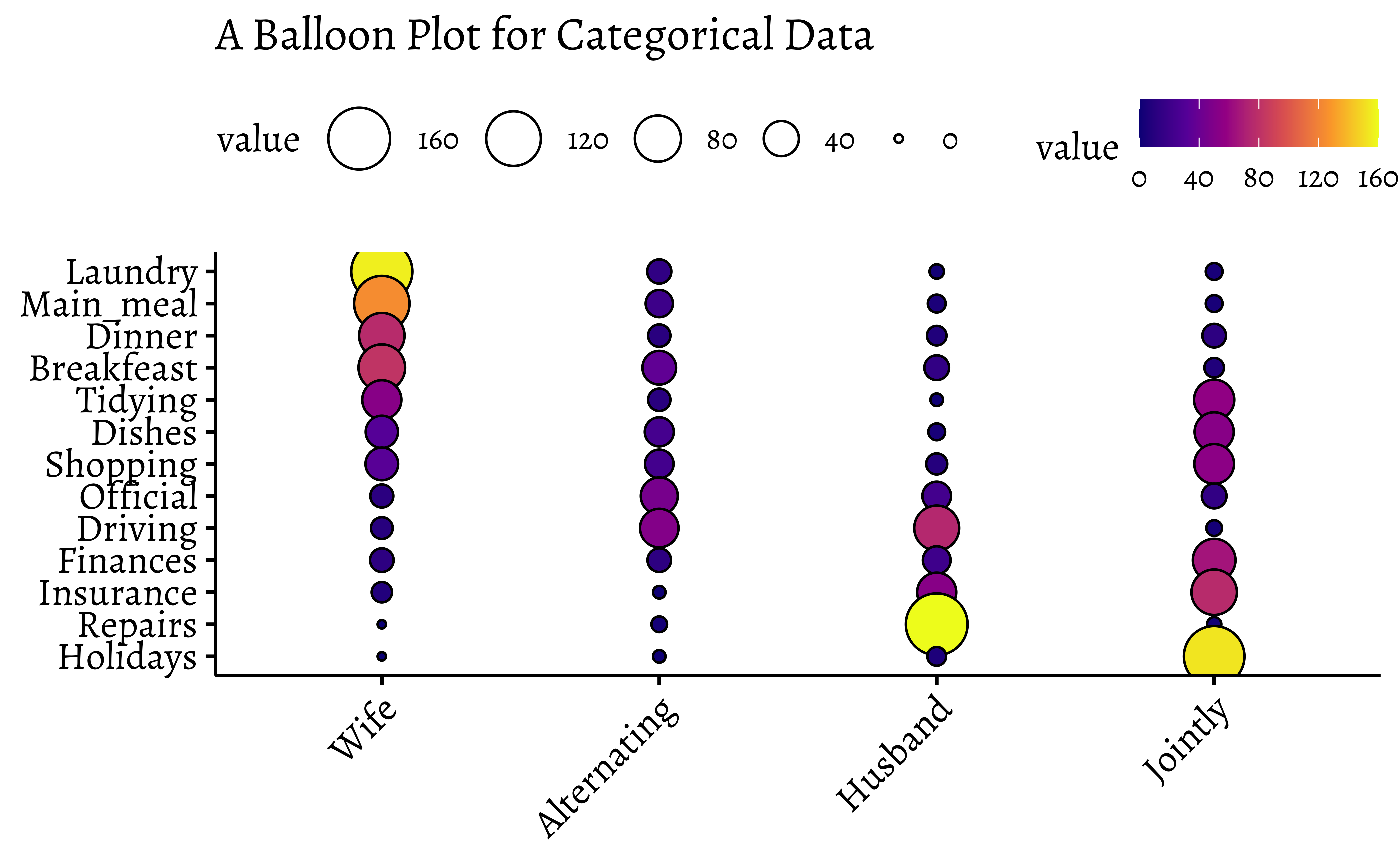
And repeat with the familiar HairEyeColor dataset:
df <- as_tibble(HairEyeColor)
dfggballoonplot(df, x = "Hair", y = "Eye", size = "n", fill = "n", ggtheme = theme_pubr(base_family = "Alegreya",
base_size = 14)) + scale_fill_viridis_c(option = "C") + labs(title = "Balloon Plot for HairEyeColor Dataset")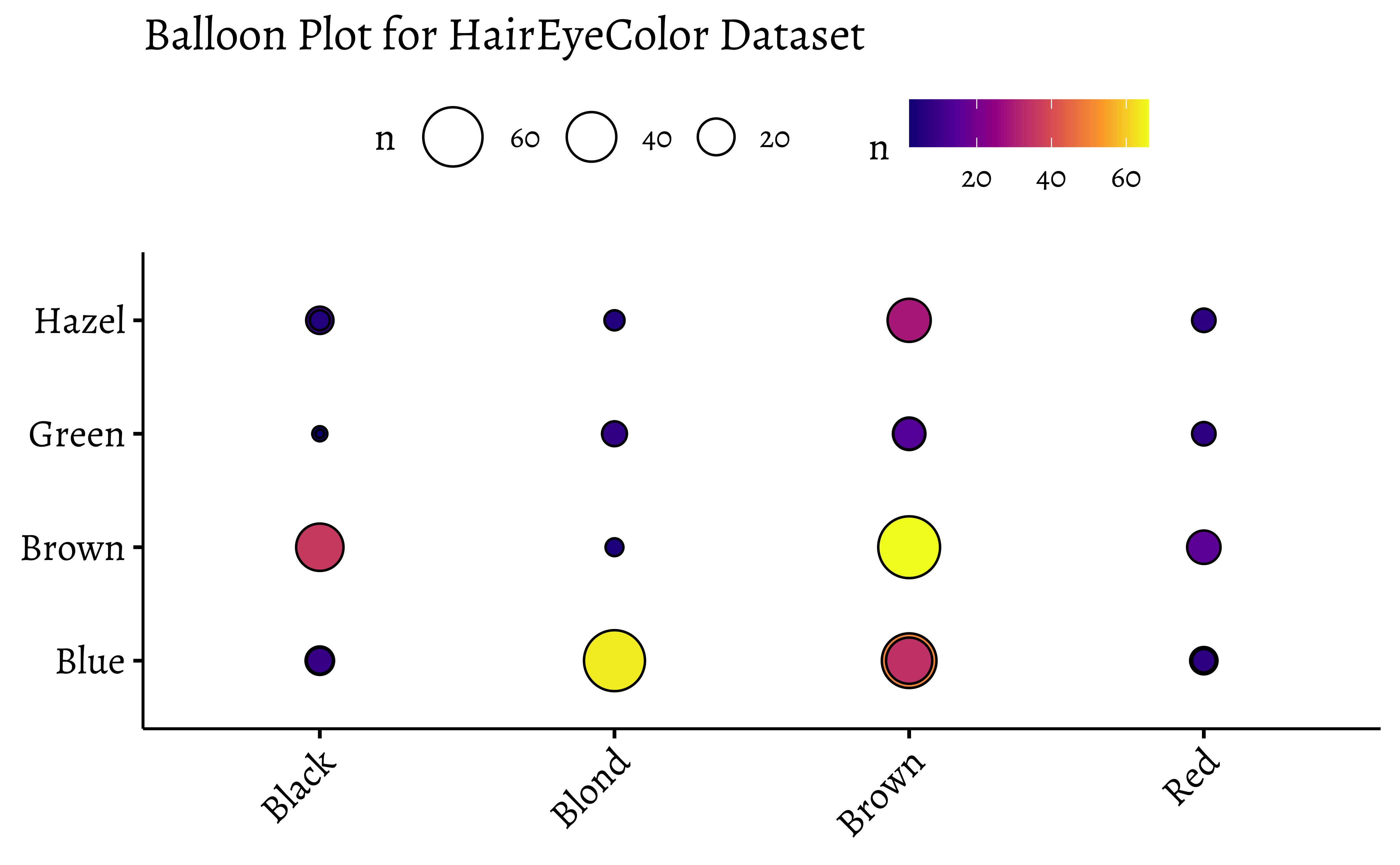
# Balloon Plot with facetting
ggballoonplot(df, x = "Hair", y = "Eye", size = "n", fill = "n", facet.by = "Sex",
    ggtheme = theme_pubr(base_family = "Alegreya")) + scale_fill_viridis_c(option = "C") +
    labs(title = "Balloon Plot with Facetting by Sex", subtitle = "Hair and Eye Color")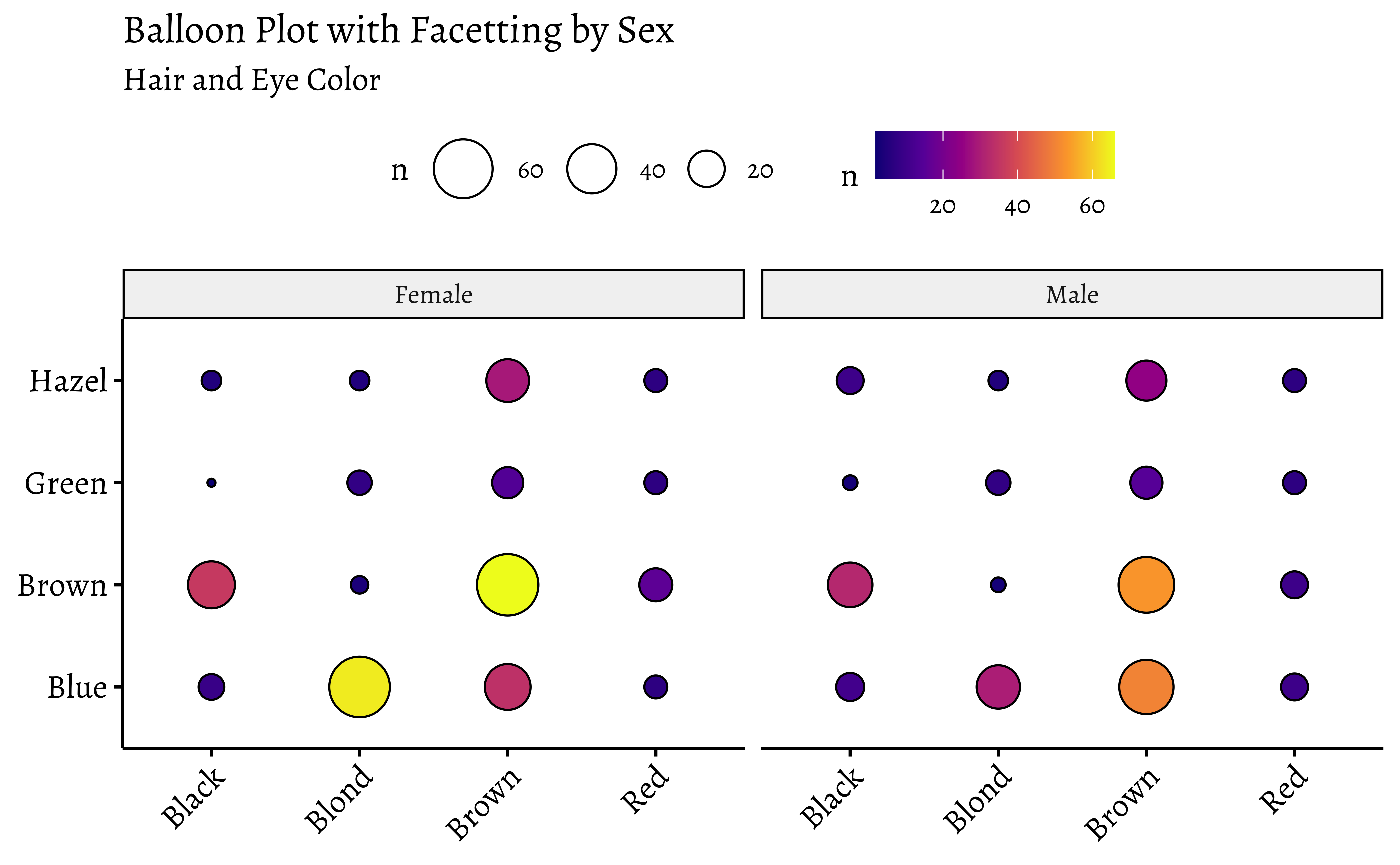
Note the somewhat different syntax with ggballoonplot: the variable names are enclosed in quotes.
Balloon Plots work because they use color and size aesthetics to represent categories and counts respectively.
12
- We can detect correlation between Quant variables using the scatter plots and regression lines.
- And we can detect association between Qual variables using mosaics, sieves (which we did not see here, but is possible in R), and with balloon plots.
- Your project primary research data may be pure Qualitative too, as with a Questionnaire / Survey instrument
- One such Qual variable therein will be your target variable
- You will need to justify whether the target variable is dependent upon the other Quals, and then to decide what to do about that.
13
How are the bar plots for categorical data different from histograms? Why don’t “regular” scatter plots simply work for Categorical data? Discuss!
There are quite a few things we can do with Qualitative/Categorical data:
- Make simple bar charts with colours and facetting
- Make Contingency Tables for a X^2-test
- Make Mosaic Plots to show how the categories stack up
- Make Balloon Charts as an alternative
- Then, draw your inferences and tell the story!
14
Take some of the categorical datasets from the
vcdandvcdExtrapackages and recreate the plots from this module. Go to https://vincentarelbundock.github.io/Rdatasets/articles/data.html and type “vcd” in thesearchbox. You can directly load CSV files from there, usingread_csv("url-to-csv").Try the
housetasksdataset that we used for Balloon Plots, to create a mosaic plot with Pearson Residuals.From Kaggle, 1000 songs to hear before you die. Can you recreate the mosaic chart shown Figure 1 (b)?
Are first names a basis for racial discrimination, in the US?
This dataset was generated as part of a landmark research study done by Marianne Bertrand and Senthil Mullainathan. Read the description therein to really understand how you can prove causality with a well-crafted research experiment.
15
This module focuses on the importance of understanding and visualizing categorical data. It discusses different ways to represent categorical data in R, including case data, frequency data, and cross-tabular count data. The text also explores various visualization techniques like bar plots, pie charts, mosaic plots, and balloon plots. It emphasizes the use of contingency tables for analyzing relationships between categorical variables, illustrating how to create them and visualize them using R packages. Additionally, the text delves into the concept of Pearson residuals, which help to identify associations between categorical variables and highlight deviations from independence.
16
- University of Iowa. STAT4580: Statistics and Actuarial Science. Visualizing Categorical Data in R
- Mine Cetinkaya-Rundel and Johanna Hardin. An Introduction to Modern Statistics, Chapter 4. Exploratory Analysis of Categorical Data. https://openintro-ims.netlify.app/explore-categorical.html
- Using the
strcplotcommand fromvcd, https://cran.r-project.org/web/packages/vcd/vignettes/strucplot.pdf
- Creating Frequency Tables with
vcd, https://cran.r-project.org/web/packages/vcdExtra/vignettes/A_creating.html
- Creating mosaic plots with
vcd, https://cran.r-project.org/web/packages/vcdExtra/vignettes/D_mosaics.html
- Nice Chi-square interactive story at https://statisticalstories.xyz/chi-square
- Chittaranjan Andrade(July 22, 2015). Understanding Relative Risk, Odds Ratio, and Related Terms: As Simple as It Can Get. https://www.psychiatrist.com/jcp/understanding-relative-risk-odds-ratio-related-terms/
- Michael Friendly, Corrgrams: Exploratory displays for correlation matrices. The American Statistician August 19, 2002 (v1.5). https://www.datavis.ca/papers/corrgram.pdf
- H. Riedwyl & M. Schüpbach (1994), Parquet diagram to plot contingency tables. In F. Faulbaum (ed.), Softstat ’93: Advances in Statistical Software, 293–299. Gustav Fischer, New York.
- Winston Chang (2024). R Graphics Cookbook. https://r-graphics.org
| Package | Version | Citation |
|---|---|---|
| ggmosaic | 0.4.0 | Jeppson et al. (2023); Jeppson and Hofmann (2023) |
| ggpubr | 1.0.0 | Kassambara (2026) |
| tinytable | 0.19.0 | Arel-Bundock (2026) |
| vcd | 1.4.14 | Meyer et al. (2006); Zeileis et al. (2007); Meyer et al. (2026) |
| vcdExtra | 0.9.8 | Friendly and Klorfine (2026) |
| visStatistics | 0.3.0 | Schilling (2026) |
Arel-Bundock, Vincent. 2026. tinytable: Simple and Configurable Tables in “HTML,” “LaTeX,” “Markdown,” “Word,” “PNG,” “PDF,” and “Typst” Formats. https://vincentarelbundock.github.io/tinytable/.
Friendly, Michael, and Gavin Klorfine. 2026. vcdExtra: “vcd” Extensions and Additions. https://doi.org/10.32614/CRAN.package.vcdExtra.
Jeppson, Haley, and Heike Hofmann. 2023. “The r Journal: Generalized Mosaic Plots in the Ggplot2 Framework.” The R Journal 14 (4): 50–78. https://doi.org/10.32614/RJ-2023-013.
Jeppson, Haley, Heike Hofmann, and Dianne H. Cook. 2023. ggmosaic: Mosaic Plots in the “ggplot2” Framework. https://haleyjeppson.github.io/ggmosaic/, https://github.com/haleyjeppson/ggmosaic.
Kassambara, Alboukadel. 2026. ggpubr: “ggplot2” Based Publication Ready Plots. https://CRAN.R-project.org/package=ggpubr.
Meyer, David, Achim Zeileis, and Kurt Hornik. 2006. “The Strucplot Framework: Visualizing Multi-Way Contingency Tables with Vcd.” Journal of Statistical Software 17 (3): 1–48. https://doi.org/10.18637/jss.v017.i03.
Meyer, David, Achim Zeileis, Kurt Hornik, and Michael Friendly. 2026. vcd: Visualizing Categorical Data. https://doi.org/10.32614/CRAN.package.vcd.
Schilling, Sabine. 2026. visStatistics: Automated Selection and Visualisation of Statistical Hypothesis Tests. https://doi.org/10.32614/CRAN.package.visStatistics.
Zeileis, Achim, David Meyer, and Kurt Hornik. 2007. “Residual-Based Shadings for Visualizing (Conditional) Independence.” Journal of Computational and Graphical Statistics 16 (3): 507–25. https://doi.org/10.1198/106186007X237856.
Citation
BibTeX citation:
@online{2022,
  author = {},
  title = {\textless Iconify-Icon
    Icon=“icon-Park-Outline:proportional-Scaling”\textgreater\textless/Iconify-Icon\textgreater{}
    {Proportions}},
  date = {2022-12-27},
  url = {https://madhatterguide.netlify.app/content/courses/Analytics/10-Descriptive/Modules/40-CatData/},
  langid = {en},
  abstract = {Types, Categories, Counts, and Associations}
}
For attribution, please cite this work as:
“<Iconify-Icon
Icon=‘icon-Park-Outline:proportional-Scaling’></Iconify-Icon>
Proportions.” 2022. December 27. https://madhatterguide.netlify.app/content/courses/Analytics/10-Descriptive/Modules/40-CatData/.