Scales
Percentages, Ratios, and such like
1
2 Introduction
We may have been using ggplot2 for a while now, learning how to add fonts, colours, and annotations. Here we will look at changing the scales on the axes of our graphs and plots. Scales such as percentages, ratios, and other such like are needed when the quantities depicted demand it, when the data variabls on the axes are not simple counts or measurements.
Here we will look at some of the neatfeatures from the scales package.
3 Scales: Breaks and Labels
The scales package provides functions that are useful for scaling axes and legends in ggplot2. It is part of the tidyverse and is automatically loaded when you load ggplot2.
There are several parts to scaling: the breaks, the labels, and the transformations.
Breaks: These are the points at which ticks appear on an axis. You can specify breaks manually or use functions to generate them automatically.
Labels: These are the text labels that appear at the breaks. You can customize the labels to display values in different formats, such as percentages, currency, dates, or scientific notation.
Transformations: These are functions that can be applied to the data before plotting, such as logarithmic or square root transformations.
Scales can be applied all the aesthetics in ggplot: x, y, color, fill, size, shape, and even some esoteric ones area, alpha, linewidth etc.
4 Case Study: gss-wages
We will work with datasets that we have seen in earlier modules, datasets that deal with variables like currencies, or which vary over several multiples.
Let us take an income dataset from Vincent Arel-Bundock’s website.. We will use the dataset gss_wages which is available here.https://vincentarelbundock.github.io/Rdatasets/csv/stevedata/gss_wages.csv
As always, we will start with a table of the data:
4.1 Basic Plots
Let us create a basic scatter plot of realrinc vs year and colour by gender, and another boxplot of realrinc by gender:
Show the Code
p1 <- gf_point(
  data = gss_wages, realrinc ~ year,
  color = ~gender, alpha = 0.8, size = 1
) %>%
  gf_labs(y = "Income", x = "Year", title = "GSS-Wages Dataset") %>%
  gf_refine(scale_color_brewer(palette = "Set1"))
p1

p2 <- gf_boxplot(
  data = gss_wages, realrinc ~ gender,
  color = ~gender, fill = ~gender,
  alpha = 0.8, orientation = "x"
) %>%
  gf_labs(
    y = "Income", x = "Gender",
    title = "GSS-Wages Dataset"
  ) %>%
  gf_refine(scale_color_brewer(palette = "Set1"))
p2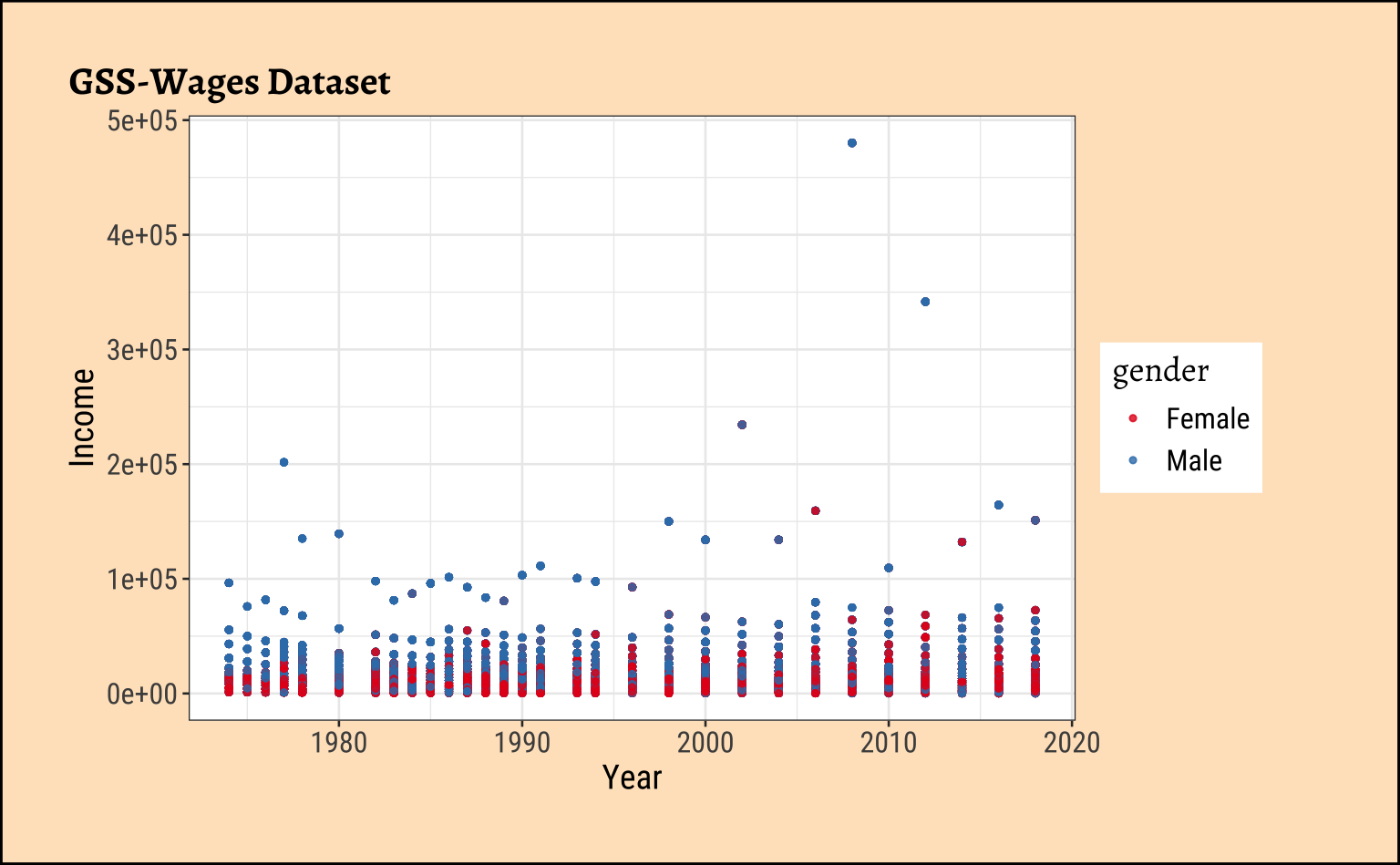
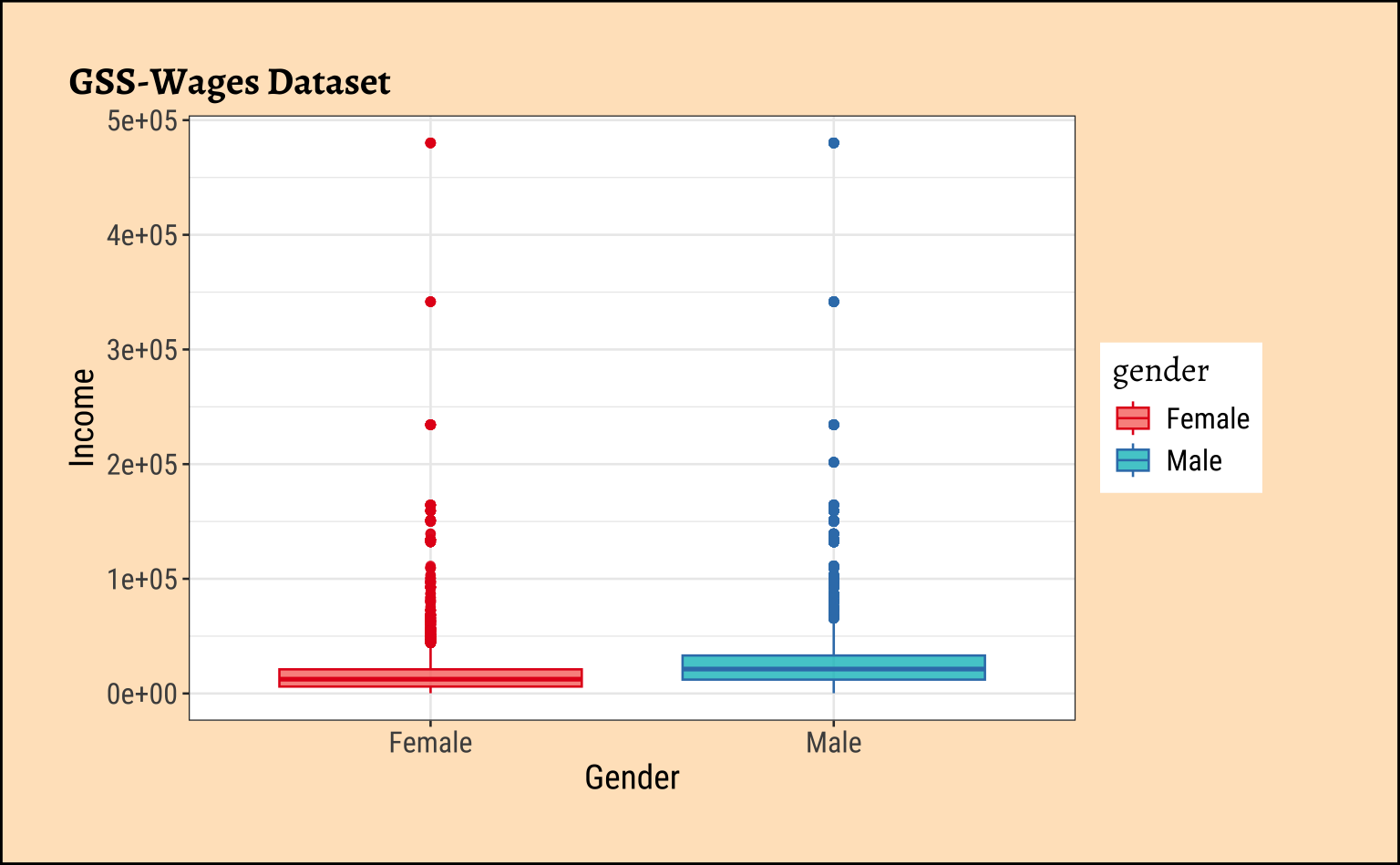
Note the somewhat unwieldy y-axes in the plots! Let us now change the y-axis to show income in thousands of dollars. We will use the scales package for this.
Show the Code
p1 %>%
  gf_refine(scale_y_continuous(labels = scales::label_currency(scale = 0.001, suffix = "K"))) |>
  gf_labs(subtitle = "Note Dollar Currency Scale on y-axis")


p2 %>%
  gf_refine(scale_y_continuous(labels = scales::label_currency(scale = 0.001, suffix = "K"))) |>
  gf_labs(subtitle = "Note Dollar Currency Scale on y-axis")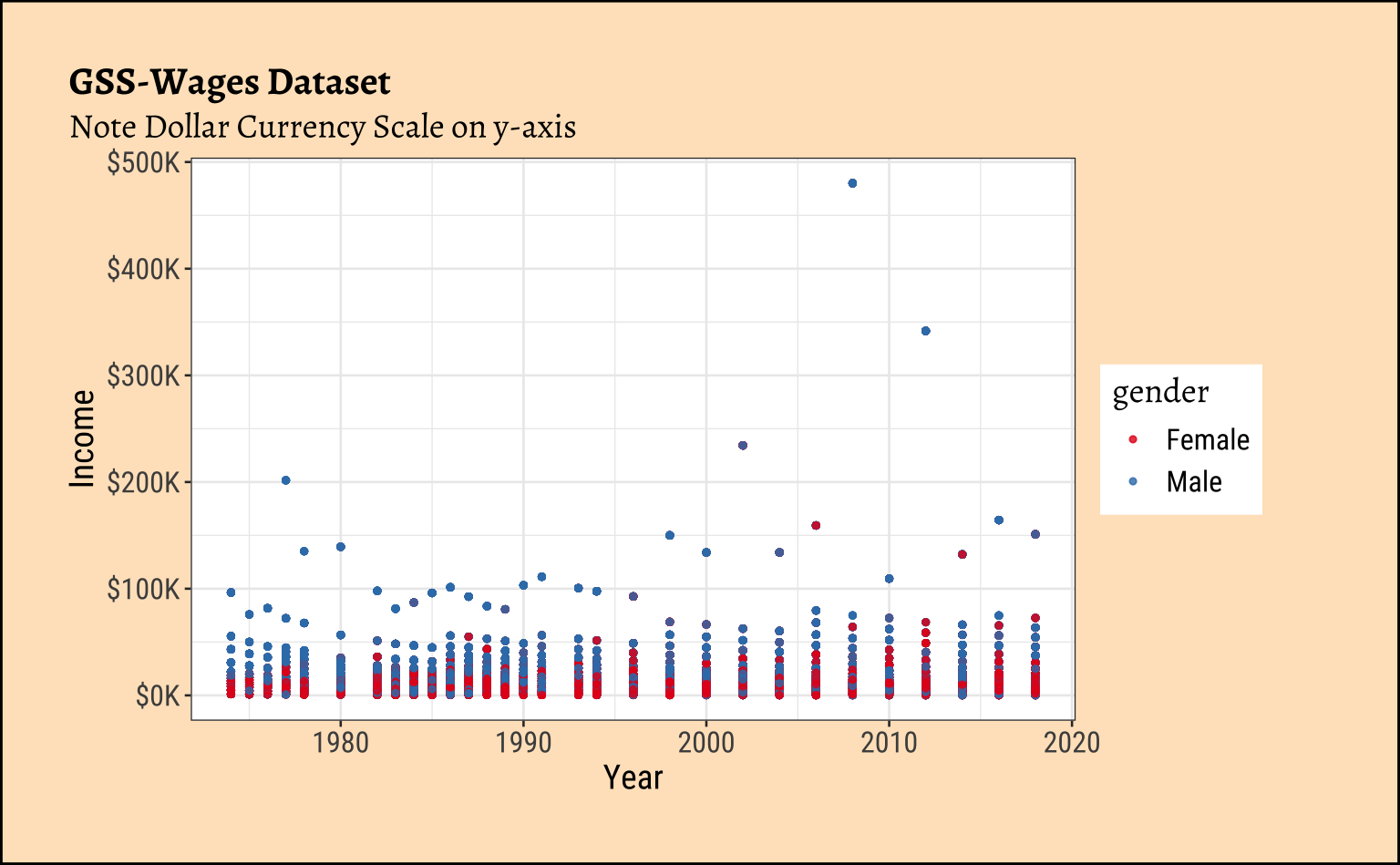
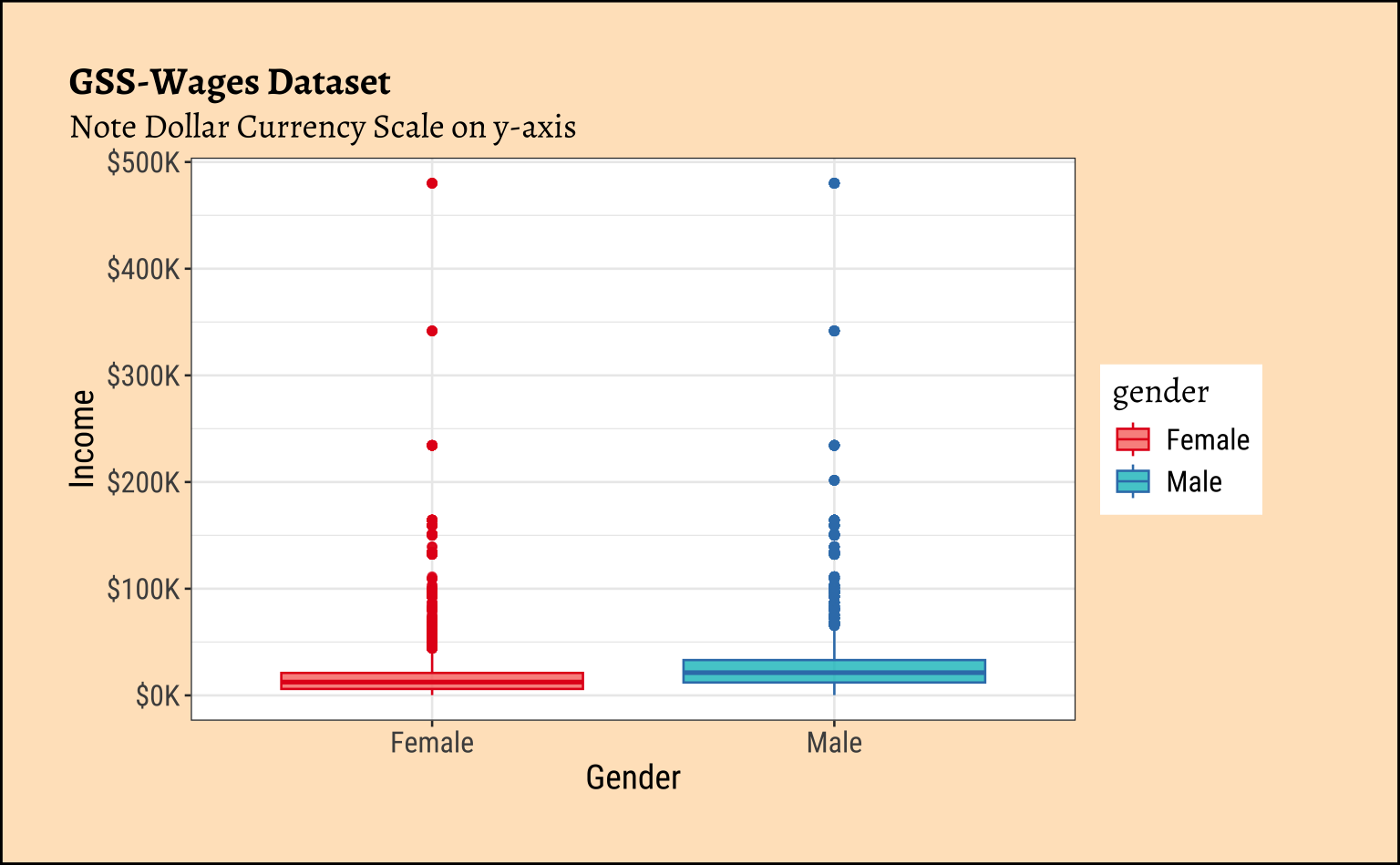
The scale function label_currency has several arguments that can be used to customize the display of currency values. Here we have used scale = 0.001 to convert the values to thousands and suffix = "K" to add a “K” suffix to the labels.
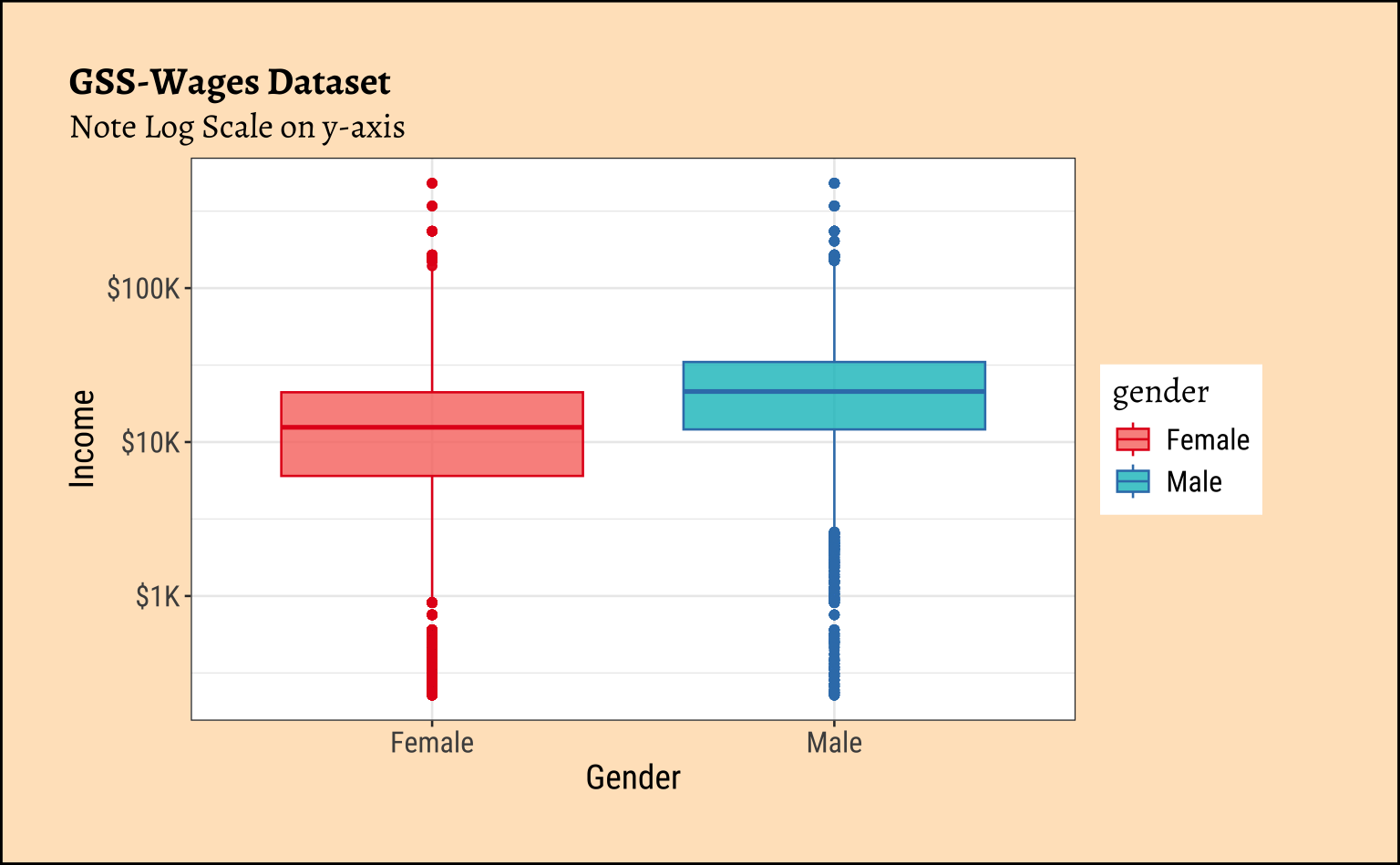
Note that the y-axis scale is linear!! We may yet be dissatisfied with this plot and wish to change the y-axis to a logarithmic scale. This is useful when the data spans several orders of magnitude, as is often the case with man-made variables such as income data. We will also, for demonstration purposes, setup an excessively detailed y-scale with far too many breaks and remedy that in the other plot!!
p1 %>%
  gf_refine(scale_y_log10(
    labels = scales::label_currency(scale = 0.001, suffix = "K"),
    breaks = scales::breaks_log(n = 20, base = 10)
  )) |>
  gf_labs(subtitle = "Note Log Scale on y-axis")
p2 %>%
  gf_refine(scale_y_log10(
    labels = scales::label_currency(scale = 0.001, suffix = "K", ),
    breaks = scales::breaks_log(n = 5, base = 10)
  )) |>
  gf_labs(subtitle = "Note Log Scale on y-axis")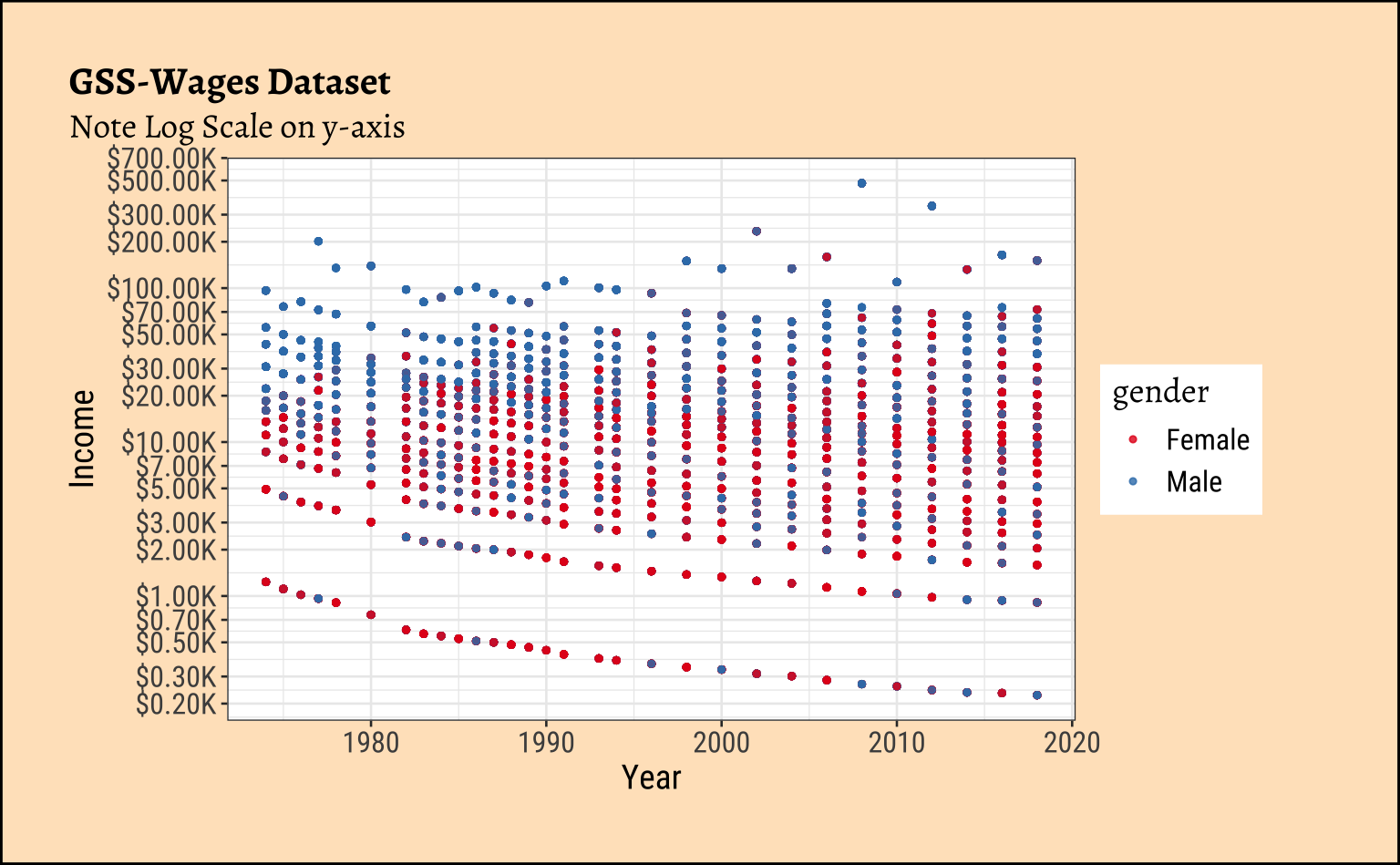
5 Case Study: Gapminder
We will work with the gapminder dataset from the gapminder package. This dataset contains data on life expectancy, GDP per capita, and population for various countries over several years.
gapminder <- gapminder::gapminder
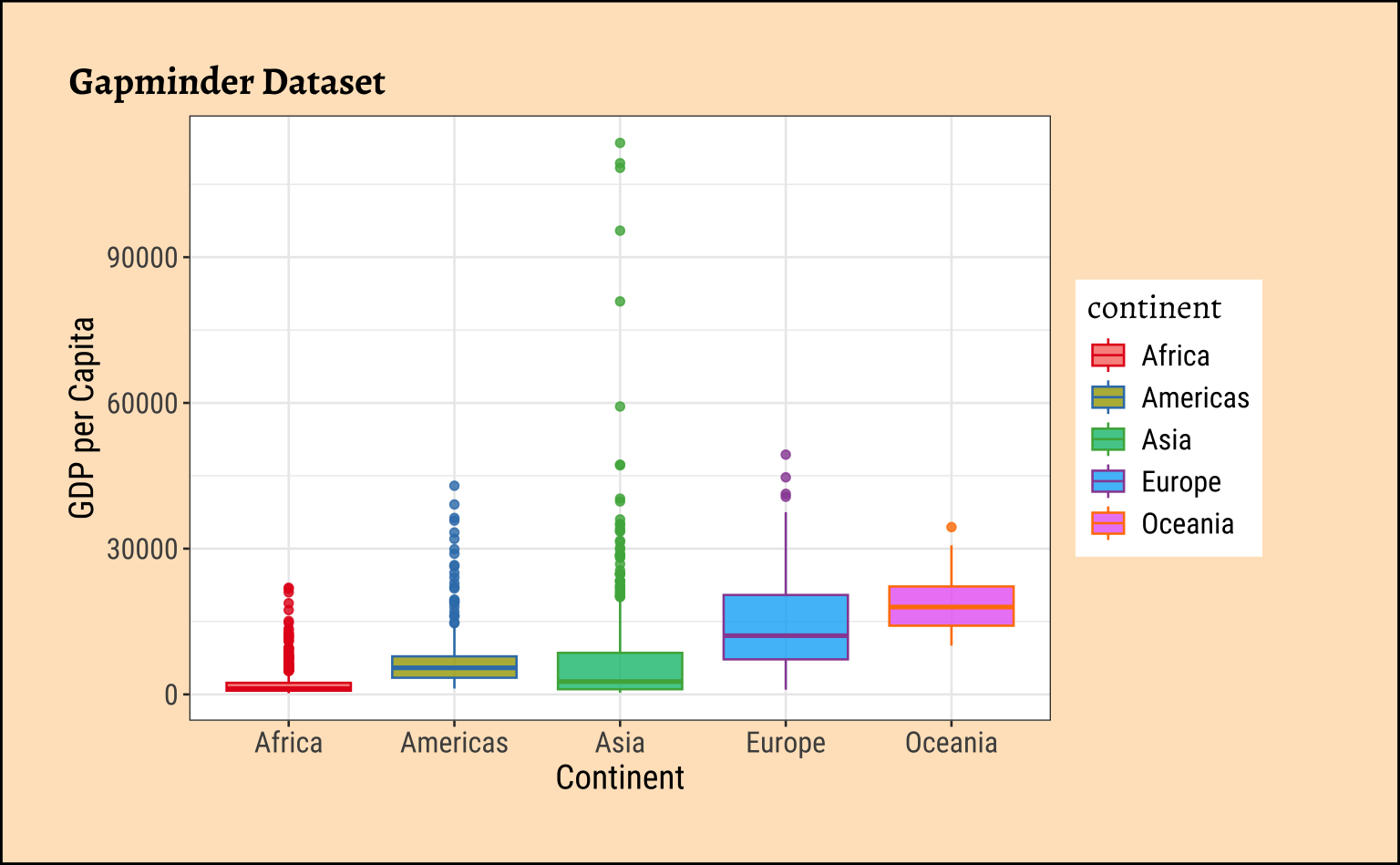
gapminderThere are several variables, most of them “man-made”, which tend to vary over several orders of magnitude. Let us see how we can depict those.
p1 <- gf_point(
  data = gapminder, gdpPercap ~ year,
  color = ~continent, alpha = 0.8, size = 1
) %>%
  gf_labs(y = "GDP per Capita", x = "Year", title = "Gapminder Dataset") %>%
  gf_refine(scale_color_brewer(palette = "Set1"))
p1
p2 <- gf_boxplot(
  data = gapminder, gdpPercap ~ continent,
  color = ~continent, fill = ~continent,
  alpha = 0.8, orientation = "x"
) %>%
  gf_labs(y = "GDP per Capita", x = "Continent", title = "Gapminder Dataset") %>%
  gf_refine(scale_color_brewer(palette = "Set1"))

p2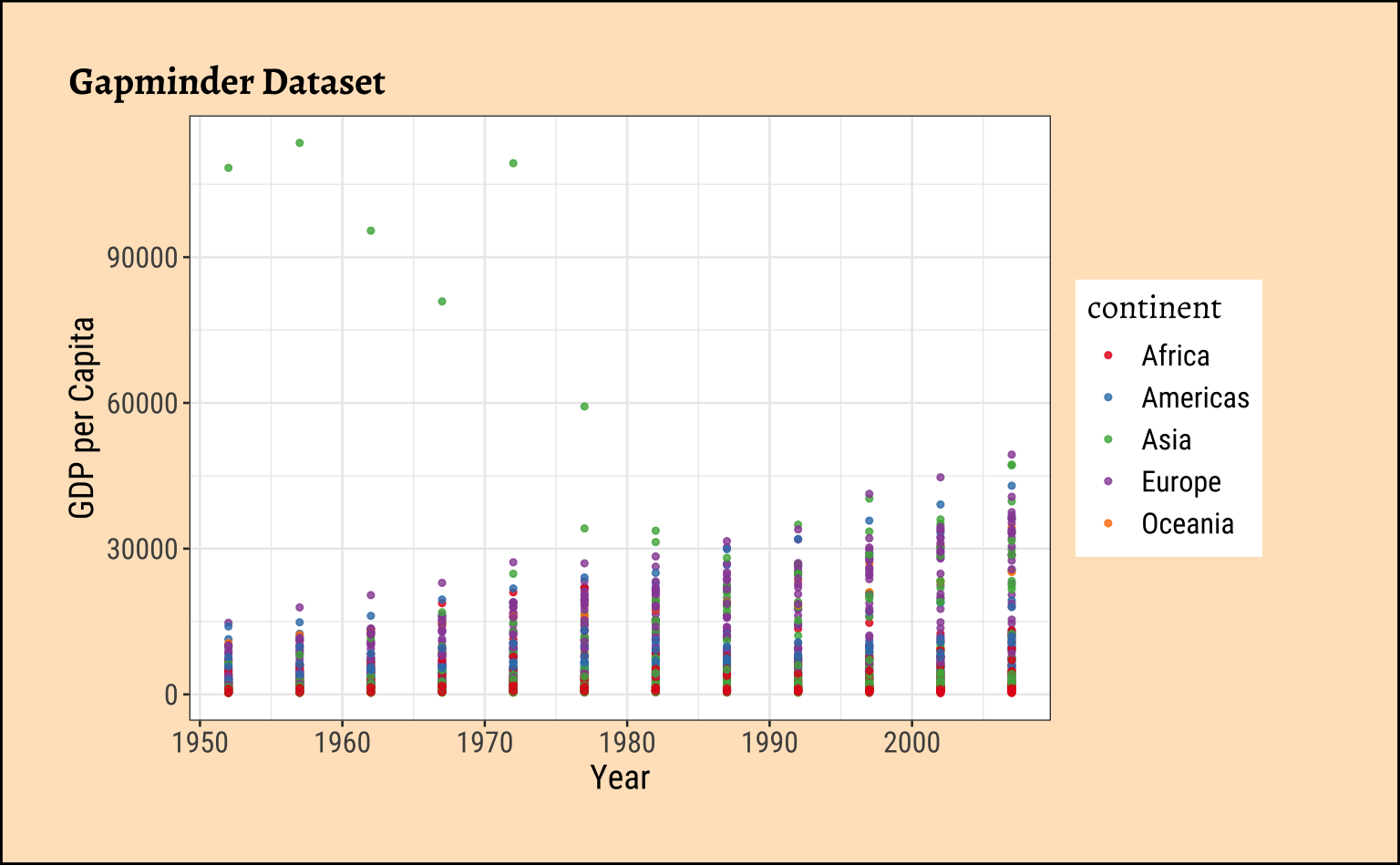
Let us convert the y-axis to show a scale in USD.
Show the Code
p1 %>%
  gf_refine(scale_y_continuous(labels = scales::label_currency(scale = 0.001, suffix = "K"))) |>
  gf_labs(subtitle = "Note Dollar Currency Scale on y-axis")


p2 %>%
  gf_refine(scale_y_continuous(labels = scales::label_currency(scale = 0.001, suffix = "K"))) |>
  gf_labs(subtitle = "Note Dollar Currency Scale on y-axis")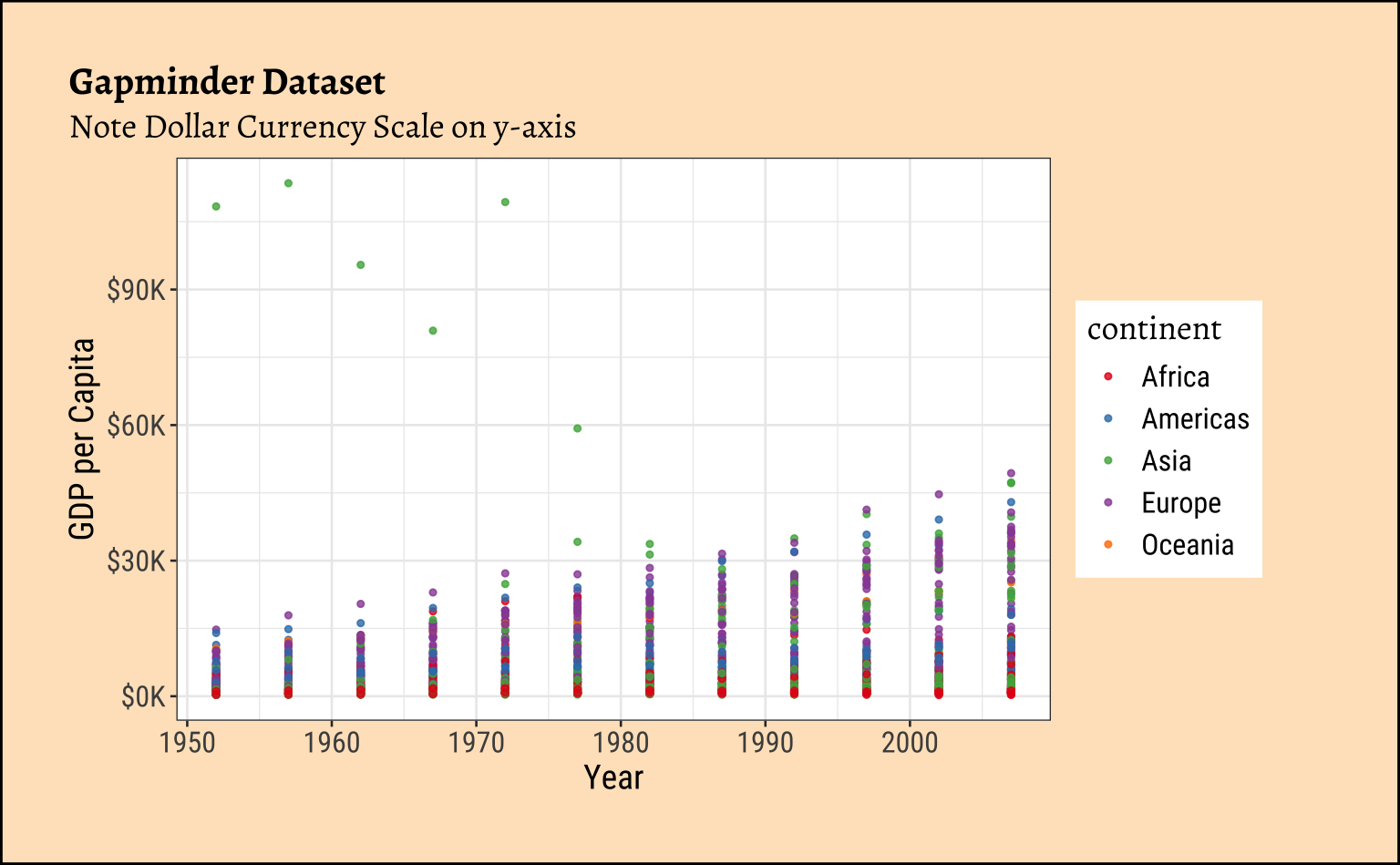
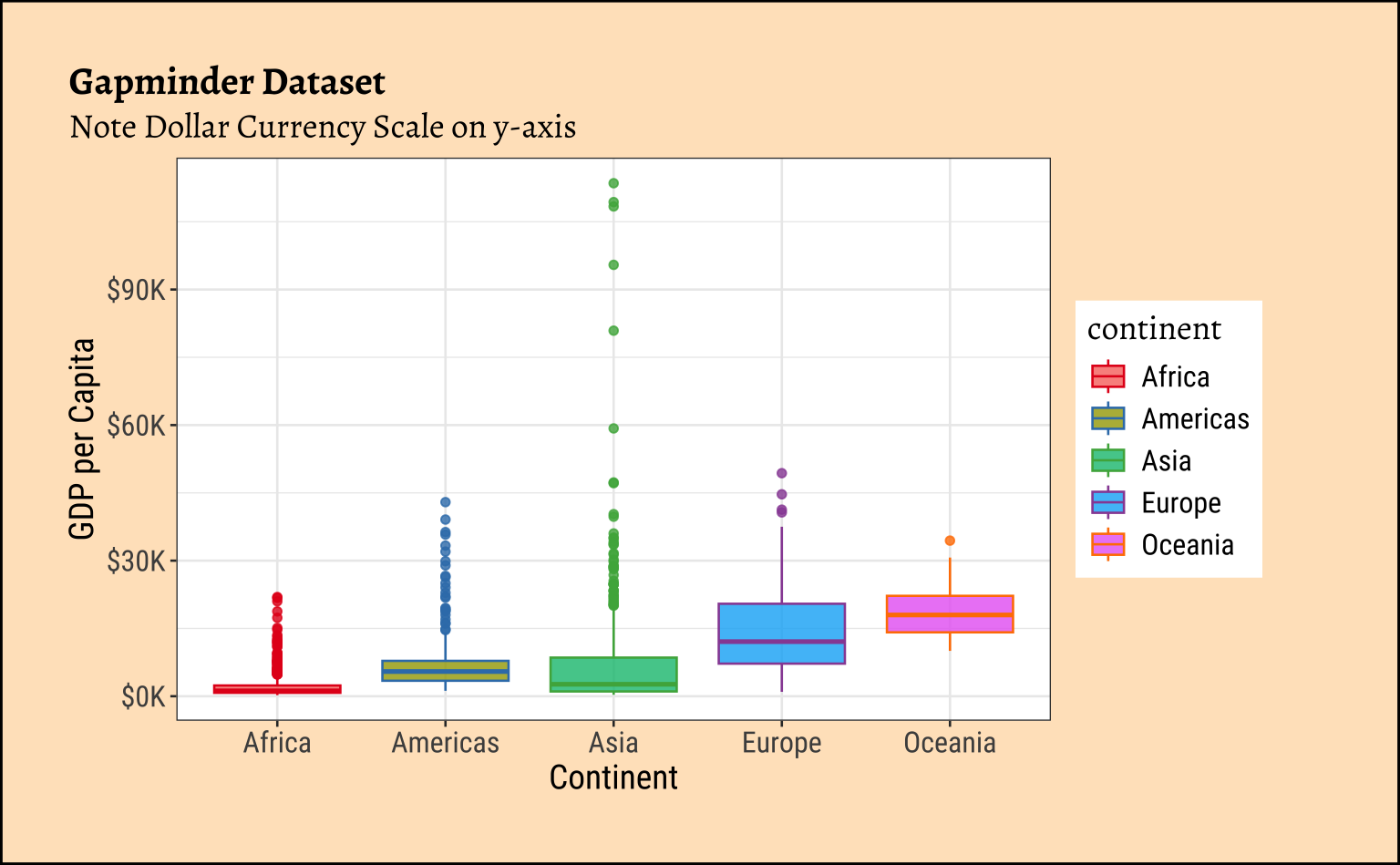
Note that the Y-axis is still linear here. No transformation applied!
And population?
Show the Code
p1 <- gf_point(
  data = gapminder, pop ~ year,
  color = ~continent,
  alpha = 0.8, size = 1
) %>%
  gf_labs(
    y = "Population", x = "Year",
    title = "Gapminder Dataset"
  ) %>%
  gf_refine(scale_color_brewer(palette = "Set1"))
p1
#####
p2 <- gf_boxplot(
  data = gapminder, pop ~ continent,
  color = ~continent, fill = ~continent,
  alpha = 0.8, orientation = "x"
) %>%
  gf_labs(
    y = "Population", x = "Continent",
    title = "Gapminder Dataset"
  ) %>%
  gf_refine(scale_color_brewer(palette = "Set1"))

p2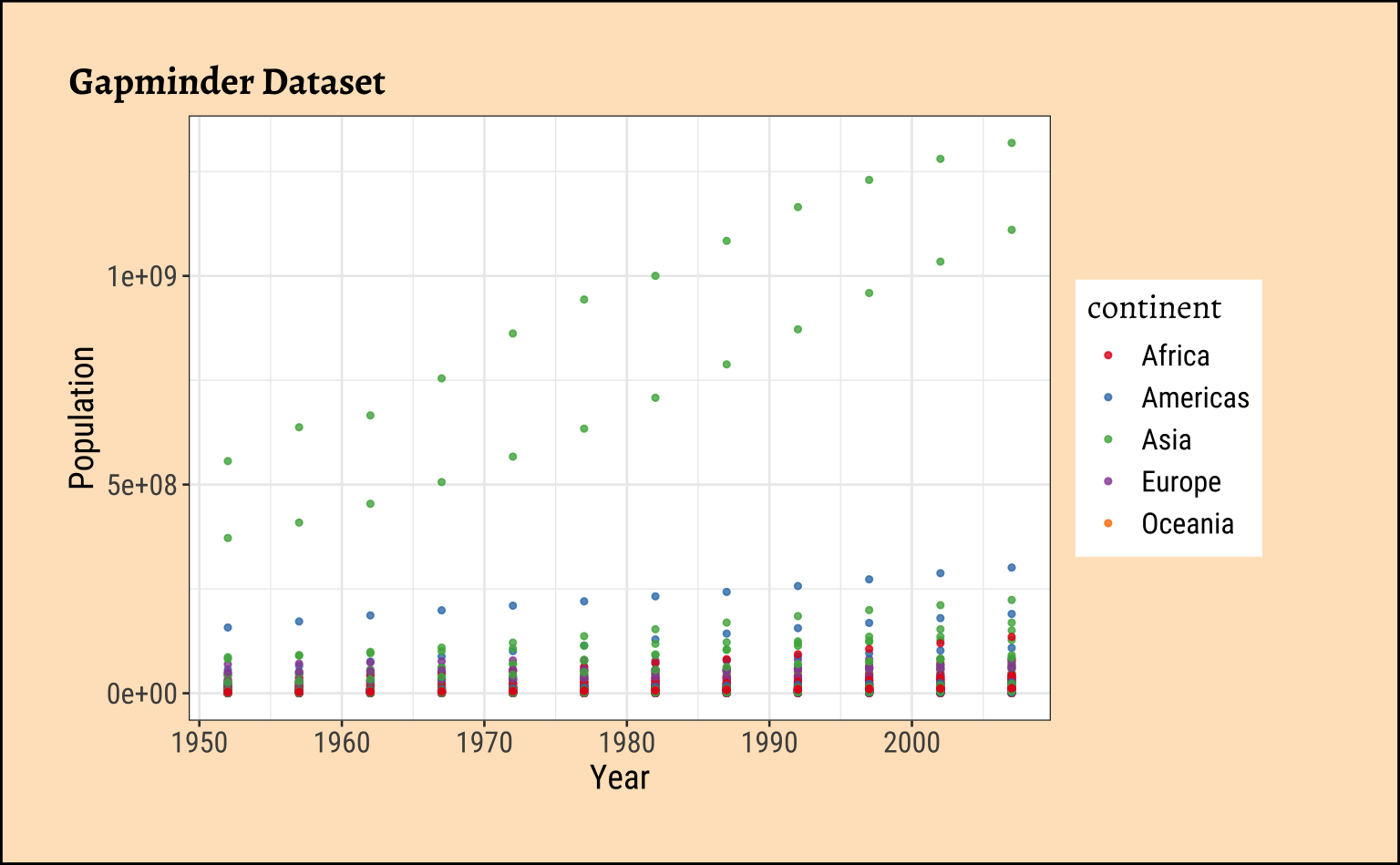
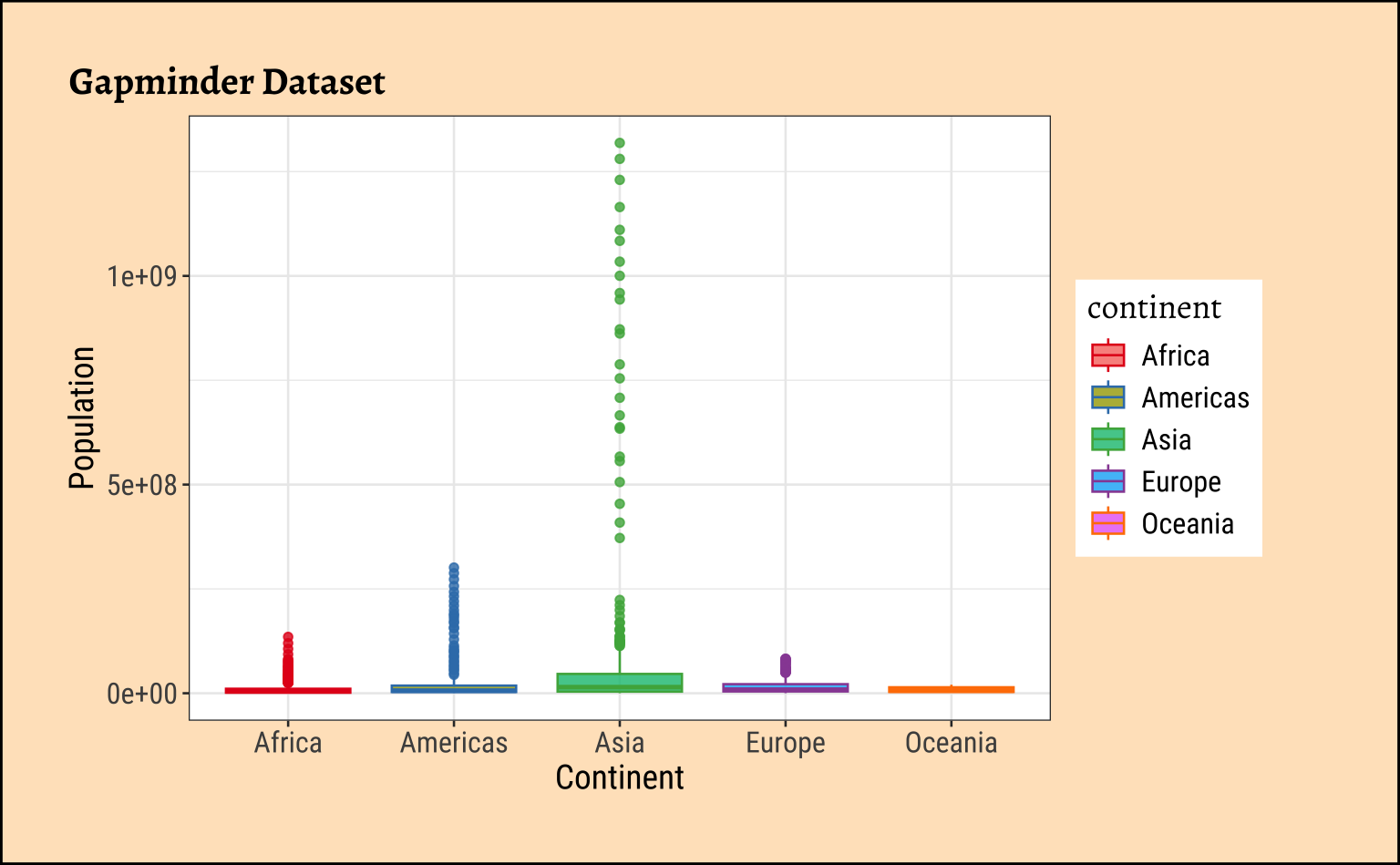
Hmmm….can we plot the y-axis in multiples? Like, 1X, 2X…..10X….100X? We wish to implement scales for data that have geometric progression, where the variable of interest spans several multiples, i.e. \frac{max_y}{min_y} \gg 1000. for example.
Show the Code
#|
unit <- 1e7 # 1X = 10 million

p1 %>%
  gf_refine(
    scale_x_continuous(breaks = seq(1950, 2010, 10)),
    scale_y_continuous(
      name = "Population (X = 10 million)",
      transform = "log10",
      breaks = c(0.1, 0.5, 1, 5, 10, 50, 100) * unit,
      labels = scales::label_number(
        scale = 1 / unit,
        suffix = "X"
      ),
      expand = expansion(mult = c(0.25, 0.25))
    )
  ) |>
  gf_labs(subtitle = "Note the log scale on the y-axis")

p2 %>%
  gf_refine(
    scale_y_continuous(
      name = "Population (X = 10 million)",
      transform = "log10",
      breaks = c(0.1, 0.5, 1, 5, 10, 50, 100) * unit,
      labels = scales::label_number(
        scale = 1 / unit,
        suffix = "X"
      ),
      expand = expansion(mult = c(0.25, 0.25))
    )
  ) |>
  gf_labs(subtitle = "Note the log scale on the y-axis")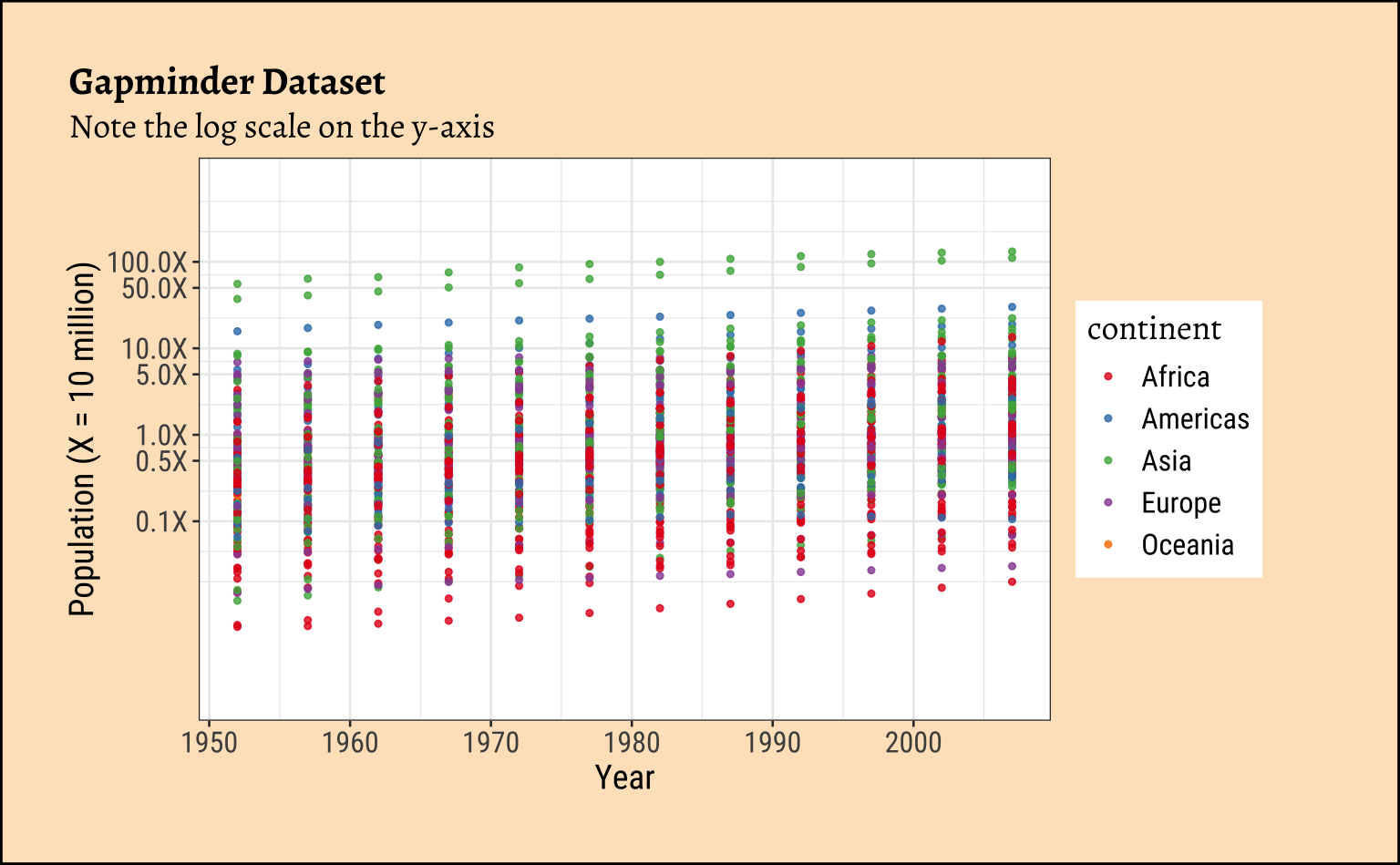
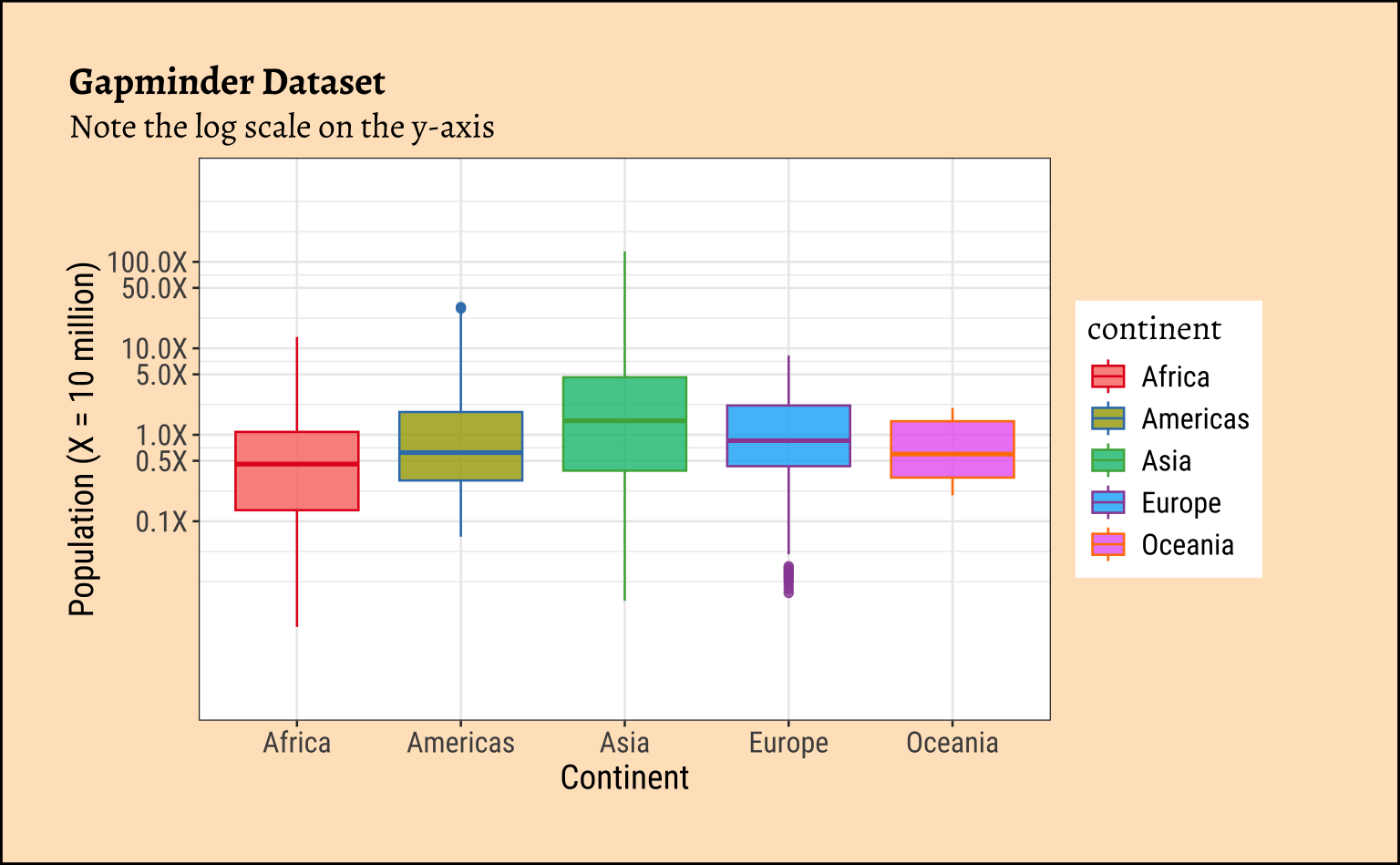
Try commenting our the transform = "log10" in the code above and see how the graphs change!
For a complex use of the scales package, where we use more than one y-axis, head off to this Case Study: Legionnaire’s Disease in the USA. Try to understand the code there and replicate!!
6 References
- R package
scales: https://scales.r-lib.org/
| Package | Version | Citation |
|---|---|---|
| scales | 1.4.0 | Wickham et al. (2025) |