library(tidyverse) # Tidy data processing and plotting
library(ggformula) # Formula based plots
library(mosaic) # Our go-to package
library(skimr) # Another Data inspection package

library(GGally) # Corr plots
library(broom) # Clean reports from Stats / ML outputs

# library(devtools)
# devtools::install_github("rpruim/Lock5withR")
library(Lock5withR) # Datasets

library(easystats) # Easy Statistical Analysis and Charts
library(correlation) # Different Types of Correlations

library(janitor) # Data cleaning and tidying package
library(visdat) # Visualize whole dataframes for missing data
library(naniar) # Clean missing data
library(DT) # Interactive Tables for our data
library(tinytable) # Elegant Tables for our data
Correlations
Correlations
Scatter Plots
Errorbar Plot
Regression Lines
Abstract
How one variable changes with another
“The world says: ‘You have needs – satisfy them. You have as much right as the rich and the mighty. Don’t hesitate to satisfy your needs; indeed, expand your needs and demand more.’ This is the worldly doctrine of today. And they believe that this is freedom. The result for the rich is isolation and suicide, for the poor, envy and murder.”
— Fyodor Dostoevsky
1
2
| Variable #1 | Variable #2 | Chart Names | Chart Shape |
|---|---|---|---|
| Quant | Quant | Scatter Plot |
|
Some of the very basic and commonly used plots for data are:
- Scatter Plot for two variables
- Pairwise Correlation Plots for multiple variables
- Errorbar chart for multiple variables
Contour PlotScatter Plot with Confidence EllipsesCorrelogram for multiple variablesHeatmap for multiple variablesCombination chart with marginal densities
3
| No | Pronoun | Answer | Variable/Scale | Example | What Operations? |
|---|---|---|---|---|---|
| 1 | How Many / Much / Heavy? Few? Seldom? Often? When? | Quantities, with Scale and a Zero Value.Differences and Ratios /Products are meaningful. | Quantitative/Ratio | Length,Height,Temperature in Kelvin,Activity,Dose Amount,Reaction Rate,Flow Rate,Concentration,Pulse,Survival Rate | Correlation |
4
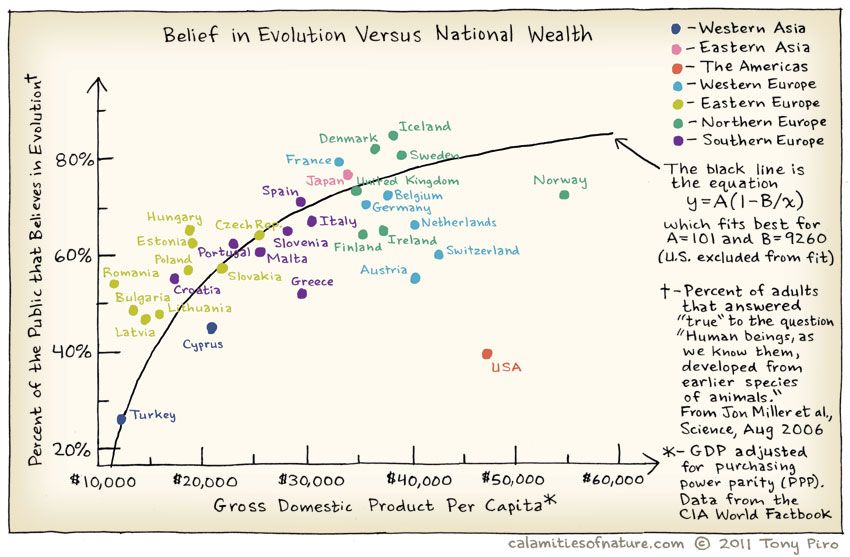
Does belief in Evolution depend upon the GSP of of the country? Where is the US in all of this? Does the Bible Belt tip the scales here?
And India?
5
One of the basic Questions we would have of our data is: Does some variable depend upon another in some way? Does y vary with x? A Correlation Test is designed to answer exactly this question.
The word correlation is used in everyday life to denote some form of association. We might say that we have noticed a correlation between rainy days and reduced sales at supermarkets. However, in statistical terms we use correlation to denote association between two quantitative variables. We also assume that the association is linear, that one variable increases or decreases a fixed amount for a unit increase or decrease in the other. The other technique that is often used in these circumstances is regression, which involves estimating the best straight line to summarise the association.
6 HollywoodMovies2011 dataset
Let us look at the HollywoodMovies2011 dataset from the {Lock5withR} package.
Note
The dataset is also available by clicking the icon below ( in case you are not able to install {Lock5withR}):
7
glimpse(movies_modified)Rows: 136
Columns: 14
$ movie <fct> "Insidious", "Paranormal Activity 3", "Bad Teache…
$ lead_studio <fct> Sony, Independent, Independent, Warner Bros, Rela…
$ story <fct> Monster Force, Monster Force, Comedy, Rivalry, Ri…
$ genre <fct> Horror, Horror, Comedy, Fantasy, Comedy, Romance,…
$ rotten_tomatoes <int> 67, 68, 44, 96, 90, 93, 75, 35, 63, 69, 69, 49, 2…
$ audience_score <int> 65, 58, 38, 92, 77, 84, 91, 58, 74, 73, 72, 57, 6…
$ theaters_open_week <int> 2408, 3321, 3049, 4375, 2918, 944, 2534, 3615, NA…
$ bo_average_open_week <int> 5511, 15829, 10365, 38672, 8995, 6177, 10278, 237…
$ domestic_gross <dbl> 54.01, 103.66, 100.29, 381.01, 169.11, 56.18, 169…
$ foreign_gross <dbl> 43.00, 98.24, 115.90, 947.10, 119.28, 83.00, 30.1…
$ world_gross <dbl> 97.009, 201.897, 216.196, 1328.111, 288.382, 139.…
$ budget <dbl> 1.5, 5.0, 20.0, 125.0, 32.5, 17.0, 25.0, 80.0, 0.…
$ profitability <dbl> 64.672667, 40.379400, 10.809800, 10.624888, 8.873…
$ opening_weekend <dbl> 13.27, 52.57, 31.60, 169.19, 26.25, 5.83, 26.04, …| skim_type | skim_variable | n_missing | complete_rate | factor.ordered | factor.n_unique | factor.top_counts | numeric.mean | numeric.sd | numeric.p0 | numeric.p25 | numeric.p50 | numeric.p75 | numeric.p100 | numeric.hist |
|---|---|---|---|---|---|---|---|---|---|---|---|---|---|---|
| factor | movie | 0 | 1 | FALSE | 136 | 30 : 1, 50/: 1, A D: 1, A V: 1 | NA | NA | NA | NA | NA | NA | NA | NA |
| factor | lead_studio | 0 | 1 | FALSE | 34 | Ind: 32, War: 12, 20t: 9, Uni: 9 | NA | NA | NA | NA | NA | NA | NA | NA |
| factor | story | 0 | 1 | FALSE | 22 | Mon: 19, Com: 14, Que: 13, Lov: 12 | NA | NA | NA | NA | NA | NA | NA | NA |
| factor | genre | 0 | 1 | FALSE | 9 | Act: 32, Com: 27, Dra: 21, Hor: 17 | NA | NA | NA | NA | NA | NA | NA | NA |
| numeric | rotten_tomatoes | 2 | 0.99 | NA | NA | NA | 53 | 27 | 4 | 29 | 54 | 78 | 97 | ▅▇▅▆▇ |
| numeric | audience_score | 1 | 0.99 | NA | NA | NA | 62 | 17 | 24 | 50 | 61 | 76 | 93 | ▂▆▇▇▆ |
| numeric | theaters_open_week | 16 | 0.88 | NA | NA | NA | 2828 | 933 | 3 | 2550 | 2995 | 3400 | 4375 | ▁▁▂▇▃ |
| numeric | bo_average_open_week | 16 | 0.88 | NA | NA | NA | 8339 | 10284 | 1513 | 3779 | 5686 | 8923 | 93230 | ▇▁▁▁▁ |
| numeric | domestic_gross | 2 | 0.99 | NA | NA | NA | 63 | 69 | 0.02 | 19 | 37 | 80 | 381 | ▇▂▁▁▁ |
| numeric | foreign_gross | 15 | 0.89 | NA | NA | NA | 97 | 156 | 0.24 | 14 | 47 | 102 | 947 | ▇▁▁▁▁ |
| numeric | world_gross | 2 | 0.99 | NA | NA | NA | 151 | 215 | 0.025 | 31 | 77 | 174 | 1328 | ▇▁▁▁▁ |
| numeric | budget | 2 | 0.99 | NA | NA | NA | 53 | 49 | 0.2 | 20 | 36 | 70 | 250 | ▇▂▂▁▁ |
| numeric | profitability | 2 | 0.99 | NA | NA | NA | 3.3 | 6.6 | 0 | 1.1 | 2.2 | 3.7 | 65 | ▇▁▁▁▁ |
| numeric | opening_weekend | 3 | 0.98 | NA | NA | NA | 20 | 25 | 0 | 7.7 | 13 | 25 | 169 | ▇▁▁▁▁ |
| name | class | levels | n | missing | distribution |
|---|---|---|---|---|---|
| movie | factor | 136 | 136 | 0 | 30 Minutes or Less (0.7%) ... |
| lead_studio | factor | 34 | 136 | 0 | Independent (23.5%) ... |
| story | factor | 22 | 136 | 0 | Monster Force (14%), Comedy (10.3%) ... |
| genre | factor | 9 | 136 | 0 | Action (23.5%), Comedy (19.9%) ... |
| name | class | min | Q1 | median | Q3 | max | mean | sd | n | missing |
|---|---|---|---|---|---|---|---|---|---|---|
| rotten_tomatoes | integer | 4 | 29 | 54 | 78 | 97 | 53 | 27 | 134 | 2 |
| audience_score | integer | 24 | 50 | 61 | 76 | 93 | 62 | 17 | 135 | 1 |
| theaters_open_week | integer | 3 | 2550 | 2995 | 3400 | 4375 | 2828 | 933 | 120 | 16 |
| bo_average_open_week | integer | 1513 | 3779 | 5686 | 8923 | 93230 | 8339 | 10284 | 120 | 16 |
| domestic_gross | numeric | 0.02 | 19 | 37 | 80 | 381 | 63 | 69 | 134 | 2 |
| foreign_gross | numeric | 0.24 | 14 | 47 | 102 | 947 | 97 | 156 | 121 | 15 |
| world_gross | numeric | 0.025 | 31 | 77 | 174 | 1328 | 151 | 215 | 134 | 2 |
| budget | numeric | 0.2 | 20 | 36 | 70 | 250 | 53 | 49 | 134 | 2 |
| profitability | numeric | 0 | 1.1 | 2.2 | 3.7 | 65 | 3.3 | 6.6 | 134 | 2 |
| opening_weekend | numeric | 0 | 7.7 | 13 | 25 | 169 | 20 | 25 | 133 | 3 |
NoteBusiness Insights from Data Inspection
movies has 136 observations on the following 14 variables.
-
moviea factor with many levels -
lead_studioa factor with many levels -
storya factor with many levels -
genrea factor with levelsAction, Adventure, Animation, Comedy, Drama, Fantasy, Horror, Romance, Thriller. -
rotten_tomatoesa numeric vector -
audience_scorea numeric vector -
theaters_open_weeka numeric vector. No. of theatres. -
bo_average_open_weeka numeric vector. -
domestic_grossa numeric vector. In million USD. -
foreign_grossa numeric vector. In million USD. -
world_grossa numeric vector. In million USD. -
budgeta numeric vector. In million USD. -
profitabilitya numeric vector. A ratio -
opening_weekenda numeric vector. In million USD.
There are no missing values in the Qual variables; but some entries in the Quant variables are missing. skim throws a warning that we may need to examine later.
Show the Code
movies_modified %>%
  DT::datatable(
    caption = htmltools::tags$caption(
      style = "caption-side: top; text-align: left; color: black; font-size: 150%;",
      "Movies Dataset (Clean)"
    ),
    options = list(pageLength = 10, autoWidth = TRUE)
  ) %>%
  DT::formatStyle(
    columns = names(movies_modified),
    fontFamily = "Roboto Condensed",
    fontSize = "12px"
  )
7.1
Let us look at the Quant variables: are these related in anyway? Could the relationship between any two Quant variables also depend upon the level of a Qual variable? - The target variable for an experiment that resulted in this data might be the profitability variable, the resultant ratio of the money poured into the movie making, and the multiplier by which we obtain returns.
NoteResearch Questions:
- Is there are relationship between
profitabilityandbudget? - How does the
opening_weekendaffectprofitability? -
Between
profitabilityanddomestic_gross? Betweenprofitabilityandforeign_gross? - Is
profitabilityvarying withrotten_tomatoes?
These should do for now! But we should make more questions when have seen some plots!
Note
See the prepositions “between” and “with” in the questions above? These helps us to formulate Questions about relationships between variables.
8
Which are the numeric variables in movies?
Now let us plot their relationships. We will use scatter plots whose shape shows us if there is a relationship between the two variables at hand. In general, if the “cloud of points” is tipped toward one side (up or down), then there is a possible relationship between the two variables. If the points are scattered all over the place, then there is no relationship between the two variables.
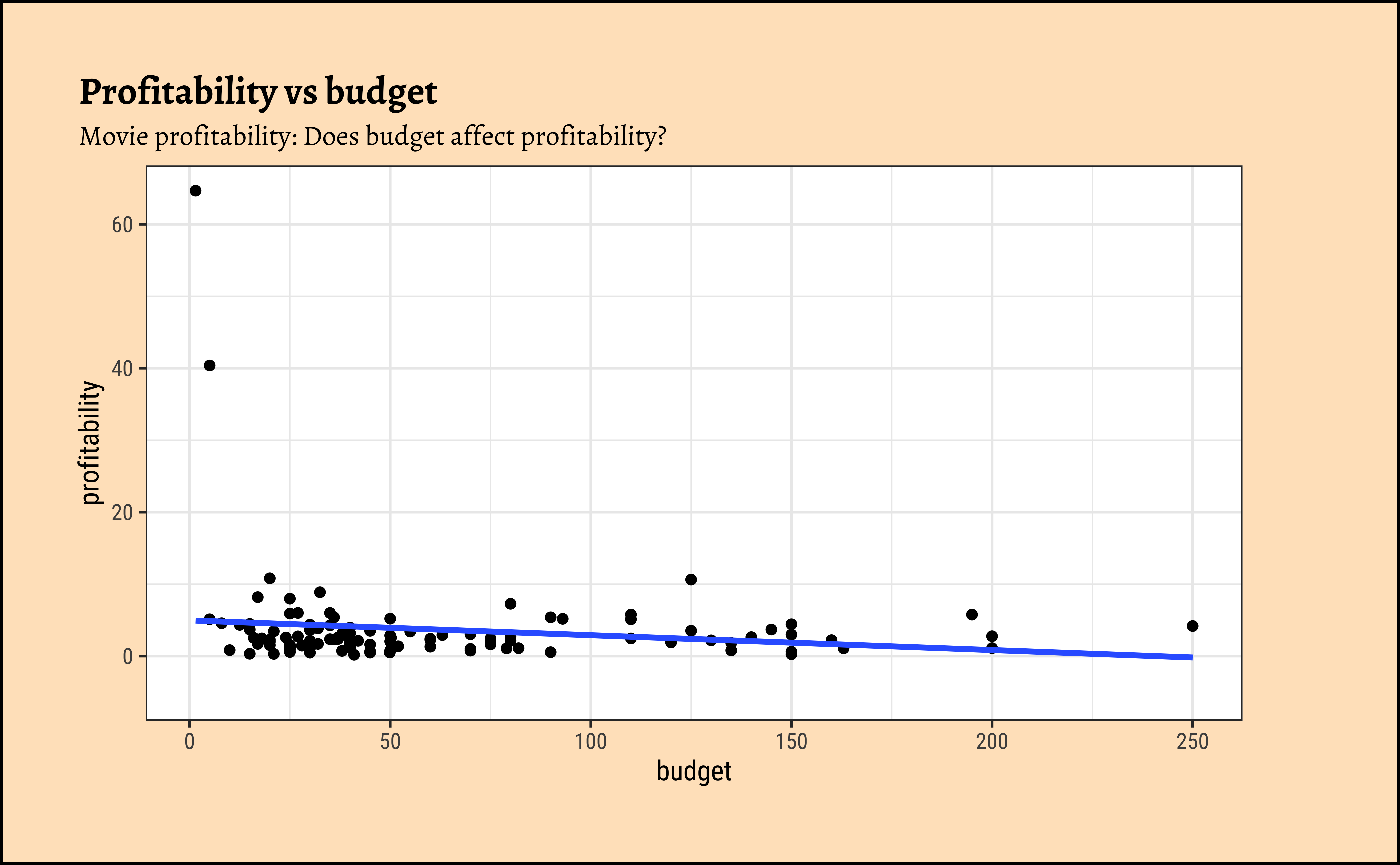
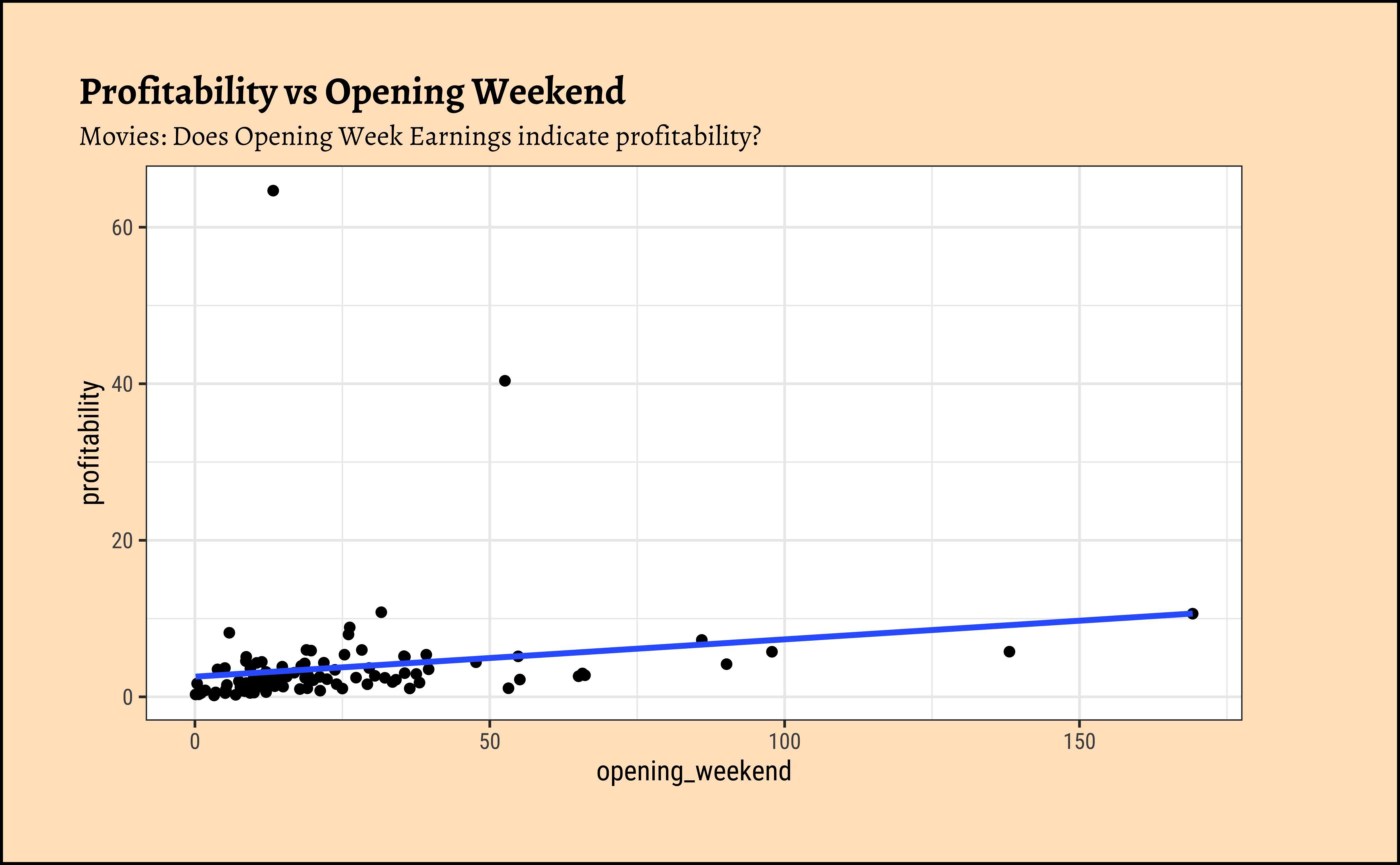
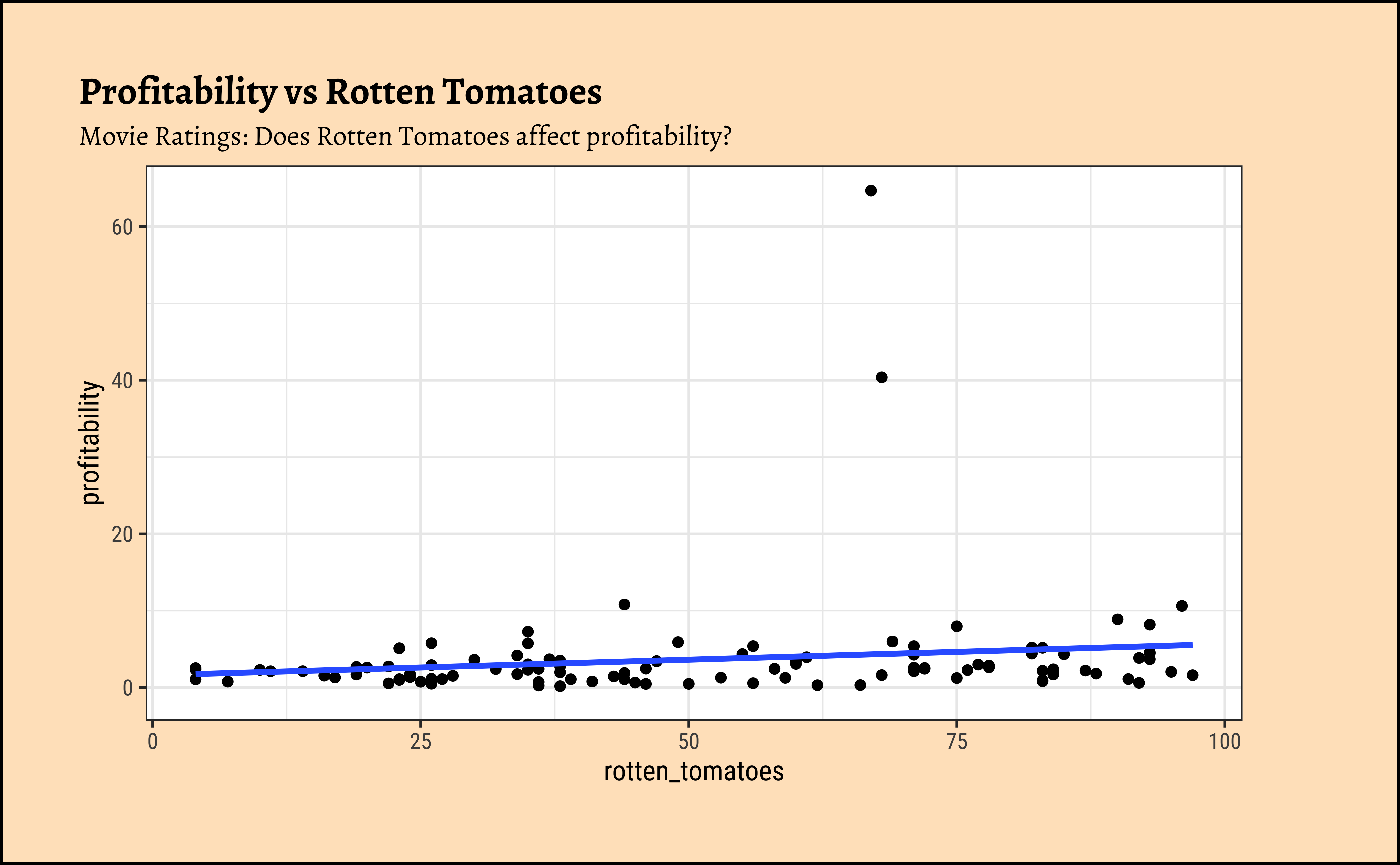
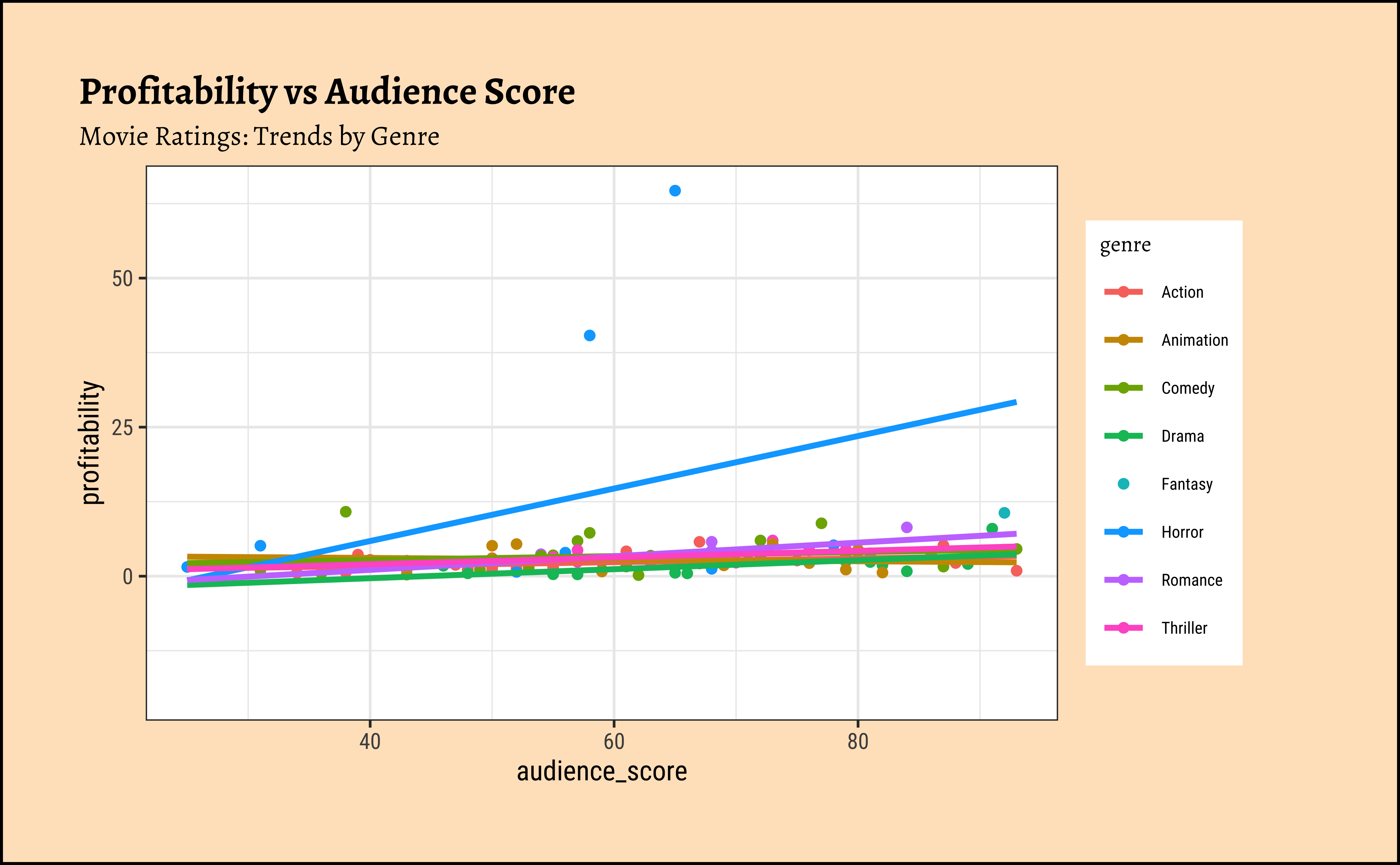
We can split some of the scatter plots using one or other of the Qual variables. For instance, is the relationship between the two ratings the same, regardless of movie genre?
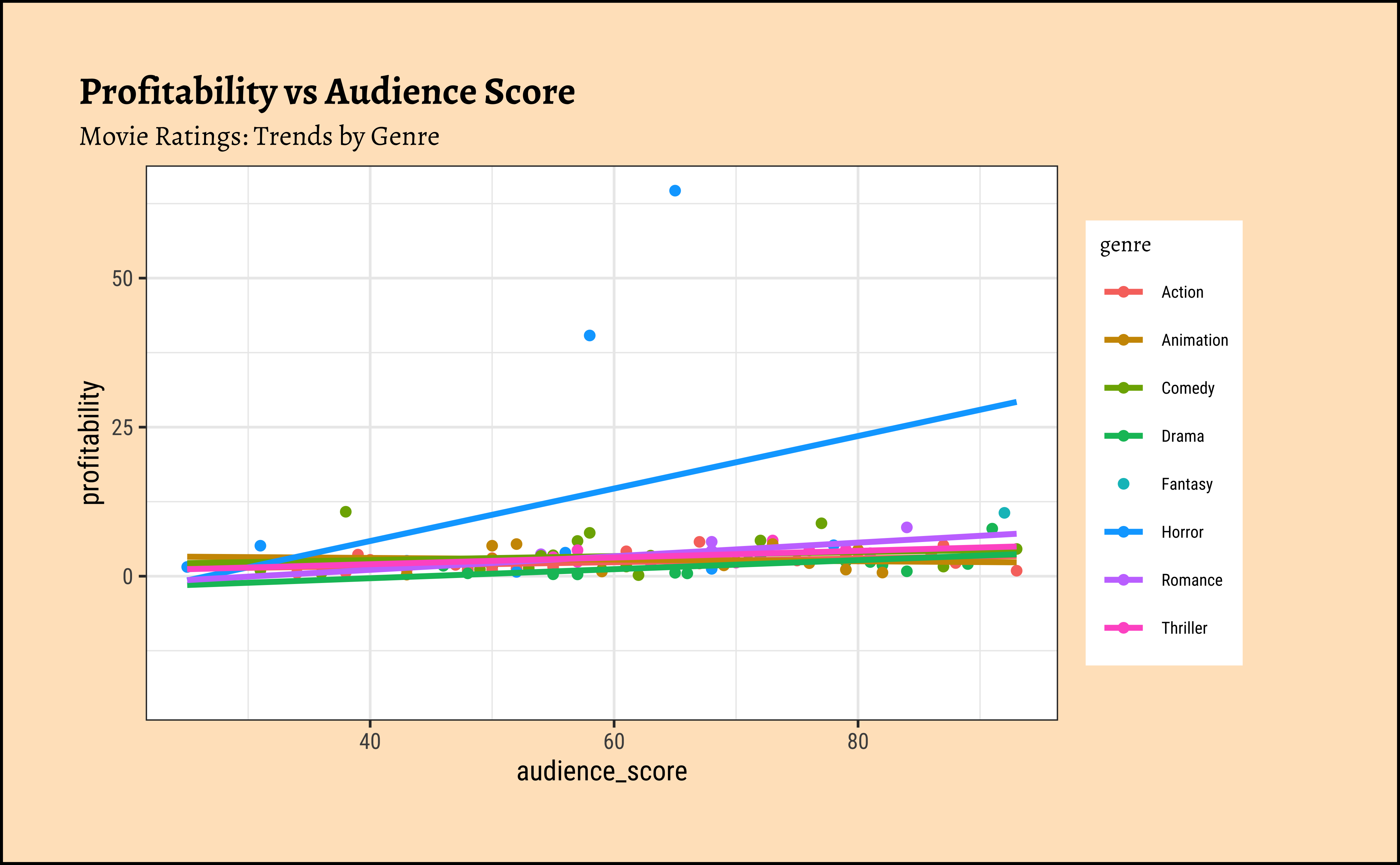
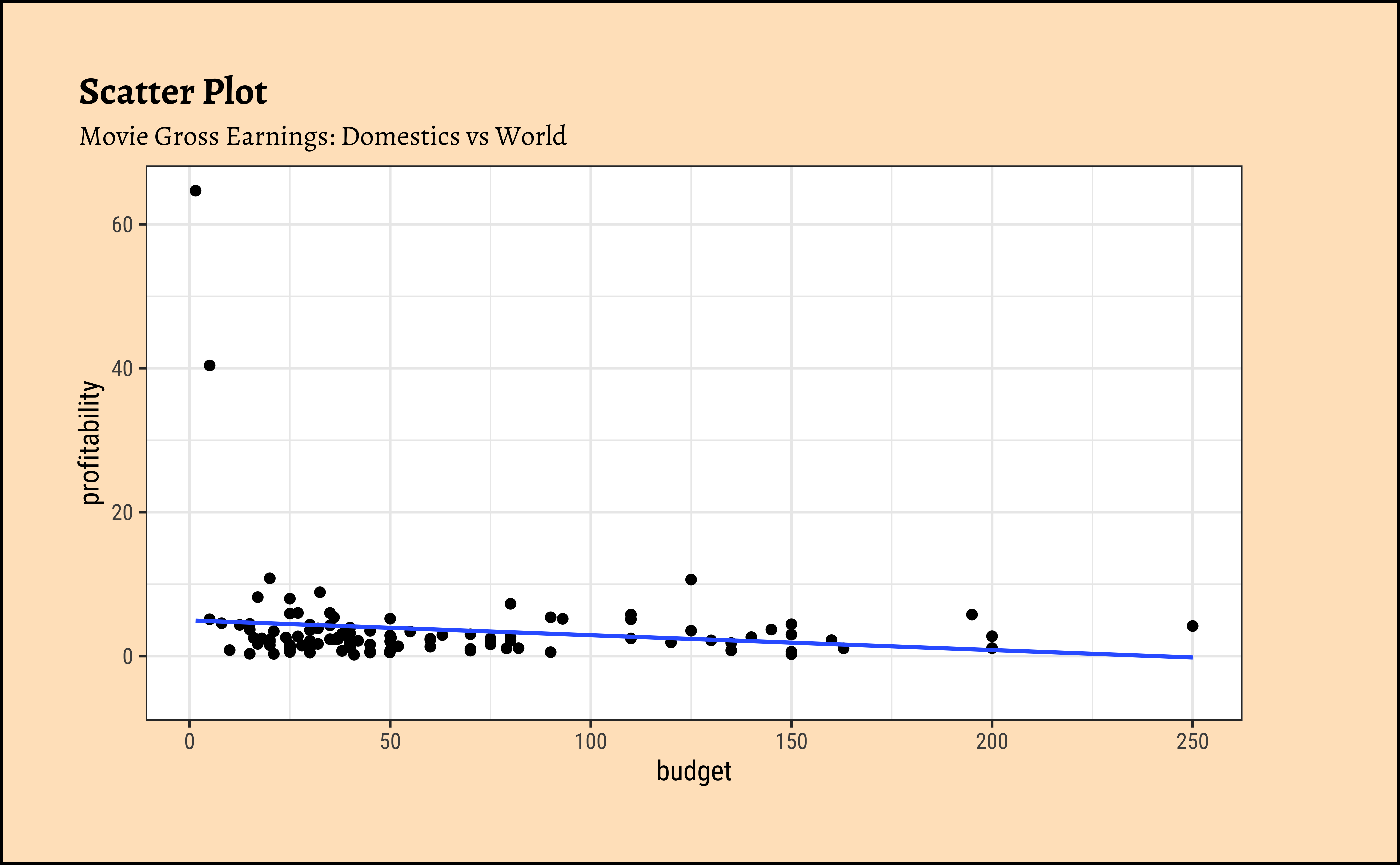
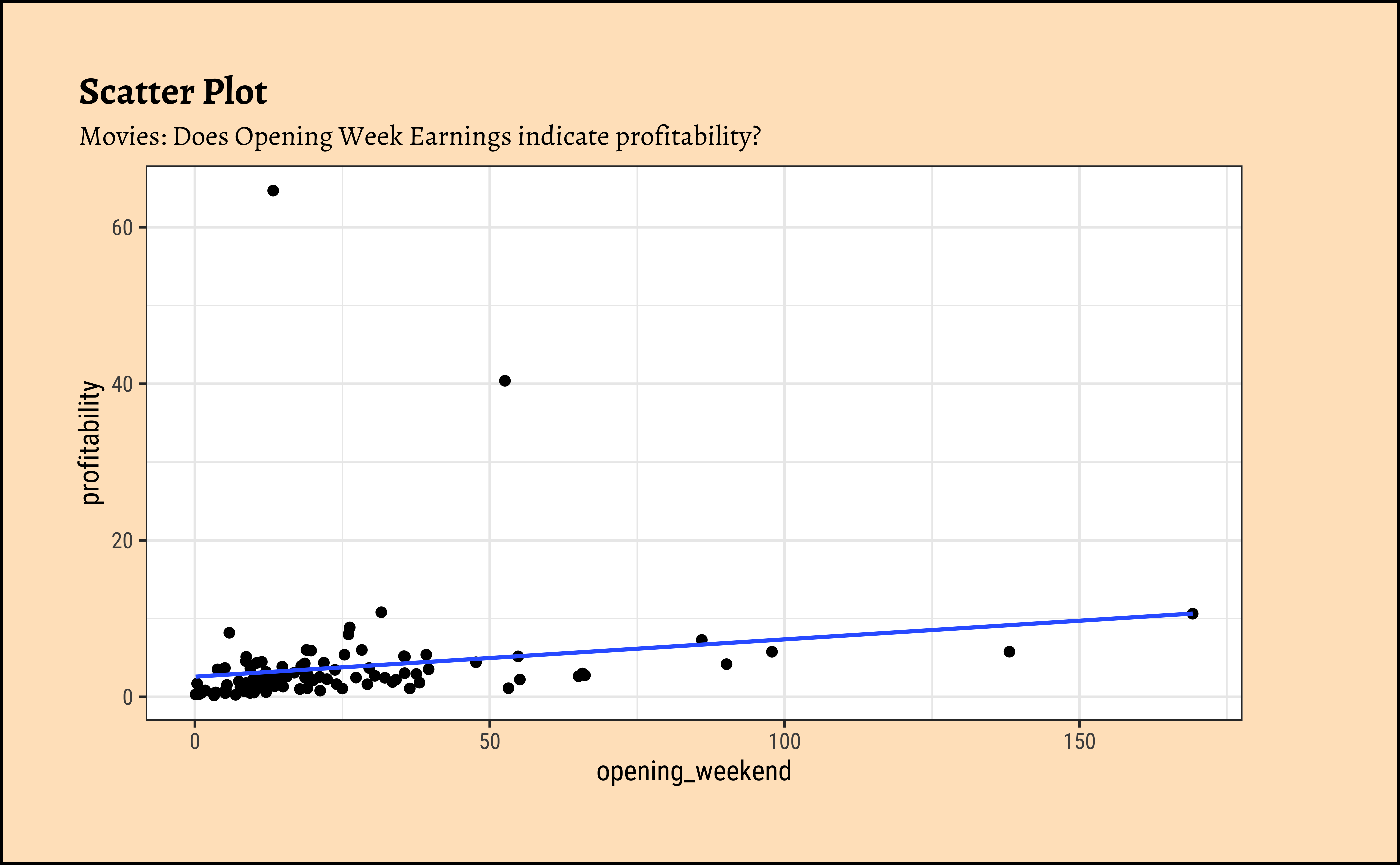
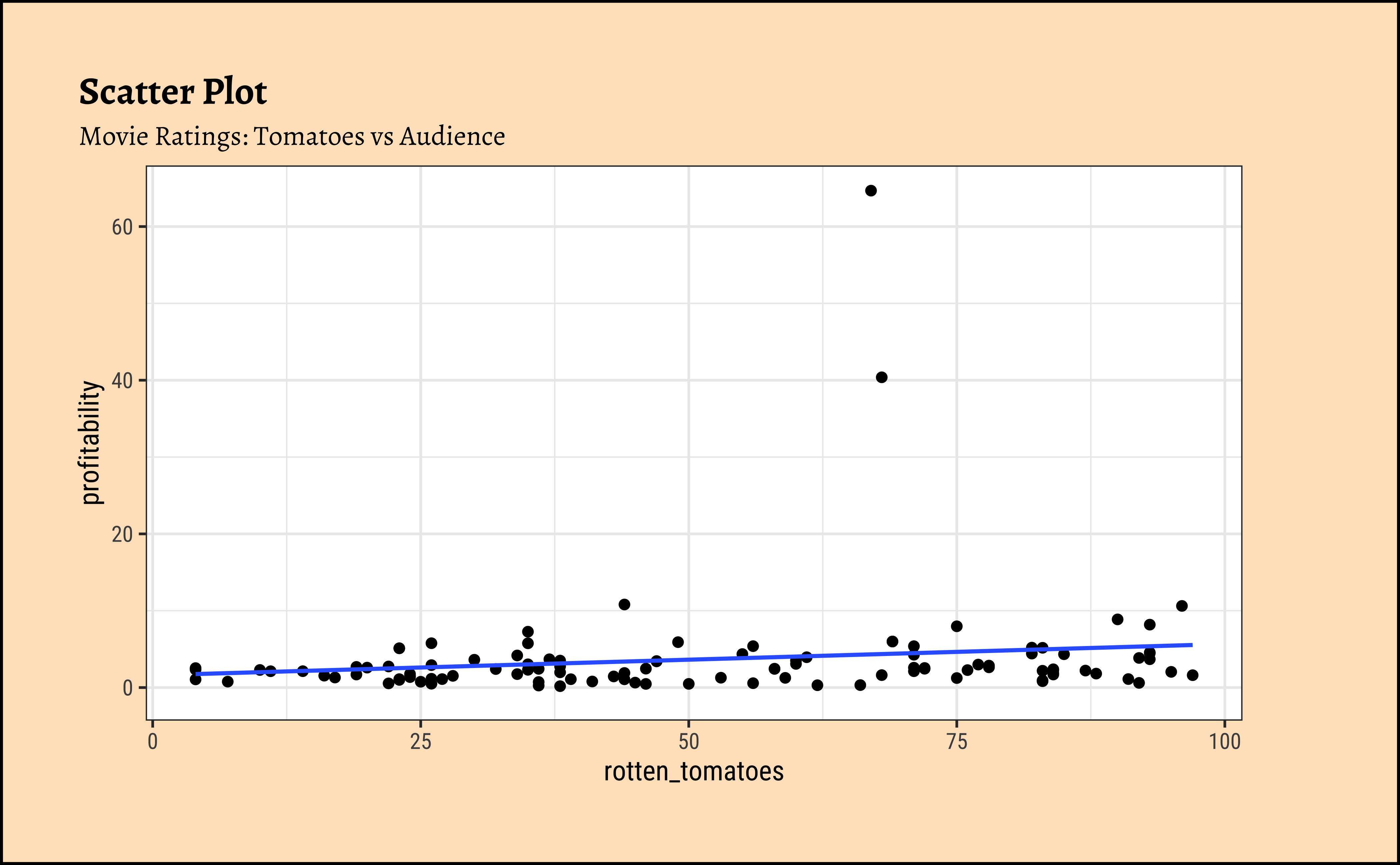
movies_modified %>%
  drop_na() %>%
  ggplot(aes(y = profitability, x = audience_score, color = genre)) +
  geom_point() +
  geom_smooth(method = "lm", se = FALSE) +
  labs(
    title = "Scatter Plot",
    subtitle = "Movie Ratings: Trends by Genre"
  )
NoteBusiness Insight from
movies scatter plots
We have fitted a trend line to each of the scatter plots.
-
profitabilityandbudget: The trend line is mildly negative…seeming to suggest that increasing thebudgetdoes not necessarily increase theprofitability. In fact, it seems to suggest that increasing thebudgetdecreases theprofitability! But is this a significant trend? We will see later. -
profitabilityandopening_weekend: The trend line is positive, suggesting that increasing theopening_weekendearnings increases theprofitability. This is a good sign for movie makers! But again, not a very markedly upward trend, so we need to check if this is significant. -
profitabilityandrotten_tomatoes: The trend line is positive, suggesting that increasing therotten_tomatoesrating increases theprofitability. Yet again, not a very markedly upward trend, so we need to check if this is significant. -
profitabilityandaudience_score: The trend lines are mostly flat, suggesting that increasing theaudience_scoredoes not do much forprofitability. The slope for Horror is higher than that for the othergenre-s ! Oh hell…people are paying to be scared witless???
Note that there are two horror movies that have been hugely successful. However, these are outliers, and are also located, in the dataset, at a place where they do not tip the trend line too much. They have limited influence, concept that becomes important with Regression Analysis.
9
So we see that there are visible relationships between Quant variables. How do we quantize this relationship, into a correlation score? Let us first define for ourselves what a correlation score is, and then we will see how to calculate it.
9.1
The degree of association is measured by a correlation coefficient, denoted by r. It is sometimes called Pearson’s correlation coefficient after its originator and is a measure of linear association. (If a curved line is needed to express the relationship, other and more complicated measures of the correlation must be used.)
The correlation coefficient is measured on a scale that varies from + 1 through 0 to – 1. Complete correlation between two variables is expressed by either + 1 or -1. When one variable increases as the other increases the correlation is positive; when one decreases as the other increases it is negative.
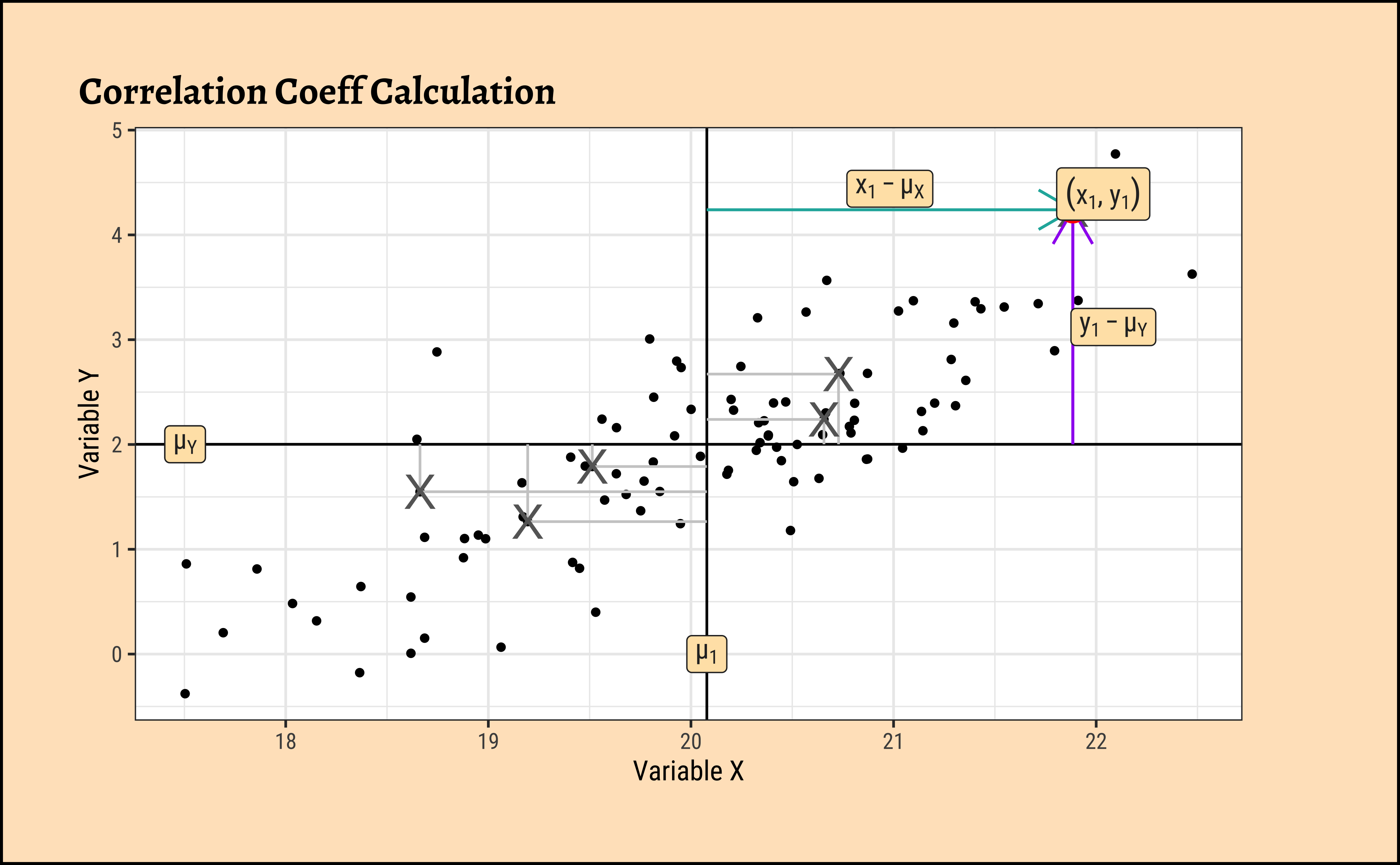
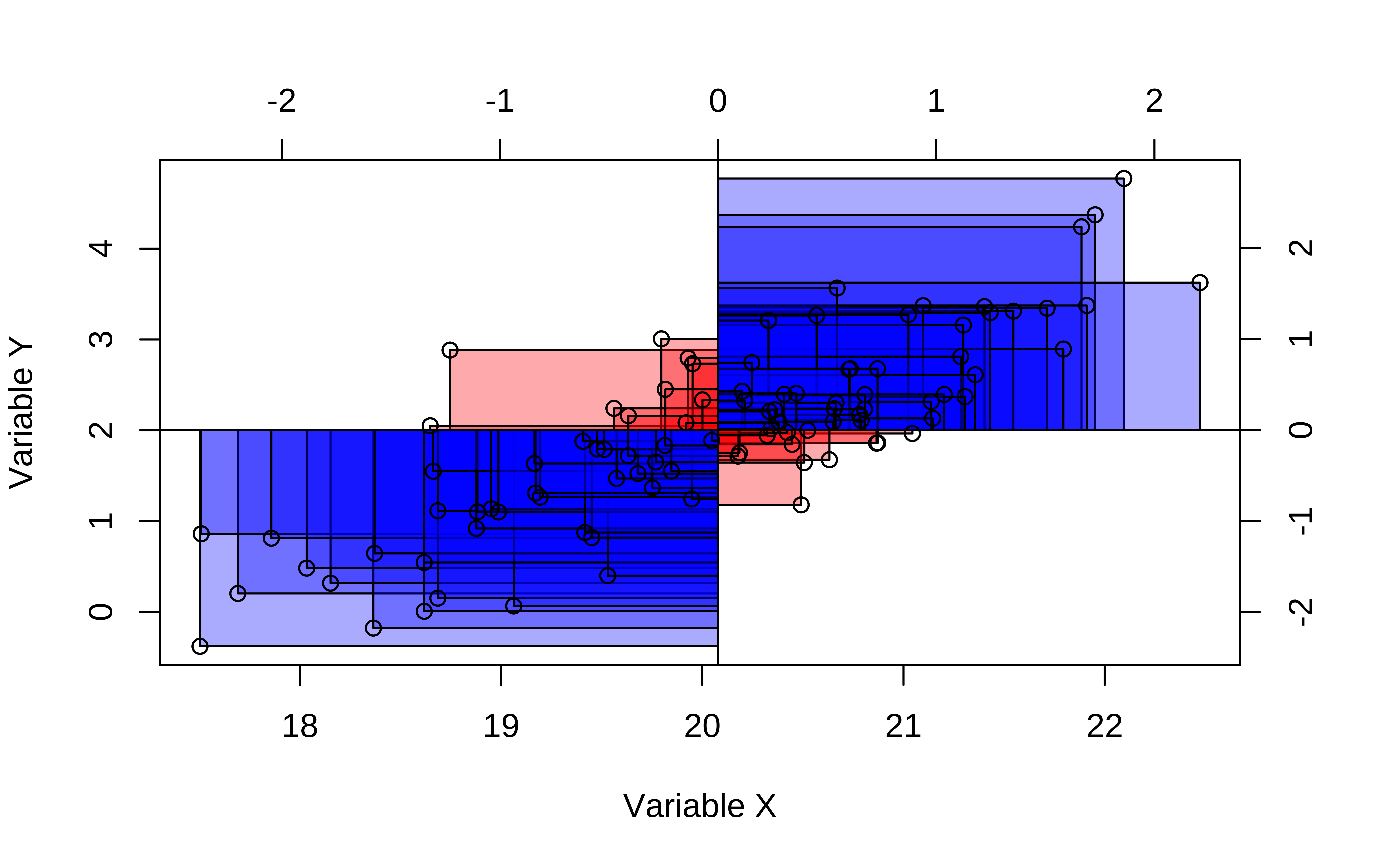
In formal terms, the correlation between two variables x and y is defined as:
\rho = E\left[\frac{(x - \mu_{x}) * (y - \mu_{y})}{(\sigma_x)*(\sigma_y)}\right] \tag{1}
where E is the expectation operator ( i.e taking mean ). Think of this as the average of the products of two scaled residuals.
TipPearson Correlation uses z-scores
We can see (x-\mu_x)/\sigma_x is a centering and scaling of the variable x. Recall from our discussion on Quantities that this is called the z-score of x.
Pearson correlation assumes that the relationship between the two variables is linear. There are of course many other types of correlation measures: some which work when this is not so. Type vignette("types", package = "correlation") in your Console to see the vignette from the correlation package that discusses various types of correlation measures.
OK, so how do we calculate this correlation coefficient? And how do we visualize it too? ( Remember: we want to visualize our analysis! )
10
We will use the GGally package to visualize correlation scores, and a formal correlation test with the mosaic package to calculate them.
10.1 Using GGally
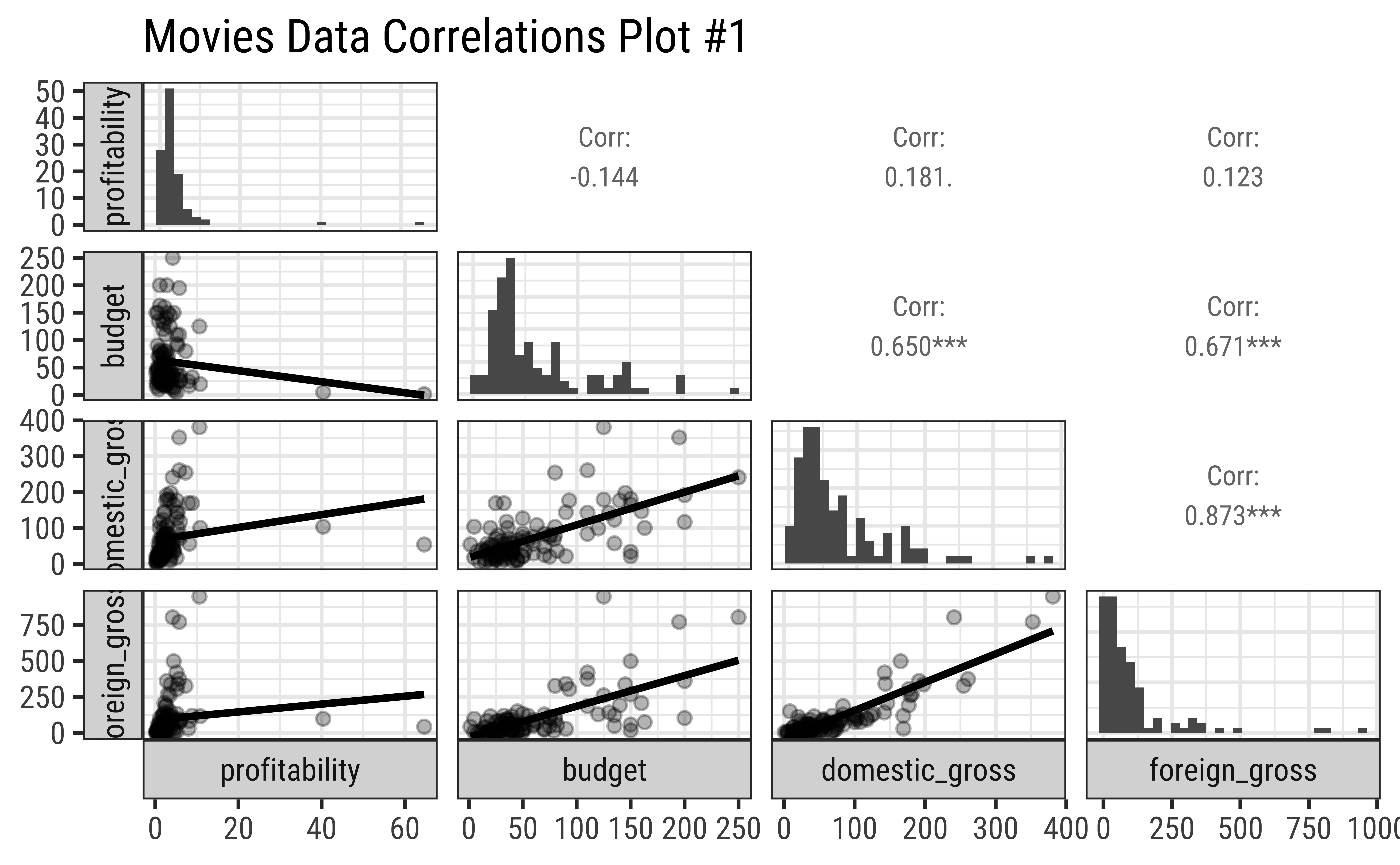
By default, GGally::ggpairs() provides:
- two different comparisons of each pair of columns
- displays either the density or count of the respective variable along the diagonal.
- With different parameter settings, the diagonal can be replaced with the axis values and variable labels.
GGally::ggpairs(
  movies_modified %>% drop_na(),
  # Select Quant variables only for now
  columns = c(
    "profitability", "budget", "domestic_gross", "foreign_gross"
  ),
  switch = "both",
  # axis labels in more traditional locations(left and bottom)

  progress = FALSE,
  # no compute progress messages needed

  # Choose the diagonal graphs (always single variable! Think!)
  diag = list(continuous = "barDiag"),
  # choosing histogram,not density

  # Choose lower triangle graphs, two-variable graphs
  lower = list(continuous = wrap("smooth", alpha = 0.3, se = FALSE)),
  title = "Movies Data Correlations Plot #1"
)
NoteBusiness Insight from Pairs Plot #1
-
profitabilityandbudgethave a very slight negative correlation, but this does not appear to be significant. -
profitabilityhas low correlation scores with bothDomesticGross(.181) and also withForeignGross(0.123). -
DomesticGrossandForeignGrosshave a very high correlation score (0.96), which is expected, since most movies are released in both markets, and the earnings are usually similar. However, as noted, neither influencesprofitabilitymuch. Sigh. - Note in passing that the
profitabilityand both the “Gross” related variables have highly skewed distributions. That is the nature of the movie business!
10.2 Using cor_test
We must always keep in mind that we are looking at a dataset, a sample, and not the entire population. So, we need to be careful about making claims about the population based on our sample. What this means is that our sample-estimated correlation scores r are not the final word on the correlation between two population-variables, \rho.
We need to conduct a statistical test to see if the correlation is significant, i.e. if it is likely to be true for the entire population from which our sample was drawn, and also assign numbers to the uncertainty that we must have in our correlation estimate.
Both correlations scores, and the uncertainty we have can be obtained by conducting a formal test in R. We will use the mosaic function cor_test to get these results:
| estimate | statistic | p.value | parameter | conf.low | conf.high | method | alternative |
|---|---|---|---|---|---|---|---|
| -0.08 | -0.96 | 0.34 | 132 | -0.25 | 0.09 | Pearson’s product-moment correlation | two.sided |
| estimate | statistic | p.value | parameter | conf.low | conf.high | method | alternative |
|---|---|---|---|---|---|---|---|
| 0.7 | 11.06 | 0 | 131 | 0.6 | 0.77 | Pearson’s product-moment correlation | two.sided |
| estimate | statistic | p.value | parameter | conf.low | conf.high | method | alternative |
|---|---|---|---|---|---|---|---|
| 0.69 | 10.22 | 0 | 118 | 0.58 | 0.77 | Pearson’s product-moment correlation | two.sided |
NoteBusiness Insights from Correlation Tests
The budget and profitability are not well correlated, sadly. We see this from the p.value which is 0.34 and the confidence values for the correlation estimate which also cover 0.
However, both DomesticGross and ForeignGross are well correlated with budget.
Look at the conf.low and conf.high coloumns: these are calculated uncertainty limits on the estimated correlation. If these *do not straddle 0, then we m-a-y infer that the correlation is significant. More when we study Inference for Correlation in a later module.
As stated earlier, in our dataset we have a specific dependent or target variable, which represents the outcome of our experiment or our business situation. The remaining variables are usually independent or predictor variables. A very useful thing to know, and to view, would be the correlations of all independent variables. Using the correlation package from the easystats family of R packages, this can be very easily achieved. Let us quickly do this for the familiar mtcars dataset: we will quickly glimpse it, identify the target variable, and plot the correlations:
glimpse(mtcars)Rows: 32
Columns: 11
$ mpg <dbl> 21.0, 21.0, 22.8, 21.4, 18.7, 18.1, 14.3, 24.4, 22.8, 19.2, 17.8,…
$ cyl <dbl> 6, 6, 4, 6, 8, 6, 8, 4, 4, 6, 6, 8, 8, 8, 8, 8, 8, 4, 4, 4, 4, 8,…
$ disp <dbl> 160.0, 160.0, 108.0, 258.0, 360.0, 225.0, 360.0, 146.7, 140.8, 16…
$ hp <dbl> 110, 110, 93, 110, 175, 105, 245, 62, 95, 123, 123, 180, 180, 180…
$ drat <dbl> 3.90, 3.90, 3.85, 3.08, 3.15, 2.76, 3.21, 3.69, 3.92, 3.92, 3.92,…
$ wt <dbl> 2.620, 2.875, 2.320, 3.215, 3.440, 3.460, 3.570, 3.190, 3.150, 3.…
$ qsec <dbl> 16.46, 17.02, 18.61, 19.44, 17.02, 20.22, 15.84, 20.00, 22.90, 18…
$ vs <dbl> 0, 0, 1, 1, 0, 1, 0, 1, 1, 1, 1, 0, 0, 0, 0, 0, 0, 1, 1, 1, 1, 0,…
$ am <dbl> 1, 1, 1, 0, 0, 0, 0, 0, 0, 0, 0, 0, 0, 0, 0, 0, 0, 1, 1, 1, 0, 0,…
$ gear <dbl> 4, 4, 4, 3, 3, 3, 3, 4, 4, 4, 4, 3, 3, 3, 3, 3, 3, 4, 4, 4, 3, 3,…
$ carb <dbl> 4, 4, 1, 1, 2, 1, 4, 2, 2, 4, 4, 3, 3, 3, 4, 4, 4, 1, 2, 1, 1, 2,…## Target variable: mpg
## Calculate all correlations
cor <- correlation::correlation(mtcars)
corWe see correlation between all pairs of variables. We need to choose just those with target variable mpg:
cor %>%
  # Filter for target variable `mpg` and plot
  filter(Parameter1 == "mpg") %>%
  gf_errorbar(CI_low + CI_high ~ reorder(Parameter2, r),
    width = 0.5
  ) %>%
  gf_point(r ~ reorder(Parameter2, r), size = 4, color = "red") %>%
  gf_hline(yintercept = 0, color = "grey", linewidth = 2) %>%
  gf_labs(
    title = "Correlation Errorbar Chart",
    subtitle = "Target variable: mpg",
    x = "Predictor Variable",
    y = "Correlation Score with mpg"
  )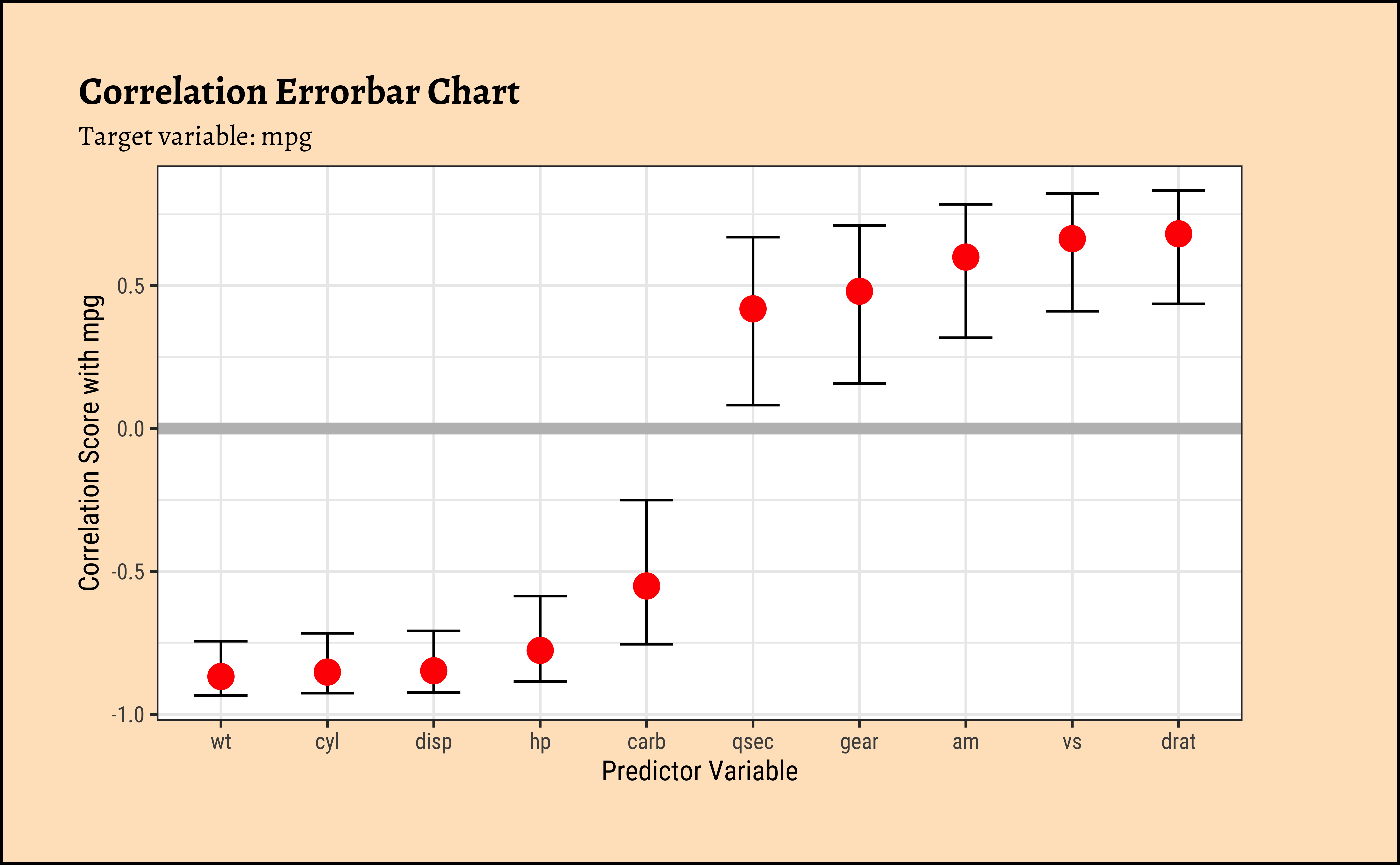
NoteBusiness Insights from ErrorBar Plot
- Several variables are negatively correlated and some are positively correlated with ’mpg`. (The grey line shows “zero correlation”)
- Since none of the error bars straddle zero, the correlations are mostly significant.
11 An Interactive Correlation Game
Head off to this interactive game website where you can play with correlations!
12 Simpson’s Paradox
See how the overall correlation/regression line slopes upward, whereas that for the individual groups slopes downward!! This is an example of Simpson’s Paradox!
13
- Try to play this online Correlation Game.
Note3. Gas Prices and Consumption
As described here. Note the log-transformed Quant data…why do you reckon this was done in the data set itself?
Note4. Horror Movies (Bah.You awful people..)
Note6. Food Delivery Times
14
- Scatter Plots, when they show “linear” clouds, tell us that there is some relationship between two Quant variables we have just plotted
- If so, then if one is the target variable you are trying to design for, then the other independent, or controllable, variable is something you might want to design with.
Important
Target variables are usually plotted on the Y-axis, while Predictor variables are on the X-Axis, in a Scatter Plot. Why? Because y = mx + c !
- Correlation scores are good indicators of things that are, well, related. While one variable may not necessarily cause another, a good correlation score may indicate how to chose a good predictor.
- That is something we will see when we examine Linear Regression
- Always, always, plot and test your data! Both numerical summaries as tables, and graphical summaries as charts, are necessary! See below!!
WarningAnd How about these datasets?
| dataset | mean_x | mean_y | std_dev_x | std_dev_y | corr_x_y |
|---|---|---|---|---|---|
| away | 54 | 48 | 17 | 27 | -0.064 |
| bullseye | 54 | 48 | 17 | 27 | -0.069 |
| circle | 54 | 48 | 17 | 27 | -0.068 |
| dino | 54 | 48 | 17 | 27 | -0.064 |
| dots | 54 | 48 | 17 | 27 | -0.06 |
| h_lines | 54 | 48 | 17 | 27 | -0.062 |
| high_lines | 54 | 48 | 17 | 27 | -0.069 |
| slant_down | 54 | 48 | 17 | 27 | -0.069 |
| slant_up | 54 | 48 | 17 | 27 | -0.069 |
| star | 54 | 48 | 17 | 27 | -0.063 |
| v_lines | 54 | 48 | 17 | 27 | -0.069 |
| wide_lines | 54 | 48 | 17 | 27 | -0.067 |
| x_shape | 54 | 48 | 17 | 27 | -0.066 |
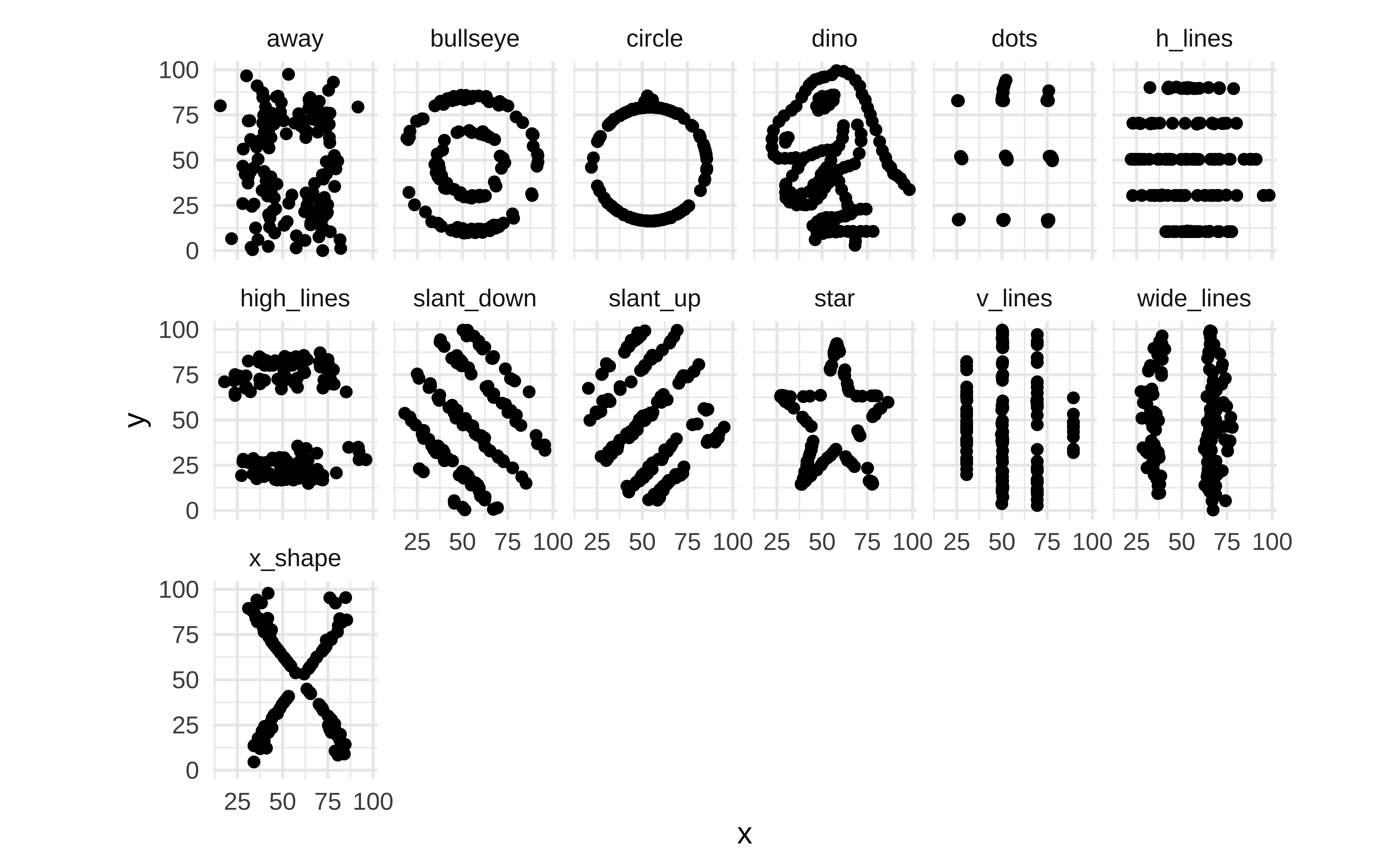
Yes, you did want to plot that cute T-Rex, didn’t you? Here is the data then!!
Warning
- Can selling more ice-cream make people drown?
- Use your head about pairs of variables. Do not fall into this trap)
15
Scatter Plots give a us sense of change; whether it is linear or non-linear. We can get an idea of correlation between variables with a scatter plot. Our workflow for evaluating correlations between target variable and several other predictor variables uses several packages such as GGally, corrplot, correlation, and of course mosaic for correlation tests.
16
This document focusses on correlation between quantitative variables. It examines different ways to visualize correlations, including scatter plots and correlograms. The document provides examples of how to use R packages like GGally and corrplot to create these visualizations and correlation tests to assess the strength and significance of relationships between variables. The tutorial uses the HollywoodMovies2011 and mtcars datasets as examples to demonstrate these concepts.
17
- Winston Chang (2024). R Graphics Cookbook. https://r-graphics.org
- Minimal R using
mosaic. https://cran.r-project.org/web/packages/mosaic/vignettes/MinimalRgg.pdf
- Antoine Soetewey. Pearson, Spearman and Kendall correlation coefficients by hand https://www.r-bloggers.com/2023/09/pearson-spearman-and-kendall-correlation-coefficients-by-hand/
- Taiyun Wei, Viliam Simko. An Introduction to corrplot Package. https://cran.r-project.org/web/packages/corrplot/vignettes/corrplot-intro.html
Attali, Dean, and Christopher Baker. 2025. ggExtra: Add Marginal Histograms to “ggplot2,” and More “ggplot2” Enhancements. https://doi.org/10.32614/CRAN.package.ggExtra.
Gillespie, Colin, Steph Locke, Rhian Davies, and Lucy D’Agostino McGowan. 2025. datasauRus: Datasets from the Datasaurus Dozen. https://doi.org/10.32614/CRAN.package.datasauRus.
Meschiari, Stefano. 2026. Latex2exp: Use LaTeX Expressions in Plots. https://doi.org/10.32614/CRAN.package.latex2exp.
Robinson, David, Alex Hayes, Simon Couch, and Emil Hvitfeldt. 2026. broom: Convert Statistical Objects into Tidy Tibbles. https://doi.org/10.32614/CRAN.package.broom.
Schloerke, Barret, Di Cook, Joseph Larmarange, et al. 2025. GGally: Extension to “ggplot2”. https://doi.org/10.32614/CRAN.package.GGally.
Wei, Taiyun, and Viliam Simko. 2024. R Package “corrplot”: Visualization of a Correlation Matrix. https://github.com/taiyun/corrplot.
Citation
BibTeX citation:
@online{2022,
  author = {},
  title = {\textless Iconify-Icon Icon=“icon-Park-Outline:change”
    Width=“1.2em”
    Height=“1.2em”\textgreater\textless/Iconify-Icon\textgreater{}
    {Change}},
  date = {2022-11-22},
  url = {https://madhatterguide.netlify.app/content/courses/Analytics/10-Descriptive/Modules/30-Change/},
  langid = {en},
  abstract = {How one variable changes with another}
}
For attribution, please cite this work as:
“<Iconify-Icon Icon=‘icon-Park-Outline:change’
Width=‘1.2em’
Height=‘1.2em’></Iconify-Icon> Change.”
2022. November 22. https://madhatterguide.netlify.app/content/courses/Analytics/10-Descriptive/Modules/30-Change/.